Running an auto repair workshop means handling many tasks at the same time. A customer brings in a vehicle, the team checks the problem, prepares an estimate, gets approval, completes the repair, creates an invoice, and collects payment. When all of these steps are managed manually, the process can become slow and difficult to track.
Repair Estimate and Billing Software can help workshops bring these important steps into one simple workflow. Instead of keeping estimates, repair details, invoices, and payment records in different places, the team can manage them in a more organized way.
A better repair process is not only about completing jobs faster. It is also about keeping customers informed, reducing billing mistakes, tracking parts and labor, and making sure the final invoice matches the work completed.
In this guide, we will look at seven simple ways digital estimate and billing tools can help your workshop manage repairs better.
Table of Contents
Why Repair Estimate and Billing software Need to Work Together
A repair estimate is normally created before the work starts. It gives the customer an idea of the expected repair cost and helps the workshop explain the required services, parts, and labor.
After the customer approves the work, the technician completes the repair. The final invoice is then created based on the actual work and parts used.
If the estimate and invoice are managed separately, employees may need to enter the same information more than once. This can waste time and may lead to incorrect charges.
Repair Estimate and Billing Software can help connect these steps. The workshop can start with the repair job, prepare an estimate, track the approved work, and then use the completed repair details when creating the final invoice.
7 Ways to Manage Repair Estimate and billing software Better
1. Create a Clear Repair Job Before Preparing the Estimate
A good repair process starts with accurate information. When the vehicle arrives, the service advisor should record the customer’s complaint, vehicle details, mileage, requested service, and other useful information.
The technician can then inspect the vehicle and add findings to the job. This may include problems found during inspection, recommended services, required parts, and expected labor.
These details provide a strong base for creating an estimate.
With Repair Estimate and Billing Software, customer, vehicle, and repair information can stay connected. This means the service advisor does not have to start a new record every time the repair moves to another stage.
A clear job record can also help technicians understand exactly what needs to be checked and repaired.
2. Prepare Estimates Faster
Customers often want to know the expected repair cost before approving the work. A workshop should therefore be able to prepare estimates quickly and clearly.
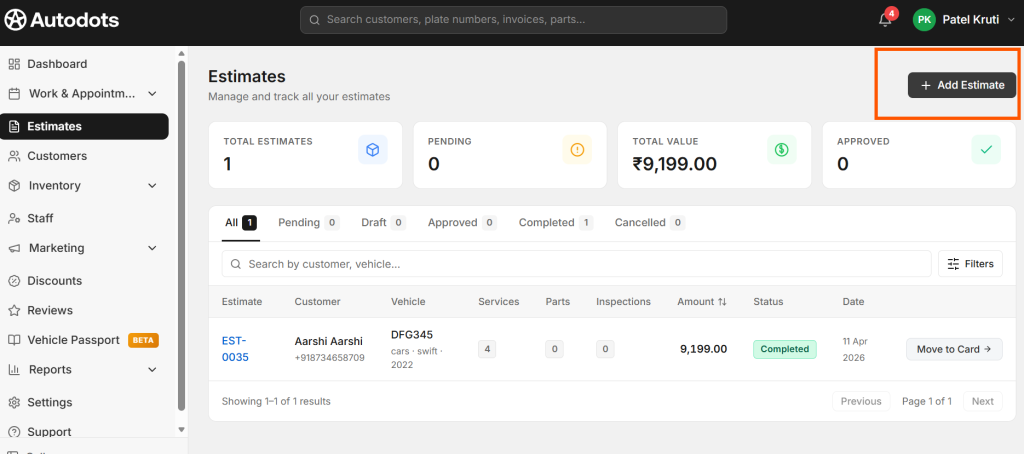
An estimate can include spare parts, labor charges, service charges, taxes, discounts, and the expected total amount. The customer can review these details before giving approval.
Repair Estimate and Billing Software can make this process easier by allowing the team to prepare estimates using information already recorded in the repair job.
This can reduce repeated typing and help the service advisor avoid missing important repair items.
A clear estimate can also improve customer communication because the customer can see what work is recommended and how much it may cost.
3. Track Customer Approval Before Starting Extra Work
Vehicle inspections sometimes reveal problems that were not mentioned when the customer first arrived. For example, a customer may visit for an oil service, but the technician may find worn brake pads during the inspection.
In such cases, the workshop should explain the additional repair and expected cost before completing the work.
A digital estimate process can help the team add the recommended repair to the estimate and keep a record of the approval.
Repair Estimate and Billing Software can help workshops keep approved work organized. This makes it easier to understand which repairs were originally requested and which additional services were approved later.
Clear approval records can also help avoid confusion when the final invoice is prepared.
4. Keep Parts and Labor Connected to the Repair
Parts and labor are major parts of most repair bills. If they are recorded separately from the repair job, the service advisor may have to collect information from different sources before preparing the final invoice.
A connected digital workflow can make this easier. The technician or service advisor can record the parts used and labor completed against the correct repair job.
With Repair Estimate and Billing Software, these details can be kept with the vehicle and repair record. This can make it easier to check the actual work completed before billing the customer.
It can also help the workshop maintain better records of parts used during different repairs.
5. Turn Completed Repairs Into Clear Invoices
Once the repair is finished, the workshop needs to create the final invoice. The invoice should match the actual services, parts, and labor completed during the job.
Creating the invoice from the existing repair information can be much faster than starting from an empty invoice.
Repair Estimate and Billing Software can help connect completed repair details with the final bill. The service advisor can review the items, make any required changes, add applicable taxes or discounts, and prepare the final invoice.
This can reduce repeated data entry and help lower the risk of forgetting a part or service charge.
A clear invoice should also be easy for the customer to understand. Show the services, parts, labor, discounts, taxes, and final amount in a simple format.
6. Track Payments and Outstanding Amounts
The repair process does not end when the invoice is created. The workshop also needs to record whether the customer has paid and how much was received.
Payment records should stay connected with the correct invoice. This helps the workshop identify paid invoices and outstanding amounts.
Repair Estimate and Billing Software can help keep billing and payment information organized in the same workflow.
For example, after the customer pays the final invoice, the service advisor can update the payment status. The owner or manager can then review the day’s completed payments without checking separate paper records.
Accurate payment records can also make it easier to follow up on unpaid invoices.
7. Keep a Complete Repair and Billing History
Customers often return to the same workshop for future service. Previous repair and billing information can be very useful during these visits.
The service advisor may want to know when the vehicle was last serviced, which parts were replaced, what repairs were completed, or how much the previous service cost.
Digital records can make this information easier to find. Instead of searching through old files, the team can access the customer’s vehicle history and review previous jobs and invoices.
Repair Estimate and Billing Software can help keep estimates, repairs, invoices, and payments connected with customer and vehicle records.
This can make future service visits easier and help the workshop provide more useful information to returning customers.
Build a Simple Repair-to-Payment Workflow
A workshop does not need a complicated process to manage repairs effectively. A simple workflow can make every stage easier to understand.
- Customer Check-In: Record customer and vehicle details.
- Job Card: Add the customer’s complaint and requested work.
- Inspection: Record problems found by the technician.
- Estimate: Add recommended services, parts, and labor.
- Approval: Get customer approval before starting additional work.
- Repair: Complete the approved services and record actual parts and labor.
- Invoice: Create the final bill from the completed repair.
- Payment: Record the payment and complete vehicle delivery.
When these steps are connected, employees can spend less time moving information between different files and systems.
Make Estimates Easy for Customers to Understand
An estimate should not be filled with complicated language. Customers may not understand technical terms used by mechanics, so simple descriptions are often better.
For example, instead of using only a technical part name, the workshop can provide a simple description of what the part or service does when needed.
The estimate should clearly show the expected parts, labor, taxes, discounts, and total cost. If the repair has multiple options, explain them in a simple way.
A customer who understands the estimate is more likely to feel comfortable approving the repair.
Reduce Differences Between Estimates and Final Bills
Sometimes the final repair cost is higher than the original estimate because the technician finds additional problems. This can happen in many types of vehicle repairs.
The important thing is to communicate the change before doing the extra work.
A connected system can help the workshop track the original estimate and updated repair information. This makes it easier to understand why the final invoice changed.
Keeping this information organized can help reduce disagreements and improve customer trust.
Reduce Manual Work in Your Workshop
Manual paperwork can take a lot of time when a workshop handles many vehicles every day. Employees may write the same customer details on a job card, estimate, invoice, and payment receipt.
A digital workflow can reduce this repeated work by keeping information connected.
When customer and vehicle details are already available, employees can focus on checking the repair information instead of typing basic details again.
This can make the workshop more efficient without changing the actual repair work performed by technicians.
Benefits of Better Repair and Billing Management
- Faster estimate preparation
- Better repair job tracking
- Less repeated data entry
- Clearer customer communication
- Better parts and labor records
- Easier invoice preparation
- Improved payment tracking
- Organized vehicle history
- Less paperwork
- Smoother vehicle delivery
How AutoDots Can Help Your Workshop
AutoDots provides digital tools designed to help automotive businesses manage important workshop activities. These can include customers, vehicles, appointments, job cards, inspections, spare parts, estimates, invoices, payments, and other daily operations.
Repair Estimate and Billing Software can help connect the repair process with estimates and billing. This gives the workshop a more organized way to move from vehicle inspection to approved repair, final invoice, and payment.
For example, a customer can be added with vehicle information, a job card can be created for the repair, inspection findings can be recorded, and the required parts and labor can be added to an estimate. After approval and repair completion, the same information can support the final invoice.
This connected approach can reduce unnecessary paperwork and make it easier for service advisors and workshop owners to keep track of daily repair activity.
If you are interested in automotive business partnerships, you can explore the AutoDots partner program.
For more practical information about workshop management, automotive technology, and running a better garage, visit the AutoDots blog.
Tips for Improving Your Repair Process
Start by reviewing the current process in your workshop. Look at how customer information is collected, how job cards are created, and how estimates are prepared.
Next, check how information moves from the estimate to the technician and then to the final invoice. If employees have to copy information several times, there may be an opportunity to simplify the workflow.
Make sure technicians record parts and labor during the repair. Waiting until the vehicle is ready for delivery can make billing slower and increase the chance of missing information.
It is also important to review the final invoice before sending it to the customer. Check the vehicle details, services, parts, labor, taxes, discounts, and total amount.
Common Repair Billing Problems to Avoid
One common problem is creating estimates and invoices separately. This can lead to repeated data entry and differences between approved work and final billing.
Another problem is not recording additional repairs properly. If the customer approves extra work, the updated repair details should be recorded clearly.
Workshops should also avoid unclear invoice descriptions. Customers should be able to understand what they are being charged for.
Another mistake is forgetting to update payment records. An invoice should clearly show whether it has been paid or whether an amount is still due.
Frequently Asked Questions
What is Repair Estimate and Billing Software?
Repair Estimate and Billing Software is a digital solution that helps auto repair workshops manage repair estimates, parts, labor, invoices, payments, and related customer and vehicle information.
Can repair software connect estimates with invoices?
Yes. A connected workshop system can use estimate and completed repair information when preparing the final invoice. This can reduce repeated data entry.
Can software help track customer approval?
Yes. A digital repair workflow can help keep recommended work and approval information organized before the repair is completed.
Can repair software track parts and labor?
Yes. Workshop systems can help record parts and labor against repair jobs, making it easier to use this information when preparing estimates and final invoices.
How can digital billing save workshop time?
Digital billing can reduce repeated data entry, simplify calculations, organize repair information, and make it easier to create invoices from completed job details.
Can previous repair and invoice records be useful?
Yes. Previous records can help the workshop understand a vehicle’s service history, check earlier repairs, and answer customer questions during future visits.
Conclusion
Managing repairs becomes easier when estimates, job cards, completed work, invoices, and payments are part of one clear process. Instead of handling every stage separately, workshops can create a simple workflow that keeps important information connected.
Repair Estimate and Billing Software can help workshops prepare estimates faster, track customer approval, organize parts and labor, create clearer invoices, record payments, and maintain useful repair history.
The goal is not simply to make billing faster. A well-organized process can help the entire workshop work better. Technicians can focus on repairs, service advisors can manage customers more easily, and owners can get a clearer view of workshop activity.
Start by organizing your repair workflow from customer check-in to final payment. Keep information accurate, communicate clearly with customers, and reduce repeated manual work wherever possible. With a simple digital process, your workshop can save time, reduce confusion, and provide a smoother repair experience.