Running an auto repair shop in the USA involves much more than fixing vehicles. Shop owners and service advisors also need to manage customer details, vehicle records, repair jobs, estimates, parts, labor charges, invoices, and payments. When billing is handled manually, these tasks can take extra time and may lead to small mistakes.
Auto Repair Billing Software USA can help repair shops organize their billing process and reduce unnecessary manual work. Instead of creating every invoice from scratch, shops can keep repair details, parts, labor, and payment information connected.
Faster billing is useful for both the workshop and the customer. Shop employees can spend less time on paperwork, while customers can receive a clear bill without waiting too long. In this guide, we will look at five simple ways to make auto repair shop billing easier and more organized.
Table of Contents
Why Simple Billing Matters for Auto Repair Shops
A typical repair starts when a customer brings a vehicle to the shop. The team records the customer’s concern, checks the vehicle, prepares an estimate, gets approval, completes the repair, and then creates the final invoice.
During this process, many details need to be recorded correctly. Parts, labor, services, taxes, discounts, and payments all need to be included in the right place.
Auto Repair Billing Software USA can help connect these steps so employees do not have to enter the same information again and again.
A simple digital billing process can also make it easier for shop owners to review completed jobs, outstanding invoices, and payment records.
5 Ways to Simplify Auto Repair Shop Billing
1. Create Invoices From Repair Job Details
The easiest way to speed up billing is to start with accurate repair information. When a vehicle arrives, the shop can create a job card with customer details, vehicle information, the customer’s complaint, inspection findings, and required work.

During the repair, technicians can add the parts used and labor performed. Once the job is complete, this information can be used to prepare the final invoice.
Auto Repair Billing Software USA can help connect job information with billing details. This means the service advisor does not need to type the same customer, vehicle, parts, and service information into a new invoice.
For example, if a vehicle receives an oil change, filter replacement, and brake inspection, these services can be recorded during the repair. The information can then be reviewed before the final invoice is created.
This simple workflow can save time, especially when the shop is handling many vehicles in one day.
2. Keep Parts and Labor Clearly Organized
Auto repair invoices can contain many different charges. A customer may pay for replacement parts, labor, inspections, maintenance services, taxes, and other approved repairs.

If these items are not organized clearly, customers may have questions about the final bill. Employees may also spend extra time explaining individual charges.
With Auto Repair Billing Software USA, shops can keep parts, services, and labor as separate invoice items. This makes it easier for the customer to see exactly what was done and what they are paying for.
A clear invoice can show the part name, quantity, price, labor charge, applicable taxes, discounts, and final amount. Simple descriptions can make the bill easier to understand.
Clear billing is not only helpful for accounting. It can also improve communication between the repair shop and its customers.
3. Connect Estimates With Final Invoices
Many repair jobs begin with an estimate. After inspecting the vehicle, the shop may find that several services or parts are required. The customer can then review the estimated cost before approving the work.
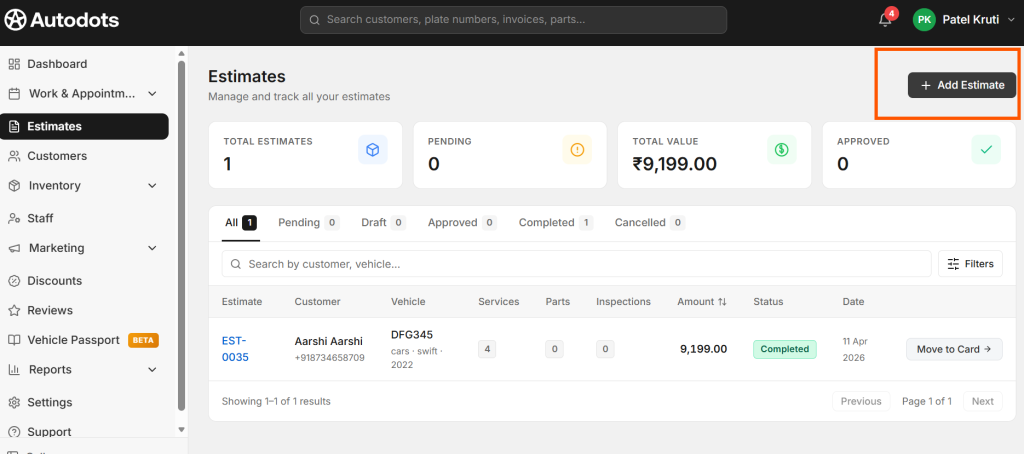
Once the customer approves the repair, the technician can complete the work. The final invoice should reflect what was actually completed and what parts were actually used.
Auto Repair Billing Software USA can help keep estimates and invoices connected. Instead of creating a new bill from the beginning, the shop can use the estimate as a starting point and update it with the final repair details.
This can also help when additional problems are found during the repair. The shop can explain the additional work and cost to the customer before completing it.
Keeping the estimate and final invoice connected creates a clearer path from inspection to approval, repair, billing, and payment.
4. Make Payment Tracking Easier
Creating an invoice is only one part of the billing process. After the customer receives the bill, the shop also needs to record the payment.
Customers may use different payment methods depending on what the shop accepts. Whatever method is used, the payment should be connected with the correct invoice.
Auto Repair Billing Software USA can help shops keep invoice and payment information organized. This makes it easier to see which invoices are paid and which amounts are still outstanding.
For shop owners, accurate payment records can also make daily financial checks easier. Instead of searching through receipts or separate files, the team can review the billing records in one place.
Updating payment information as soon as the customer pays can also prevent confusion later.
5. Keep Customer and Vehicle Billing History
Customers often return to the same repair shop for future maintenance and repairs. Previous invoices can be useful when they come back.
For example, a service advisor may want to check when the vehicle last received an oil service, which parts were replaced, or what repairs were completed during the previous visit.
Digital billing records can keep this information connected with the customer’s vehicle. This makes it easier for the team to review previous work without searching through paper files.
Auto Repair Billing Software USA can support an organized billing history that helps shops access previous repair and payment information more easily.
This can make future service visits smoother and help employees provide more informed answers when customers have questions about their vehicles.
Build a Simple Repair-to-Payment Workflow
A good billing process should be simple enough for the whole team to follow. A basic auto repair workflow can look like this:
- Customer Check-In: Record customer and vehicle information.
- Job Card: Add the customer’s complaint and requested repair.
- Inspection: Record the technician’s findings and recommended work.
- Estimate: Prepare the expected cost for parts and labor.
- Approval: Get customer approval before completing additional work.
- Repair: Record the actual services, parts, and labor.
- Invoice: Prepare the final bill using completed repair details.
- Payment: Record the payment and complete vehicle delivery.
When these steps are connected, employees can spend less time moving information between different records.
Reduce Manual Data Entry
Manual data entry is one of the biggest reasons billing can become slow. Customer details may be written down during check-in, entered into a job card, copied into an estimate, and then typed again on the final invoice.
This creates extra work and increases the chance of errors.
A connected digital system can allow the team to reuse information that has already been entered. Customer and vehicle details can stay linked with the repair job and invoice.
Auto Repair Billing Software USA can help reduce this repeated work and give service advisors more time to focus on customers and workshop operations.
Make Your Invoices Easy to Read
A fast invoice is useful, but a clear invoice is just as important. Customers should be able to understand the bill without needing a long explanation.
Use simple descriptions for repairs and parts. Clearly show the services completed, parts used, labor charges, taxes, discounts, and total amount.
If the final amount is different from the original estimate, the shop should be ready to explain why. Additional repairs should be communicated and approved before they are completed.
A clear invoice can help create trust and make the payment process smoother.
Benefits of Better Digital Billing
- Faster invoice preparation
- Less repeated data entry
- Better parts and labor tracking
- Easier estimate management
- Clearer customer invoices
- Better payment tracking
- Organized customer records
- Easy access to vehicle history
- Less paperwork
- Smoother vehicle delivery
How AutoDots Can Help Your Repair Shop
AutoDots provides digital tools designed to help automotive businesses manage important workshop activities. These can include customer management, vehicle records, appointments, job cards, inspections, spare parts, estimates, invoices, payments, and other daily operations.
Auto Repair Billing Software USA can help connect repair information with estimates, invoices, and payments. This can make it easier for repair shops to manage billing without relying on multiple disconnected records.
For example, a customer’s vehicle can be added to the system, a repair job can be created, inspection details can be recorded, approved work can be tracked, and the completed services can be used for billing.
This connected approach can help shops reduce paperwork and create a more consistent process from customer check-in to final payment.
If you are interested in working with AutoDots, you can explore the AutoDots partner program.
For more practical guides about automotive businesses, workshop management, and digital tools, visit the AutoDots blog.
Tips for Improving Your Shop Billing Process
Start by looking at how your shop currently creates estimates and invoices. Identify where employees spend the most time and where information is entered more than once.
Make sure technicians record parts and labor during the repair instead of waiting until the job is finished. This gives the service advisor better information when preparing the final bill.
Keep estimates connected with the final repair. If additional work is required, communicate the change to the customer and record the approval.
Finally, update payment records immediately after receiving payment. This keeps the shop’s billing information current and makes it easier to track outstanding amounts.
Common Billing Mistakes to Avoid
One common mistake is preparing an invoice without checking the actual work completed. The final bill should match the services and parts used during the repair.
Another mistake is adding extra repairs without clear customer approval. If the repair changes, explain the reason and expected cost before doing the additional work.
Shops should also avoid unclear invoice descriptions. Customers should be able to understand what they are paying for.
Keeping payment records separate from invoices can also create confusion. Make sure every payment is linked with the correct invoice and customer.
Frequently Asked Questions
What is Auto Repair Billing Software USA?
Auto Repair Billing Software USA is a digital solution that helps auto repair shops manage invoices, repair charges, spare parts, labor, estimates, taxes, discounts, and customer payments.
Can billing software create invoices from repair jobs?
Yes. A connected workshop system can use repair job information, including services, parts, and labor, to help prepare the final invoice. This can reduce repeated data entry.
Can repair shops connect estimates with invoices?
Yes. A digital workflow can keep estimate and invoice information connected. This makes it easier to compare approved work with the actual work completed.
Can digital billing help track unpaid invoices?
Yes. When payments are recorded against invoices, the shop can more easily identify which invoices are paid and which amounts are still outstanding.
Why should an auto repair shop use digital billing?
Digital billing can help reduce paperwork, speed up invoice creation, organize repair charges, reduce repeated data entry, and make customer and payment records easier to manage.
Conclusion
Billing does not have to be a slow or complicated part of running an auto repair shop. A clear process can help employees move from repair work to estimates, invoices, and payments without unnecessary steps.
Auto Repair Billing Software USA can help shops organize repair details, parts, labor, estimates, invoices, payments, and customer records in a more connected workflow.
The five simple improvements are to create invoices from repair details, keep parts and labor organized, connect estimates with final invoices, record payments properly, and maintain customer and vehicle billing history.
When these steps work together, your shop can spend less time on paperwork and more time serving customers. A simple digital billing process can also make invoices clearer, payments easier to track, and daily workshop operations more organized.