
Vehicle service billing involves many details. A workshop may need to manage customer information, vehicle details, repair jobs, spare parts, labor charges, taxes, discounts, invoices, and payments. When these tasks are handled manually, billing can take more time and small mistakes can become difficult to avoid.
Automotive Tax Invoice Software can help workshops organize these billing activities in one place. Instead of preparing every invoice manually, service advisors can use information already available in the repair job, estimate, and customer record.
A good billing process should be simple for the workshop and easy for the customer to understand. The invoice should clearly show the services completed, parts used, applicable taxes, discounts, and final amount. In this guide, we will look at nine practical ways to simplify vehicle service billing.
Table of Contents
Why Vehicle Service Billing Needs a Simple Process
A typical vehicle service can include several stages. The customer first books a service or visits the workshop. The service advisor records the vehicle details, the technician checks the vehicle, and an estimate is prepared. After customer approval, the repair is completed and the final invoice is created.
When every stage is managed separately, employees may need to enter the same information many times. This can slow down the workshop and create differences between the estimate and final invoice.
Automotive Tax Invoice Software can help connect these stages and keep important billing information organized throughout the repair process.

9 Ways to Simplify Vehicle Service Billing
1. Keep Customer and Vehicle Details in One Place
Accurate customer and vehicle information is the foundation of a good invoice. Details may include the customer’s name, phone number, vehicle registration, model, mileage, and service history.
Entering these details again for every invoice wastes time. It can also create mistakes when information is typed differently in different documents.
Automotive Tax Invoice Software can help keep customer and vehicle records connected with repair jobs and invoices. When a returning customer visits the workshop, the service advisor can find the existing record and continue from there.
This can make the billing process faster and reduce unnecessary data entry.
2. Connect Estimates With Final Invoices
Most larger repairs begin with an estimate. The estimate gives the customer an idea of the expected cost before the workshop starts the work.
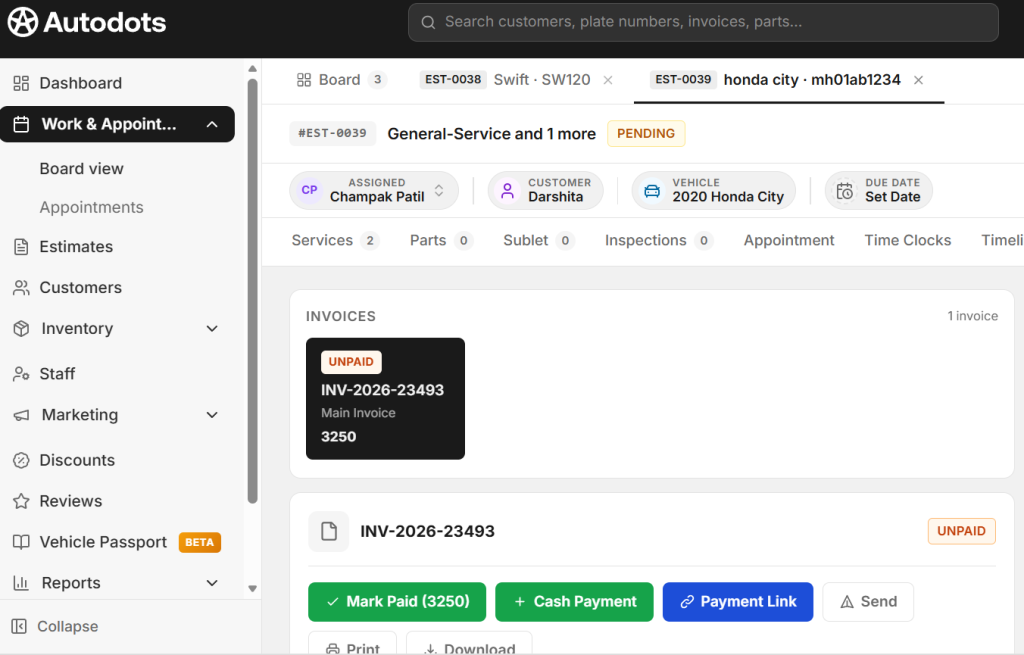
The estimate may include parts, labor, service charges, taxes, discounts, and the expected total. Once the customer approves the work, the workshop can proceed with the repair.
With Automotive Tax Invoice Software, estimate information can be used as part of the final billing workflow. The service advisor can review the approved items and update them based on the actual work completed.
This helps reduce repeated entry and makes it easier to compare the approved work with the final invoice.
3. Organize Parts and Labor Clearly
Vehicle repair invoices can contain many items. A customer may be charged for replacement parts, labor, inspection, maintenance services, and other approved work.
If all these charges are mixed together, the invoice may be difficult for the customer to understand.

Automotive Tax Invoice Software can help workshops organize parts, labor, and services as separate invoice items.
For example, an invoice can clearly show the name and quantity of a replacement part, the related labor charge, service charges, applicable taxes, discounts, and the final amount.
A clear invoice makes it easier for customers to understand what they are paying for and can reduce questions during payment.
4. Make Tax Information Easier to Manage
Tax information is an important part of business billing. Depending on the location and type of transaction, a workshop may need to include relevant tax details on an invoice.
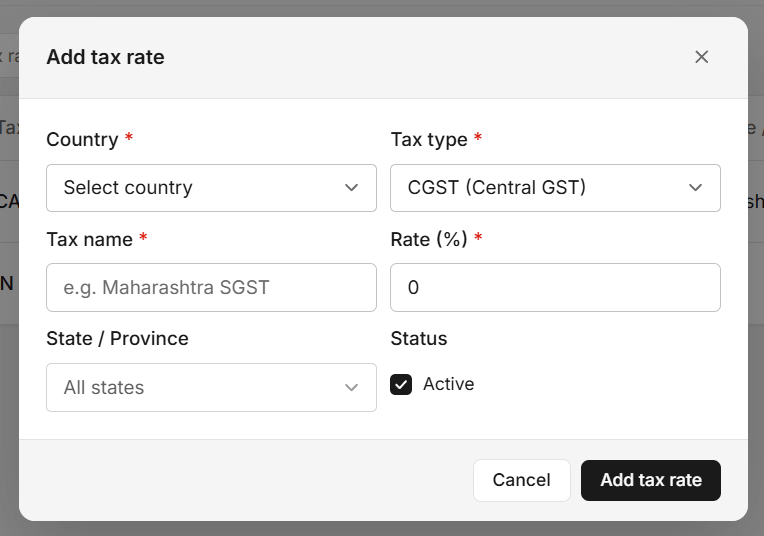
Manual tax calculations can become difficult when an invoice contains multiple items, different prices, discounts, or other charges.
Automotive Tax Invoice Software can help organize applicable tax information as part of the billing workflow, based on the tax settings and rules configured for the business.
Workshop staff should still review the invoice and make sure the tax information is correct for their business and location. Software can make the process easier, but proper business and tax practices remain important.
5. Reduce Manual Invoice Calculations
Adding parts, labor, taxes, discounts, and other charges manually can take time. It can also lead to simple calculation errors.
A digital invoice system can help calculate totals based on the information entered by the user.
Automotive Tax Invoice Software can reduce the amount of manual calculation needed while preparing vehicle service invoices.
For example, when the service advisor adds several repair items, the system can help calculate the subtotal and applicable charges according to the configured billing settings.
The final invoice should still be reviewed before it is shared with the customer. A quick check can help catch incorrect quantities, prices, discounts, or other details.
6. Create Invoices From Completed Repair Work
The final invoice should match the work actually completed on the vehicle. Sometimes the final repair is different from the original estimate because an additional issue was found during inspection.
The workshop should communicate any additional work and expected cost to the customer before completing it.
Using Automotive Tax Invoice Software can help keep the completed repair information connected with billing. The service advisor can review the final parts, labor, and services before generating the invoice.
This can make the process more accurate and reduce the need to recreate the invoice from the beginning.
7. Keep Payment Records Organized
Billing does not end when an invoice is created. The workshop also needs to record the customer’s payment.
Payment information should be linked with the correct invoice so the team can easily identify paid invoices and outstanding amounts.
Automotive Tax Invoice Software can help keep invoice and payment information organized, depending on the features available in the system.
When payment status is updated promptly, workshop owners and service advisors can get a clearer view of completed billing transactions.
This can be especially helpful for busy workshops that handle many customer vehicles every day.
8. Keep Previous Invoice and Service History
Customers often return to the same workshop for future servicing and repairs. Previous invoices can help the service team understand what work was completed during earlier visits.
For example, the team may want to check when the vehicle was last serviced, which parts were replaced, or what maintenance work was performed previously.
Automotive Tax Invoice Software can help keep billing information connected with customer and vehicle records. This makes previous invoices easier to find when needed.
A useful service history can also help employees answer customer questions faster and provide more informed service recommendations.
9. Give Customers Clear and Professional Invoices
A vehicle service invoice should be easy to read. Customers should not have to guess what each major charge means.
The invoice should clearly show the customer details, vehicle information, services, parts, labor, taxes, discounts, and total amount.
Automotive Tax Invoice Software can help workshops create more organized invoices using the repair information already recorded in the system.
Clear invoices can improve the customer experience and make the final payment process smoother. They also give customers a useful record of the work performed on their vehicle.
Create a Simple Vehicle Service Billing Workflow
A workshop can make billing easier by following the same basic process for every repair. A simple workflow can include:
- Customer Check-In: Record customer and vehicle information.
- Job Card: Add the customer’s complaint and requested service.
- Inspection: Record technician findings and recommended work.
- Estimate: Add parts, labor, services, taxes, and expected costs.
- Approval: Get customer approval before completing additional work.
- Repair: Complete the approved work and record actual parts and labor.
- Invoice: Review the completed work and prepare the final bill.
- Payment: Record the payment and complete vehicle delivery.
Keeping these stages connected can reduce confusion and help employees understand what needs to happen next.
Reduce Repeated Data Entry
Repeated data entry is one of the common reasons workshop billing becomes slow. Customer information may be entered during check-in, copied to a job card, added to an estimate, and then entered again on the final invoice.
A connected digital system can help reuse information that has already been entered.
This can save time for service advisors and reduce the chance of typing errors. It also allows employees to focus more on customers and workshop operations instead of paperwork.
Keep Tax and Billing Information Accurate
Digital billing can make calculations and invoice preparation easier, but the workshop should still make accuracy a priority.
Before finalizing an invoice, check the customer details, vehicle information, parts, quantities, labor, discounts, taxes, and final total.
Businesses should also keep their tax settings and invoicing practices updated according to the rules that apply to their location and business structure. When tax requirements change, the workshop should review its billing process and seek professional advice when needed.
Benefits of Better Vehicle Service Billing
- Faster invoice preparation
- Less repeated data entry
- Better estimate and invoice connection
- Clear parts and labor details
- Easier tax information management
- Reduced manual calculations
- Better payment tracking
- Organized vehicle service history
- Clearer customer invoices
- Less paperwork
How AutoDots Can Help Your Workshop
AutoDots provides digital tools designed to help automotive businesses manage important workshop activities. These can include customer management, vehicle records, appointments, job cards, inspections, spare parts, estimates, invoices, payments, and other daily workshop operations.
Automotive Tax Invoice Software can support a connected process from repair job creation to estimate, completed work, invoice, and payment. This can help service advisors keep important information organized instead of managing separate records for every stage.
For example, a workshop can record the customer’s vehicle, create a repair job, add inspection findings, prepare an estimate, track approved work, record parts and labor, and then use the completed repair details when preparing the final invoice.
This type of workflow can reduce paperwork and make billing easier for both workshop staff and customers.
If you are interested in automotive business partnerships, explore the AutoDots partner program.
For more practical guides about garage management, automotive technology, and workshop operations, visit the AutoDots blog.
Tips for Improving Your Billing Process
Start by checking where your workshop spends the most time during billing. Is it collecting technician information, calculating taxes, preparing estimates, entering parts, or creating invoices?
Once you identify the slowest step, look for ways to simplify it. Keep customer and vehicle information organized and record parts and labor while the repair is in progress.
Use a consistent invoice format so customers can quickly understand the charges. Make sure additional repairs are explained and approved before they are added to the final bill.
Finally, make invoice review part of the normal process. A short review before payment can prevent many common billing problems.
Common Billing Mistakes to Avoid
One common mistake is creating the final invoice without checking the actual repair work completed. The final bill should match the services, parts, and labor performed.
Another mistake is adding extra repair work without customer approval. If a new problem is found, explain the issue and expected cost before completing the additional work.
Workshops should also avoid unclear invoice descriptions. Customers should be able to understand the main services and charges without difficulty.
Finally, payment records should be updated after the customer pays. This helps keep financial records organized and reduces confusion about outstanding amounts.
Frequently Asked Questions
What is Automotive Tax Invoice Software?
Automotive Tax Invoice Software is a digital billing solution that helps automotive workshops manage repair invoices, parts, labor, taxes, discounts, customer information, and payments in an organized workflow.
Can it help create invoices from repair jobs?
Yes. A connected workshop system can use information from repair jobs, including services, parts, and labor, to help prepare the final invoice. This can reduce repeated data entry.
Can it help manage taxes on vehicle service invoices?
Digital invoicing systems can help organize tax information based on the settings configured for the business. Workshops should make sure their tax settings and invoicing practices follow the rules that apply to their location.
Can estimates be connected with final invoices?
Yes. A connected repair workflow can use an approved estimate as a starting point for final billing and allow the workshop to update the invoice according to the actual work completed.
Can it track customer payments?
Depending on the system features, payment information can be recorded against invoices. This can help workshops identify paid invoices and outstanding amounts.
Why should workshops keep previous invoices?
Previous invoices can provide useful service history. They can help the team understand earlier repairs, replaced parts, and maintenance work when the customer returns.
Conclusion
Vehicle service billing becomes easier when repair information, estimates, invoices, taxes, and payments are managed through a clear process. Instead of entering the same information several times, workshops can keep important details connected from customer check-in to final payment.
Automotive Tax Invoice Software can help simplify customer and vehicle records, estimates, parts and labor tracking, invoice preparation, tax information, payment records, and service history.
The nine improvements discussed in this guide are simple: keep customer and vehicle details organized, connect estimates with invoices, separate parts and labor, manage tax information carefully, reduce manual calculations, create invoices from completed repairs, record payments properly, maintain service history, and provide clear invoices.
The goal is not only to create invoices faster. A well-organized billing process can help reduce paperwork, improve accuracy, save staff time, and give customers a clearer view of the services completed on their vehicles.
By using a simple digital workflow and regularly checking billing information for accuracy, your workshop can make vehicle service billing more organized and provide a smoother experience from repair approval to final payment.