Every time a vehicle visits a garage, important service history gets lost — especially when the customer visits a different garage next time. With Autodots, you can set up Vehicle Passport with Autodots to automatically build a complete digital service book for every vehicle that comes to your garage.
This guide will explain everything you need to know to set up Vehicle Passport with Autodots — how it works, what gets saved, and how it builds trust with your customers.
Table of Contents
What is Vehicle Passport on Autodots?
Vehicle Passport is a digital service book that follows every vehicle across all Autodots garages. When you set up Vehicle Passport with Autodots, every completed job automatically adds a record to that vehicle’s passport — including services done, parts used, and odometer readings.
Simple Definition
Think of it as a permanent health record for a vehicle. No matter which Autodots garage the car visits, the complete service history travels with it — so any garage can instantly see what was done before and when.
Where to Find Vehicle Passport
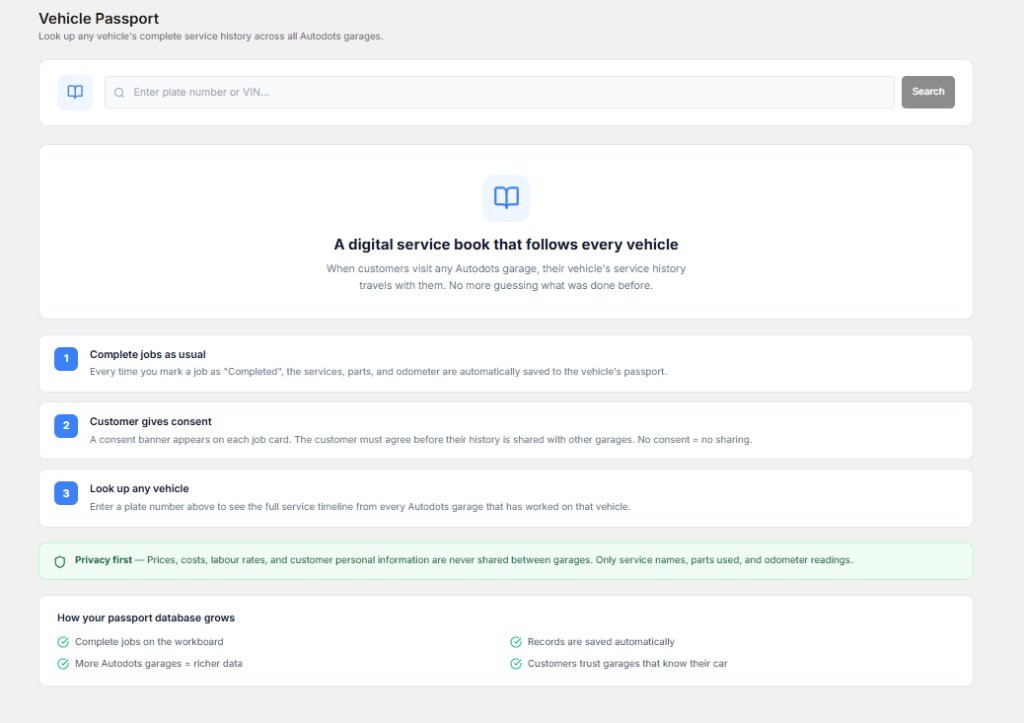
Log in to your Autodots partner dashboard. In the left side navigation menu, click on “Vehicle Passport” (marked as BETA). This is where you set up Vehicle Passport with Autodots and look up any vehicle’s complete service history.
Search Bar
At the top of the Vehicle Passport page, you will find a search bar where you can enter a plate number or VIN to instantly look up any vehicle’s full service timeline from every Autodots garage that has worked on that vehicle.
How Vehicle Passport Works — 3 Simple Steps
When you set up Vehicle Passport with Autodots, the entire process is automatic. Here is how it works:
Step 1 — Complete Jobs as Usual
There is nothing extra you need to do. Simply complete your jobs on the Workboard as you normally would. Every time you mark a job as “Completed”, the services performed, parts used, and odometer reading are automatically saved to that vehicle’s passport. No manual entry required.
Step 2 — Customer Gives Consent
A consent banner automatically appears on each job card. The customer must agree before their vehicle’s service history is shared with other garages. This means:
- Customer agrees → history is shared across Autodots garages
- Customer does not agree → history stays private, no sharing
This consent system ensures complete privacy control for every customer when you set up Vehicle Passport with Autodots.
Step 3 — Look Up Any Vehicle
Once a vehicle has service records saved, any Autodots garage can enter the plate number or VIN in the search bar to see the full service timeline. This helps mechanics immediately understand the vehicle’s complete history before starting any new job.
What Information is Saved in Vehicle Passport?
When you set up Vehicle Passport with Autodots, the following information is automatically recorded for each completed job:
What Gets Saved
- ✅ Service names performed
- ✅ Parts used during the job
- ✅ Odometer reading at time of service
- ✅ Date of service
- ✅ Garage where service was done
What is NOT Shared — Privacy First
- Prices and costs
- Labour rates
- Customer personal information
Only service names, parts used, and odometer readings are shared between garages. Customer financial and personal data always remains completely private.
How Your Vehicle Passport Database Grows
The more you use Autodots, the more valuable your Vehicle Passport database becomes. Here is how it grows automatically when you set up Vehicle Passport with Autodots:
4 Ways Database Grows
- Complete jobs on the Workboard — Every completed job adds a new record automatically
- More Autodots garages = richer data — As more garages join, vehicle histories become more complete
- Records are saved automatically — No manual work needed from your side
- Customers trust garages that know their car — Better history means better service and more loyalty
Why Vehicle Passport Builds Customer Trust
When customers know that you can see their vehicle’s complete history the moment they walk in, it builds immediate confidence. Here is why every garage owner should set up Vehicle Passport with Autodots:
For Garage Owners
- ✅ Know exactly what was done on a vehicle before — no guessing
- ✅ Avoid repeating services that were recently done
- ✅ Recommend the right next service based on history
- ✅ Faster diagnosis — mechanic knows the vehicle background instantly
- ✅ Build reputation as a professional, data-driven garage
For Customers
- ✅ No need to remember or carry service records
- ✅ Full transparency — know what was done and when
- ✅ Privacy protected — personal and financial data never shared
- ✅ Better service from any Autodots garage they visit
Vehicle Passport vs Traditional Service Book
Traditional Paper Service Book
- Customer has to carry it every visit
- Easy to lose or forget
- Only updated manually
- Not accessible to other garages
- No digital backup
Autodots Vehicle Passport
- Follows the vehicle automatically
- Never lost — stored digitally forever
- Updated automatically on job completion
- Accessible to all Autodots garages with customer consent
- Complete digital record with search by plate or VIN
Final Thoughts
Vehicle history is one of the most valuable pieces of information in automotive service. When you set up Vehicle Passport with Autodots, you give your garage a powerful advantage — instant access to a vehicle’s complete service background, automatic record keeping, and a feature that builds deep customer trust.
The best part is there is nothing extra to set up. Simply complete your jobs as usual and Autodots does the rest automatically. Log in to your partner dashboard at autodots.io and start building your Vehicle Passport database today.
Read more : For Garage Owners — Grow Your Business with Autodots: Complete Partner Guide (2026)