
Managing more than one garage can feel complicated if your system isn’t organized. With Autodots, you can easily handle multiple locations from one dashboard. In this guide, you’ll learn step-by-step how to add multiple garages on Autodots and manage everything smoothly.
Table of Contents
Why You Need Multi-Garage Management
If you run more than one workshop, having a centralized system saves time and reduces errors. Instead of switching between different tools, Autodots allows you to:
- Manage all garage data in one place
- Track performance of each branch
- Control staff and customer reviews
- Maintain consistent service quality
That’s why learning how to add multiple garages at Autodots is important for scaling your business.
Prerequisites Before Adding a Garage
Before you begin, make sure you have:
- Admin access to your Autodots account
- Basic details of the garage (name, contact info)
- Location and business hours ready
Once you have these, you’re ready to add multiple garages on Autodots without confusion.
Step-by-Step: Create a New Garage
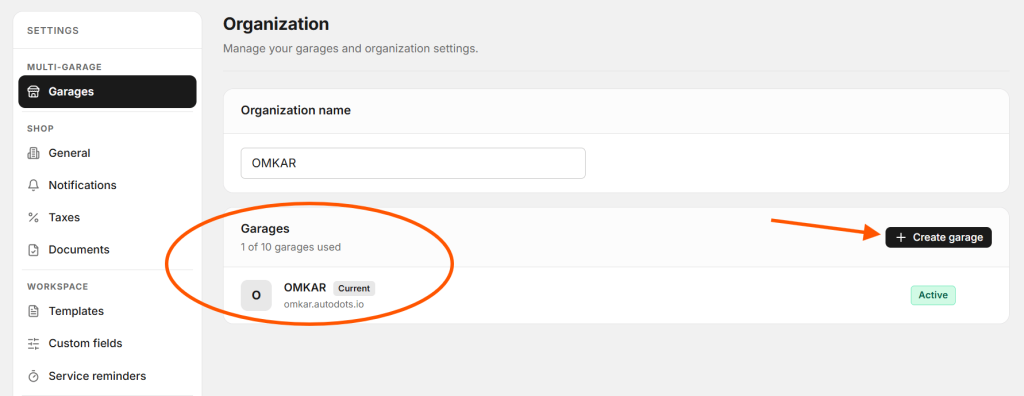
Step 1: Go to Garage Section
Login to your dashboard and navigate to the garages section. Here, you’ll see an option like “Create garage”.
Step 2: Click on Create Garage
Click the button and open the garage creation form. This is where you will add multiple garages on Autodots by entering details one by one.
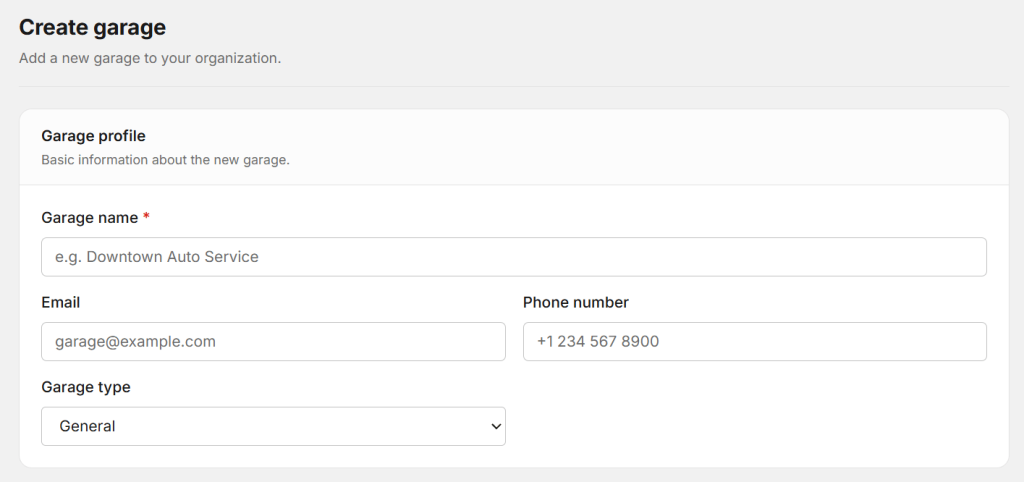
Garage Profile Setup
Basic Information
- Garage Name (required)
- Email address
- Phone number
Make sure the information is accurate because this will be used for communication when you add multiple garages on Autodots.
Garage Type Selection
- General
- Auto Repair
- Body Shop
- Tire Shop
- Oil Change
- Detailing
- Other
Selecting the correct type helps organize your services better when you add multiple garages on Autodots.
Location Details
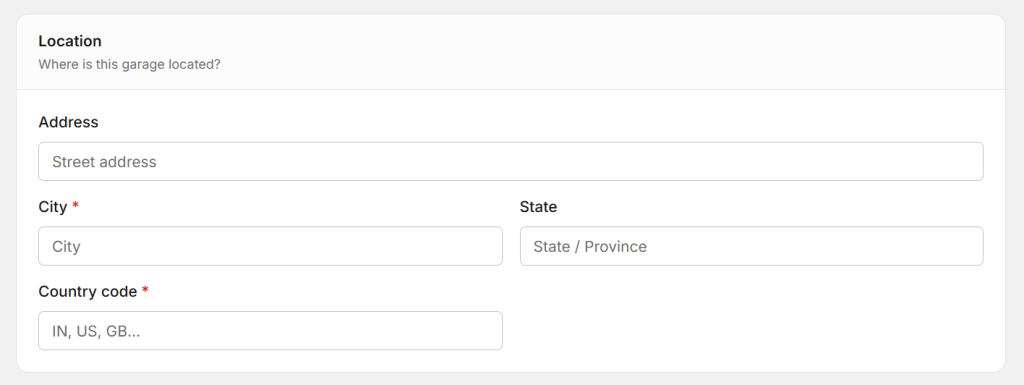
Address Information
- Address
- City (required)
- State
- Country code (required)
This step ensures that each branch is properly mapped when you add multiple garages on Autodots.
Business Hours Setup
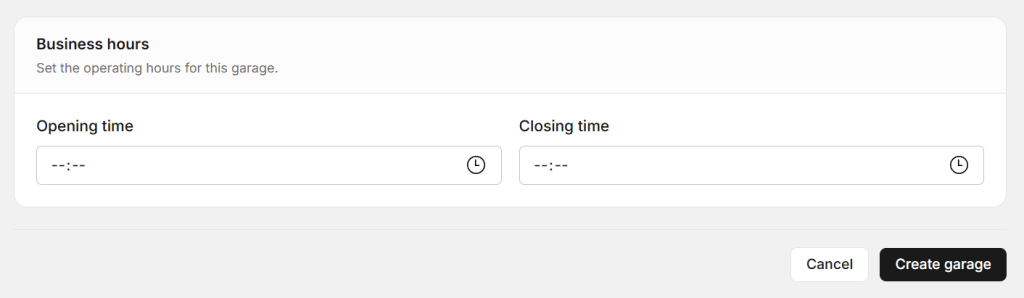
Operating Hours
- Opening time
- Closing time
You can set different hours for each garage. This flexibility is one of the key benefits when you add multiple garages on Autodots.
Save and Create Garage
After filling all details:
- Review the information
- Click on save or create
Your new garage will now appear in your dashboard. Repeat the same process to add multiple garages on Autodots as needed.
Managing Multiple Garages Efficiently
Centralized Dashboard
Autodots provides a single dashboard where you can view all garages, switch between locations, and monitor activities. This makes it easier to add multiple garages on Autodots and control everything.
Review Management
Each garage will have its own reviews. You can approve, cancel, or delete feedback easily after you add multiple garages on Autodots.
Tips for Better Multi-Garage Setup
- Keep data consistent across all garages
- Assign responsibilities to managers
- Regularly update business hours and details
These practices will help you maintain efficiency when you add multiple garages on Autodots.
Common Mistakes to Avoid
- Incorrect contact details
- Missing required fields
- Not updating business hours
Avoiding these mistakes ensures a smooth experience when you add multiple garages on Autodots.
Benefits of Using Autodots
- Easy scalability
- Better organization
- Improved customer experience
- Time-saving operations
These benefits show why businesses prefer to add multiple garages on Autodots.
Final Thoughts
Setting up multiple garages doesn’t have to be complicated. With the right steps, you can quickly add multiple garages on Autodots and manage everything from one platform.
Also read: How to Manage Garage Reviews on Autodots
Frequently Asked Questions
Can I manage multiple garages in one account?
Yes, Autodots allows you to manage multiple garages from a single dashboard.
Do I need separate login for each garage?
No, you can handle all garages using one admin account.
Can I set different business hours for each garage?
Yes, each garage can have its own working hours.
Start using Autodots for free and grow your garage faster
–> autodots.io/partners
Looking to grow your garage business?
Want to learn more?
- How to Do Garage Marketing: Complete Guide for Garage Owners (Autodots)
- How to Create Discount Offers for Garage Services with Autodots (Complete Guide)
- How to Manage Parts Inventory with Autodots: Complete Guide for Garage Owners (2026)
- How to Get Support for Your Garage Software – Autodots Help Guide