
Managing taxes in a garage can be confusing. Different countries have different tax rules. India has CGST and SGST. Canada has GST. And every invoice needs the correct tax rate applied automatically. If you are doing this manually, you are wasting time and risking errors. Garage tax rates need to be set up once — and then applied automatically to every invoice and estimate. That is exactly what Autodots helps you do.
In this guide, you will learn how to set up and manage garage tax rates in Autodots — step by step, with no confusion.
Table of Contents
What Are Garage Tax Rates?
Garage tax rates are the tax percentages applied to your invoices and estimates when you charge customers for services or parts. Depending on your country, these may include:
- GST — Goods and Services Tax (used in India, Canada, Australia)
- CGST — Central GST (India)
- SGST — State GST (India)
- VAT — Value Added Tax (used in UK and Europe)
When you set up garage tax rates correctly in your workshop management software, every invoice is calculated accurately — without manual errors.
Why Garage Tax Rates Matter for Your Workshop
Many garage owners apply taxes manually on each invoice. This leads to mistakes, inconsistent billing, and unhappy customers. Here is why setting up proper garage tax rates in Autodots is important:
- Every invoice has the correct tax applied automatically
- No calculation errors
- Professional invoices with proper tax breakdown
- Different tax rates for different countries and states
- Saves time on every single invoice
How to View Your Garage Tax Rates in Autodots
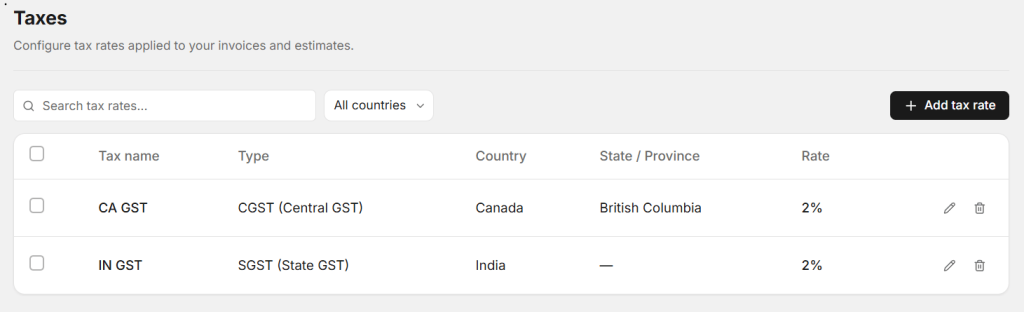
In Autodots, all your tax rates are managed from one simple page. Go to Settings → Taxes and you will see a complete list of all your configured tax rates.
Each tax rate shows:
- Tax Name — e.g. CA GST, IN GST
- Type — CGST, SGST, or other tax types
- Country — which country this tax applies to
- State / Province — specific state if applicable
- Rate — the percentage applied on invoices
You can also search tax rates by name or filter by country — making it easy to manage garage tax rates across multiple locations.
Start using Autodots for free and grow your garage faster
–> autodots.io/partners
How to Add a New Garage Tax Rate in Autodots
Adding a new tax rate in Autodots takes less than one minute. Here is how:
Step 1 — Go to Settings → Taxes
Open your Autodots dashboard and navigate to the Taxes section under Settings.
Step 2 — Click “Add Tax Rate”
Click the + Add tax rate button in the top right corner of the page.
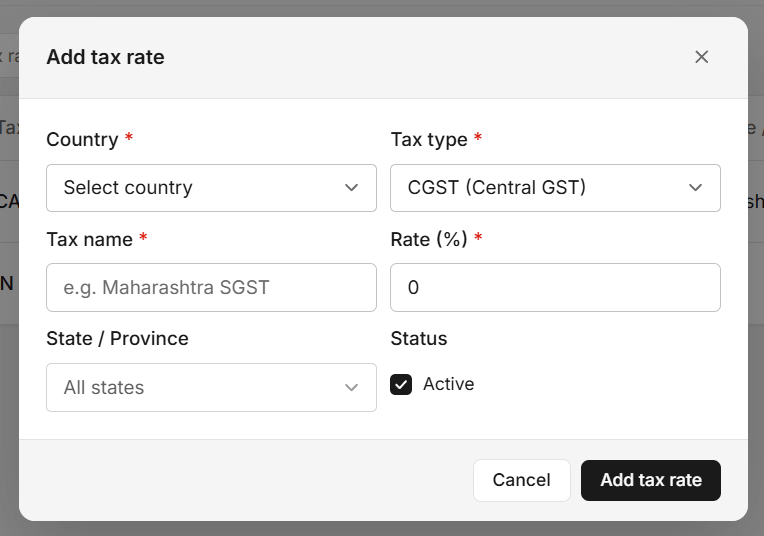
Step 3 — Fill in the Tax Details
A simple form will appear. Fill in the following:
- Country — Select the country this tax applies to (e.g. India, Canada)
- Tax Type — Choose from CGST, SGST, or other available types
- Tax Name — Give it a clear name (e.g. Maharashtra SGST, CA GST)
- Rate (%) — Enter the tax percentage (e.g. 2%, 9%, 18%)
- State / Province — Select a specific state or leave as “All states”
- Status — Keep it Active so it applies to invoices
Step 4 — Click “Add Tax Rate”
Click the button and your new garage tax rate is saved. It will now be available to apply on all invoices and estimates automatically.
Managing Multiple Garage Tax Rates
If your garage operates in multiple countries or states, Autodots makes it easy to manage all your garage tax rates from one place. For example:
- CA GST — CGST at 2% for Canada, British Columbia
- IN GST — SGST at 2% for India
You can add as many tax rates as needed. Each one can be assigned to a specific country and state — so the right tax is always applied to the right invoice automatically.
Edit or Delete a Tax Rate
Already have a tax rate that needs updating? No problem. In the Taxes list, each row has two action buttons:
- Edit — Update the rate, name, or state anytime
- Delete — Remove a tax rate you no longer need
This gives you full control over all your garage tax rates at any time.
Start using Autodots for free and grow your garage faster
–> autodots.io/partners
Garage Tax Rates Applied to Invoices and Estimates
Once your tax rates are set up in Autodots, they are automatically available when you create an invoice or estimate. You simply select the correct tax rate and Autodots calculates the total amount with tax included — instantly and accurately.
This means:
- No manual tax calculations
- No errors on invoices
- Professional tax breakdown shown on every document
- Customers receive accurate, transparent billing
Why Autodots Is the Best Way to Manage Garage Tax Rates
Most garage owners either do taxes manually or use a separate accounting tool. Autodots combines everything — job cards, invoices, estimates, and garage tax rates — in one platform built specifically for workshops.
You do not need to switch between tools. You do not need an accountant to set it up. Everything is simple, clear, and ready to use from day one.
Final Thoughts
Setting up garage tax rates correctly is one of the most important things you can do for your workshop. It keeps your billing accurate, saves time, and makes your garage look professional. With Autodots, the entire process takes just a few minutes — and once it is done, every invoice and estimate is handled automatically.
Stop doing taxes manually. Set up your garage tax rates in Autodots today and never worry about billing errors again.
Ready to take your garage digital? Autodots helps garage owners manage jobs, invoices, inventory and customers — all in one platform. Register your garage free at autodots.io/partners
Looking to grow your garage business?
Want to learn more?