
If you own a car and want professional service without wasting time searching manually, you can easily book car service on Autodots in just a few minutes. This guide will take you through the complete process — from searching a garage to live tracking your booking.
Table of Contents
What is Autodots?
Autodots is an online platform where car owners can find verified garages near them, compare services and prices, and book car service on Autodots instantly. It removes the hassle of calling multiple garages and waiting for quotes.
Step 1: Search Garages Near You
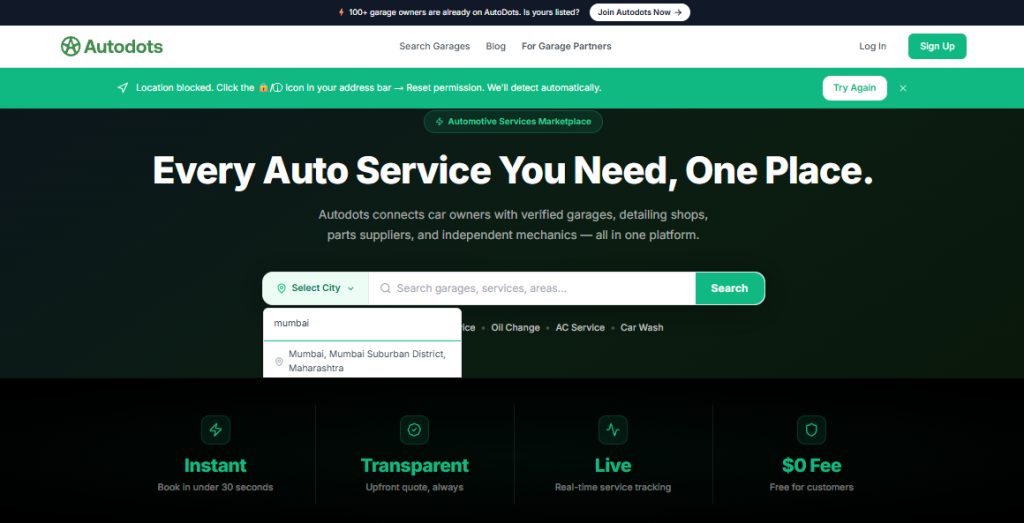
The first step to book car service on Autodots is to visit the platform and enter your city name in the search bar. For example, if you are in Rajkot, simply type “Rajkot” and you will see a list of verified garages near you.
You can also use service filters like:
- General Service
- Oil Change
- AC Service
- Brake Service
- Engine Repair
- Denting & Painting
- Tyres & Battery
These filters make it easier to find the exact service you need without scrolling through all garages manually.
Step 2: Select a Garage
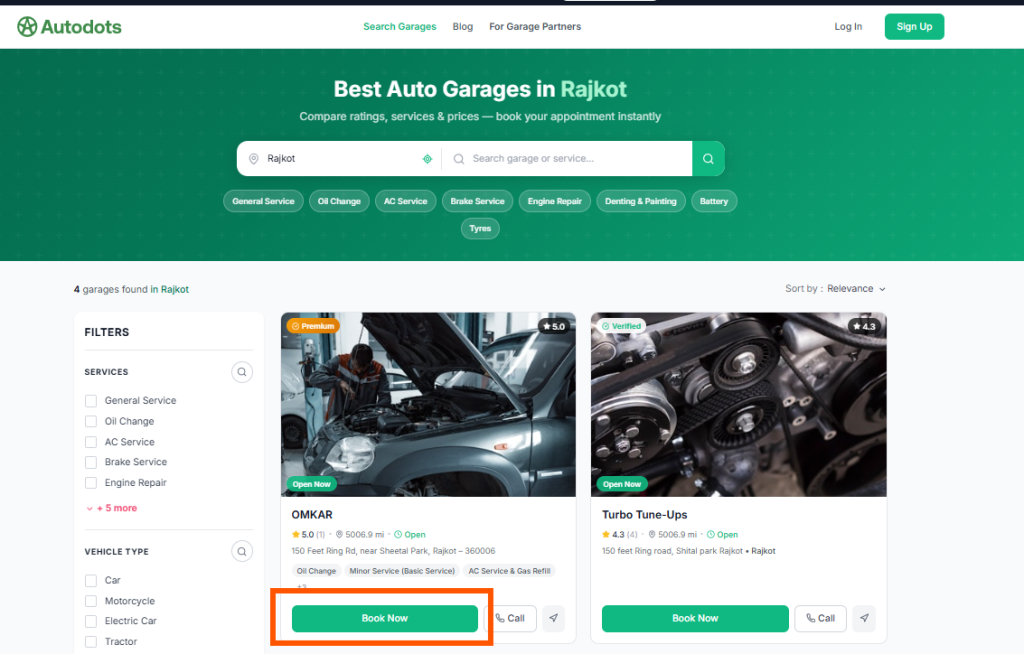
Once you search, you will see garage listings with ratings, distance, and available services. Each garage shows a “Book Now” button. Before you book car service on Autodots, you can tap on any garage to view its full profile including:
- About the garage
- All available services with prices
- Customer reviews
- Photos
- Opening hours
- Location map
- Contact details
For example, OMKAR Garage in Rajkot offers services like Oil Change (₹500), Minor Service Basic Service (₹5,000), and AC Service & Gas Refill (₹3,499). You can view all 6 services by clicking “View all services.”
Step 3: Add Services to Cart
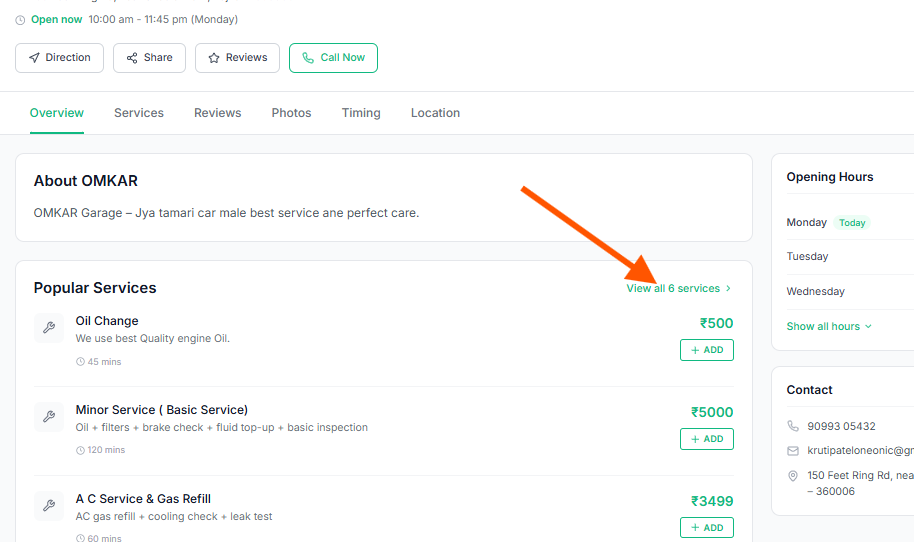
After reviewing the garage profile, click the + ADD button next to each service you want. You can add multiple services at once. This is one of the most useful features when you want to book car service on Autodots — you can combine services like Minor Service and AC Service in a single booking.
Step 4: Choose Appointment Time
Next, select your preferred date and time slot. The platform shows available time slots clearly — for example, 7:30 PM, 8:00 PM, 9:30 PM, and so on. Choose a slot that is convenient for you before you proceed to book car service on Autodots.
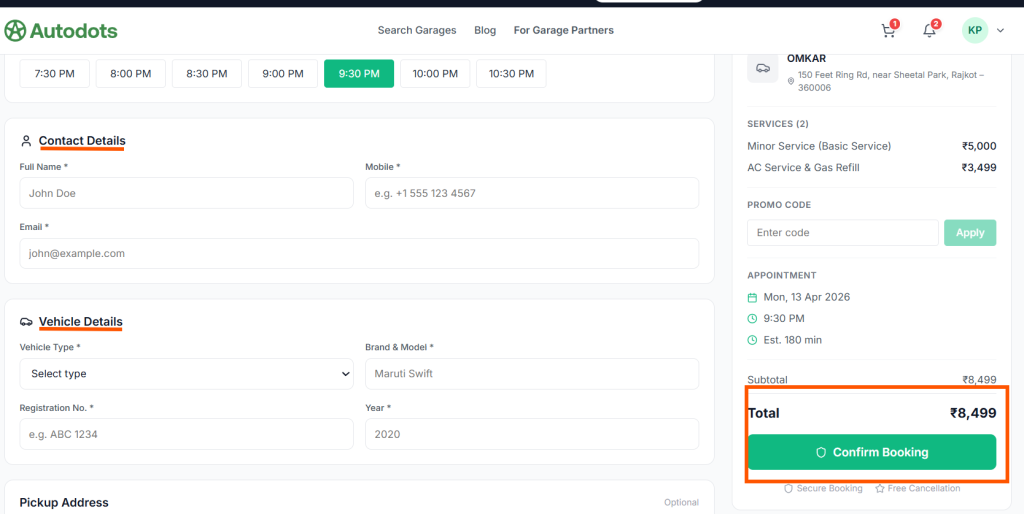
Step 5: Fill Contact and Vehicle Details
To complete your booking, you need to fill in:
- Contact Details — Full Name, Mobile Number, Email
- Vehicle Details — Vehicle Type, Brand & Model, Registration No., Year
- Pickup Address — Optional (if you need doorstep pickup)
These details help the garage prepare for your vehicle before you arrive. Always fill accurate details when you book car service on Autodots to avoid any confusion at the garage.
Step 6: Review Order Summary
On the right side of the booking page, you will see a complete Order Summary including:
- Garage name and address
- Selected services with individual prices
- Appointment date and time
- Estimated duration
- Subtotal and Total amount
- Promo code field
Always review this summary carefully before you confirm when you book car service on Autodots.
Step 7: Choose Payment Method
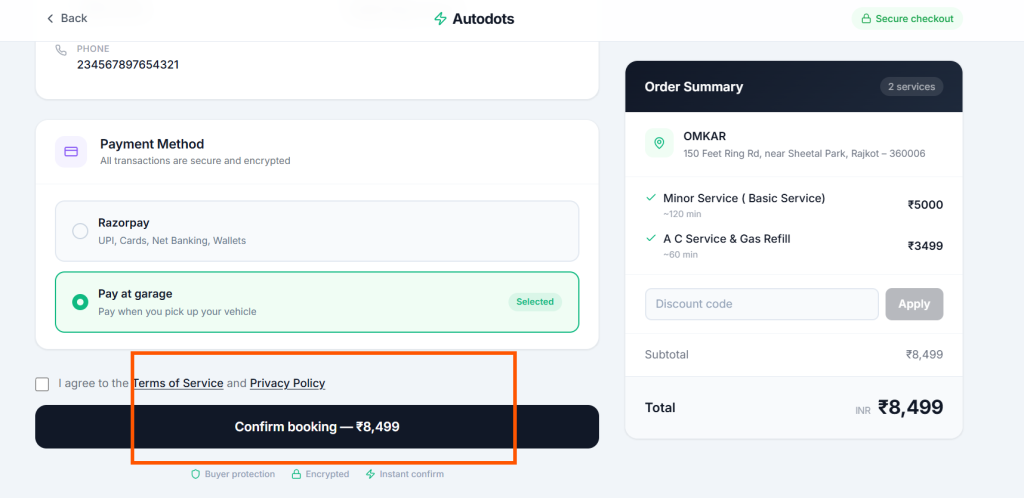
Autodots offers two payment options at checkout:
- Razorpay — UPI, Cards, Net Banking, Wallets (online payment)
- Pay at Garage — Pay when you pick up your vehicle
Both options are secure. The “Pay at Garage” option is very popular for users who prefer to pay cash after service. Select your preferred method, agree to the Terms of Service and Privacy Policy, then click “Confirm Booking” to successfully book car service on Autodots.
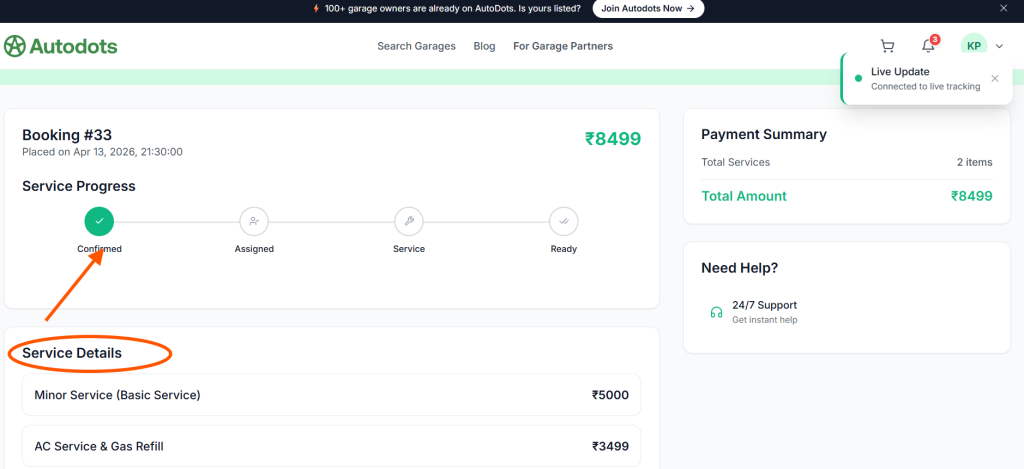
Step 8: Booking Confirmed — Live Tracking
Once you book car service on Autodots, you will immediately receive a booking confirmation. Your booking will show:
- Booking number (e.g., Booking #33)
- Date and time placed
- Total amount
- Service Progress tracker
- Payment Summary
The Service Progress section shows live 4-step tracking:
- ✅ Confirmed — Booking received by garage
- ⏳ Assigned — Mechanic assigned to your vehicle
- 🔧 Service — Work in progress
- ✔️ Ready — Your vehicle is ready for pickup
This live tracking feature is connected in real time, so you always know the exact status of your car service.
Need Help? 24/7 Live Chat Support
If you face any issue after you book car service on Autodots, the platform provides 24/7 support with instant help. A live chat option is available on your booking page, so you can get assistance anytime without calling.
Why You Should Book Car Service on Autodots
Here are the top reasons why car owners prefer to book car service on Autodots:
- ✅ Verified garages only
- ✅ Transparent pricing — no hidden charges
- ✅ Multiple services in one booking
- ✅ Secure online payment or pay at garage
- ✅ Live tracking of service progress
- ✅ 24/7 customer support
- ✅ Free cancellation available
- ✅ Instant booking confirmation
Final Thoughts
The entire process to book car service on Autodots is simple, transparent, and takes only a few minutes. From searching verified garages to live tracking your service progress, Autodots makes car maintenance completely hassle-free.
Whether you need a basic oil change or a full AC service, you can find it all in one place. Visit autodots.io and book your next car service today.
Read more : Autodots Guide