
A customer walks into your garage. He says — “You serviced my car 4 months ago. What did you do that time?”
You open WhatsApp. You scroll. You search. 5 minutes pass. You find nothing.
This is exactly the problem that car service history software solves. Every vehicle. Every service. Every part. All saved in one place — forever.
In this blog, we will show you how to track vehicle service history the right way using car service history software like Autodots.
Table of Contents
Why Vehicle Service History Matters for Your Workshop
Most garage owners think service history is only for the customer. But it is actually more useful for YOU as a workshop owner.
For Your Workshop:
- Know exactly what was done on every car
- Avoid repeating the same service unnecessarily
- Track which parts were replaced and when
- Remind customers when next service is due
For Your Customer:
- Full transparency of every service done
- Trust builds when history is clear
- Customers come back because you remember their car
Without car service history software, all this information lives in your head — or worse, in old WhatsApp chats.
Problems Without Car Service History Software
1. You Cannot Find Old Records
Paper registers get lost. WhatsApp chats get buried. Excel sheets get corrupted. Without proper car service history software, finding a 3-month-old record takes 20 minutes — if you find it at all.
2. You Miss Service Reminders
Customer’s car was due for oil change last month. You had no system to remind them. They went to your competitor. You lost the business.
3. You Cannot Track Parts Replaced
Which brake pads did you put on this car? When? You have no idea. This creates trust issues if the customer comes back with a complaint.
4. Mechanics Repeat Work
Without history, a new mechanic might redo work that was already done last visit. This wastes time and creates customer complaints.
5. No Data for Business Decisions
Which car models come most often? Which services are most requested? Without car service history software, you are running your garage blind.
What is Car Service History Software?
Car service history software is a digital system that saves every detail of every vehicle visit — automatically. When a customer brings their car, you create a job card. Everything on that job card gets saved to the vehicle’s permanent history.
Next time the same car comes in, you open the software and see:
- Every past visit date
- Every service done
- Every part replaced
- Every mechanic who worked on it
- Every payment made
This is what makes car service history software like Autodots so powerful for workshop owners.
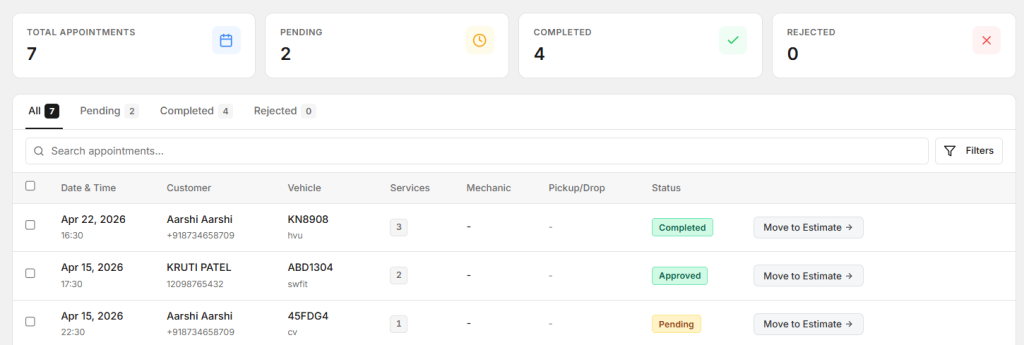
Start using Autodots for free and grow your garage faster
–> autodots.io/partners
How to Track Vehicle Service History with Autodots
Autodots makes vehicle service history tracking simple. Here is how it works step by step:
Step 1 — Create a Digital Job Card
When a vehicle comes in, create a new job card. Add the vehicle number, customer name, and contact details. Autodots saves this permanently.
Step 2 — Add Full Service Details
Add every service being done — oil change, brake check, tyre rotation, engine work — everything. Add parts used with quantities and prices.
Step 3 — Assign to Mechanic
Assign the job to your mechanic directly in the system. He can see exactly what needs to be done — no confusion, no missed steps.
Step 4 — Complete the Job
Once work is done, mark the job as complete. Invoice is generated automatically from the same job card.
Step 5 — History is Saved Forever
Every completed job automatically goes into that vehicle’s service history. Next time the same car comes — open Autodots, search vehicle number, and full history appears in 3 seconds.
This is the power of proper car service history software.
Read this for more info : How to Use Custom Fields for Garage Job Cards in Autodots to Track More Info
Key Features of Good Car Service History Software
Vehicle-wise History
Search by vehicle number and see every visit, every service, every payment — all in one screen.
Customer-wise History
Search by customer name and see all vehicles they have brought to your garage.
Service Reminders
Set automatic reminders for next oil change, tyre rotation, or any scheduled service. Customer gets notified — they come back to you.
Parts Tracking
Know exactly which parts were used on which vehicle. No confusion, no disputes.
Payment History
See which invoices are paid and which are pending — per vehicle or per customer.
Cloud Backup
All history is saved on cloud. Phone broke? Laptop crashed? No problem. Your data is always safe with good car service history software.
Car Service History Software vs Paper Register — Quick Comparison
| Feature | Paper Register | Car Service History Software |
|---|---|---|
| Search Speed | 10-20 minutes | 3 seconds |
| Data Safety | Can be lost/damaged | Cloud backup always |
| Service Reminders | Manual only | Automatic |
| Parts Tracking | Very difficult | Per vehicle |
| Payment History | Separate register | Built-in |
| Access from Phone | Not possible | Anytime anywhere |
| Multiple Mechanics | Confusing | Clear assignments |
Real Example — How Service History Saved a Garage
Priya owns a small garage in Ahmedabad with 2 mechanics. She was using a paper register for 3 years. One day, the register was damaged in rain. 3 years of customer data — gone.
She switched to Autodots car service history software. Today, every vehicle history is saved on cloud. She sends automatic service reminders every month. 30% of her old customers came back just because of reminder messages.
Her monthly revenue increased by 25% — just by tracking service history properly.
Frequently Asked Questions
How far back does car service history software save records?
Good software like Autodots saves records permanently. There is no time limit — every job card ever created stays in the system forever.
Can I search vehicle history by number plate?
Yes. In Autodots, simply type the vehicle number and the complete service history appears instantly.
Does car service history software work for all vehicle types?
Yes — cars, bikes, trucks, EVs, commercial vehicles. Any vehicle you service can be tracked in the system.
Is my customer data safe in car service history software?
Yes. Autodots uses cloud storage with full data backup. Your customer and vehicle data is always secure and accessible only by you.
Can I send service reminders to customers automatically?
Yes. Autodots allows you to set next service dates and send automatic reminders — so customers never forget and always come back to your garage.
Conclusion
Every car that comes to your garage is an opportunity. If you remember that car — its history, its needs, its next service — the customer will always come back to you.
That is exactly what car service history software does. It remembers everything so you never have to.
Stop relying on paper registers and WhatsApp chats. Switch to proper car service history software and watch your customer retention grow every month.
Try Autodots today — and never lose a vehicle record again.
Looking to grow your garage business?
Want to learn more?