
When you book a car service online, having reliable support is just as important as the service itself. Autodots customer support is built to give you instant help whenever you need it — whether it is a booking issue, a payment query, or a general question about your vehicle service.
In this guide, we will explain every option available in Autodots customer support so you always know exactly where to go when you need help.
Table of Contents
How to Access Autodots Customer Support
To access Autodots customer support, log in to your account on autodots.io. Once logged in, click on the support section from your account menu. You will see a green banner that says “How can we help you?” with a search bar to find help articles instantly.
There are four main tabs available in the support section:
- Chat — Start a live conversation instantly
- Tickets — Raise a formal support request
- FAQ — Find answers to common questions
- Contact — Email, business hours, and live chat details
Option 1: Live Chat Support
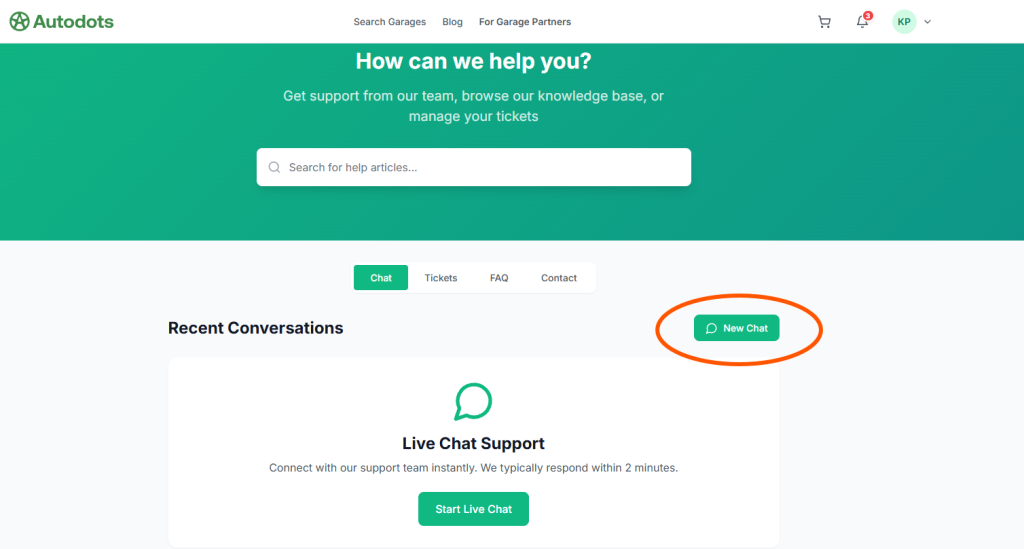
The fastest way to get help from Autodots customer support is through Live Chat. Click on the “Chat” tab and you will see the Live Chat Support section with a “Start Live Chat” button.
Key details about Live Chat:
- ✅ Available 24/7 — any time, any day
- ✅ Average response time — within 2 minutes
- ✅ Click “New Chat” button to start a new conversation
- ✅ All recent conversations are saved and visible under “Recent Conversations”
Live Chat is the best option when you need an immediate answer. Whether your booking status is unclear or you have a payment question, Autodots customer support team responds within 2 minutes on live chat.
Option 2: Support Tickets
For detailed or non-urgent issues, you can raise a Support Ticket through Autodots customer support. Click on the “Tickets” tab and then click the “New Ticket” button.
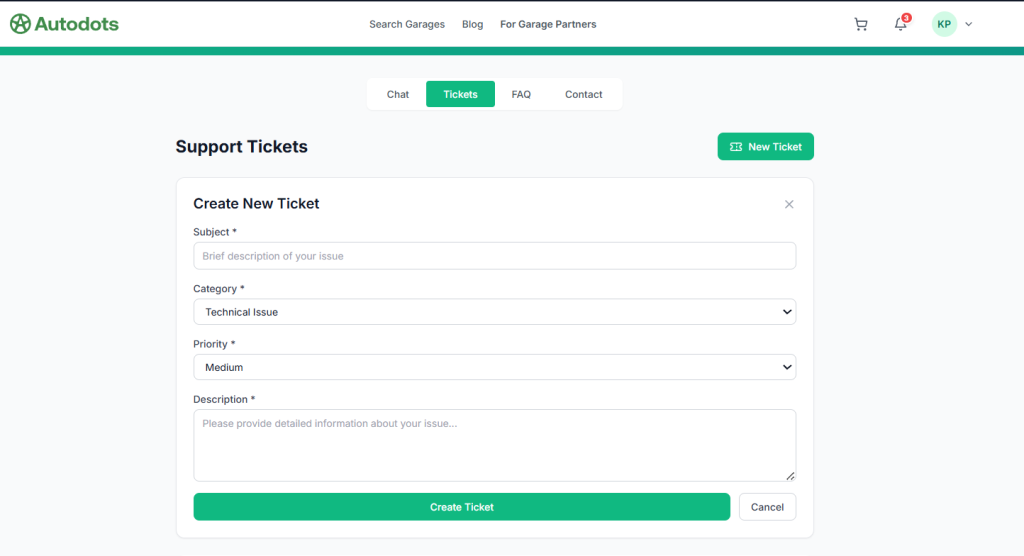
When creating a new ticket, you need to fill in the following details:
- Subject — Brief description of your issue
- Category — Choose from options like Technical Issue, Booking Issue, Payment, etc.
- Priority — Set as Low, Medium, or High depending on urgency
- Description — Provide detailed information about your issue
Once you fill all fields, click “Create Ticket” and your request will be submitted to the Autodots customer support team. You will receive updates on your ticket status directly in the platform.
Support tickets are useful when your issue needs detailed investigation — for example, a billing discrepancy or a service quality complaint.
Option 3: FAQ Section
The FAQ tab in Autodots customer support contains answers to the most commonly asked questions. Before raising a ticket or starting a chat, it is always a good idea to check the FAQ section first.
The FAQ section covers topics like:
- How to book a car service
- How to cancel or reschedule a booking
- Payment methods and refund policy
- How live tracking works
- How to join as a garage partner
You can also use the search bar at the top of the support page to find specific help articles quickly without browsing through all sections manually.
Option 4: Contact Us
The Contact tab shows three ways to reach Autodots customer support directly:
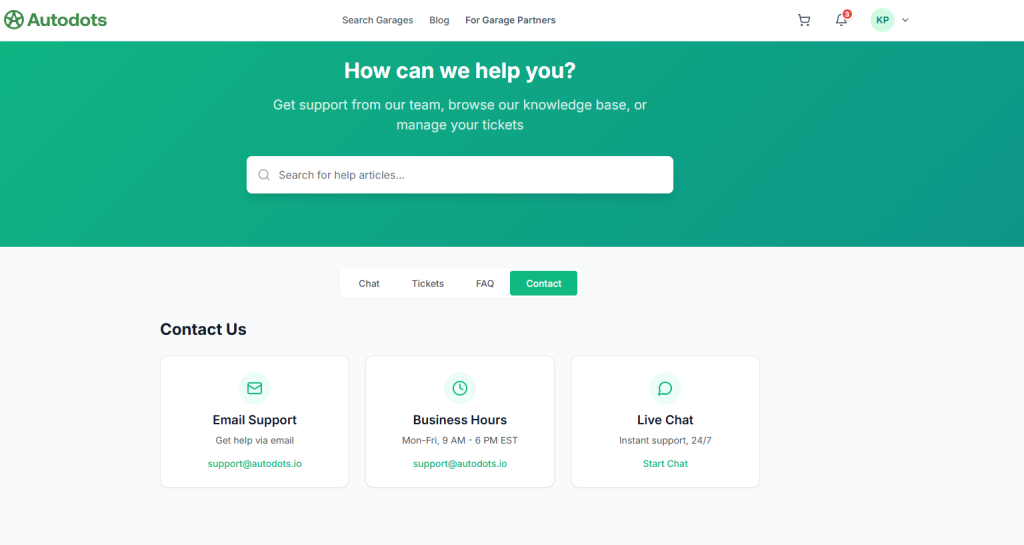
1. Email Support
Send your query to [email protected] and the team will respond with a detailed solution. Email support is best for non-urgent issues where you need a written record of the conversation.
2. Business Hours
The official business hours for Autodots customer support are Monday to Friday, 9 AM – 6 PM EST. For queries outside business hours, use Live Chat or raise a support ticket.
3. Live Chat
The Contact tab also has a direct “Start Chat” link for instant 24/7 support. This connects you to the same live chat system available in the Chat tab.
Notifications — Stay Updated Automatically
Apart from contacting Autodots customer support manually, the platform also sends automatic notifications for important updates. You can access notifications by clicking the bell icon in the top right corner of your account.
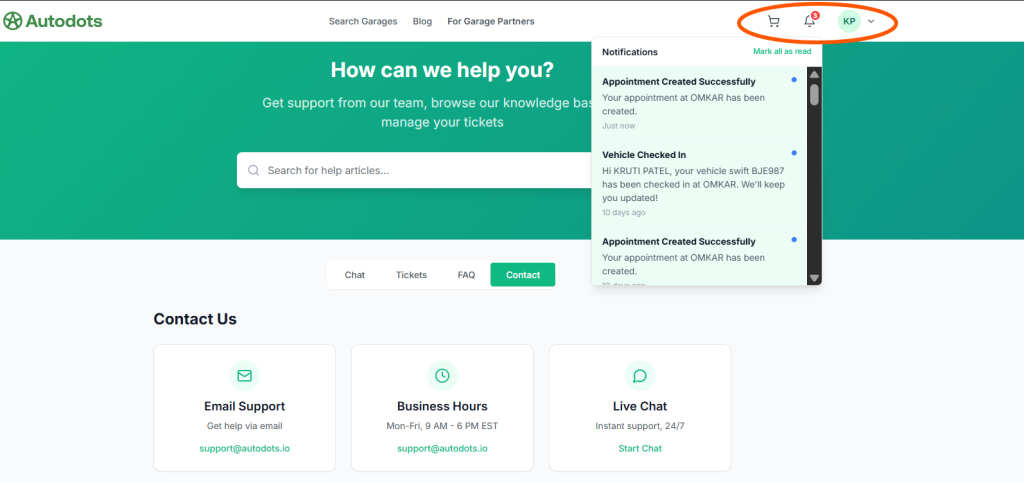
Examples of notifications you will receive:
- 🔔 Appointment Created Successfully — Confirmation when booking is placed
- 🔔 Vehicle Checked In — Alert when your vehicle arrives at the garage
- 🔔 Service Status Updates — Real-time progress notifications
These automatic notifications reduce the need to contact support for basic status updates, making the overall experience smoother for every user.
Which Support Option Should You Use?
Here is a quick reference guide to help you choose the right Autodots customer support option:
| Situation | Best Option |
|---|---|
| Need instant help right now | Live Chat |
| Detailed complaint or billing issue | Support Ticket |
| Quick general question | FAQ Section |
| Formal written communication | Email Support |
| Check booking or vehicle status | Notifications |
Final Thoughts
Autodots customer support is designed to make sure no user is ever left without help. With 24/7 live chat, support tickets, a detailed FAQ section, email support, and automatic notifications, every type of issue is covered efficiently.
Whether you are a car owner with a booking question or a garage partner with a technical issue, Autodots customer support has the right channel for you. Visit autodots.io and get the help you need instantly.
Read more :
How to Book Car Service on Autodots: Complete Step-by-Step Guide (2026)
Autodots Guide: Complete Explanation of What Autodots Is, Its Features, and How It Works in 2026