Running a tire shop is not only about selling tires or fitting wheels. Every day, your team may need to handle customer calls, vehicle details, appointments, tire stock, invoices, payments, and follow-ups. When these tasks are managed in different places, small mistakes can quickly become bigger problems.
A better system can bring these daily tasks into one clear workflow. With tire center management software, a tire business can organize customer information, manage jobs, track inventory, and keep the team on the same page. The goal is simple: spend less time searching for information and more time serving customers.
Table of Contents
1. Keep Customer and Vehicle Details in One Place
A busy tire center can deal with many customers every day. Remembering every vehicle, tire size, service date, and customer request is difficult when information is stored in notebooks, spreadsheets, or separate apps.
Tire center management software can help your team keep customer and vehicle details together. When a customer returns, staff can quickly find useful information such as the vehicle model, previous services, tire details, and notes.
This makes conversations easier and helps staff give more useful service. Instead of asking the same questions again, your team can check the customer’s history and understand what was done before.
A clear customer record can also help with follow-ups. For example, if a customer may need a tire replacement or seasonal check, your team can use the stored information to plan a reminder.
2. Make Appointments Easier to Manage
Appointment problems can affect the whole shop. If too many vehicles arrive at the same time, technicians can become overloaded. If the schedule has empty gaps, your shop may lose valuable working time.
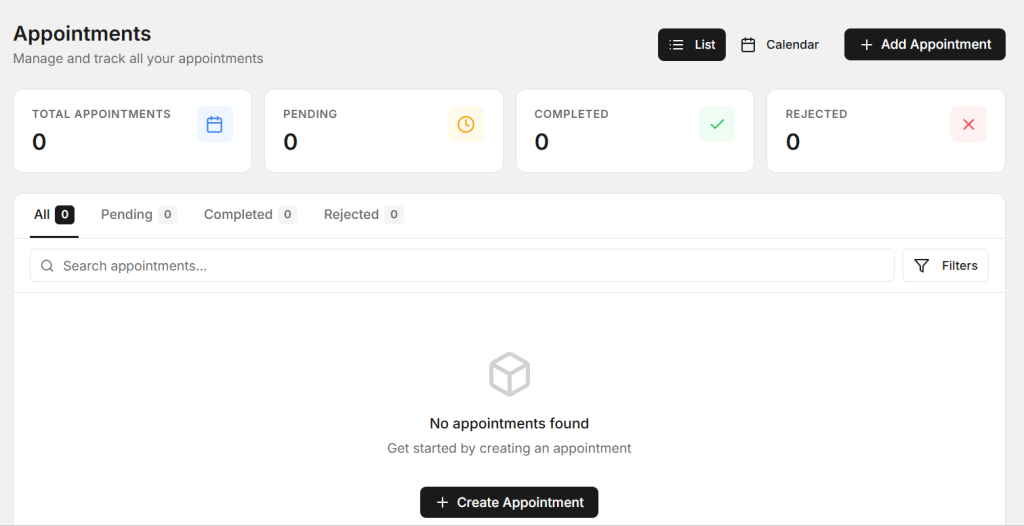
Tire center management software can make scheduling easier by giving your team a clear view of upcoming jobs. Staff can see which services are booked, when vehicles are expected, and how much work is planned for the day.
A better schedule helps your team prepare before the customer arrives. If a job needs specific tires or parts, staff can check availability in advance. This can reduce delays and make the customer experience smoother.
You can also use reminders to reduce missed appointments. A simple message before a scheduled visit can help customers remember the date and time. Fewer missed appointments can mean a more predictable daily workload.
3. Track Tire Inventory Before You Need It
Inventory is one of the most important parts of a tire business. You need the right products available at the right time, but keeping track of stock can become difficult as the number of tire brands, sizes, and types grows.

Tire center management software can give your team a clearer way to monitor inventory. Instead of checking shelves manually every time, staff can use the system to see what is available and identify products that may need to be reordered.
Good inventory tracking can also help reduce two common problems: running out of popular tires and keeping too much slow-moving stock. Both situations can affect cash flow and customer service.
For example, if a customer calls about a particular tire size, your staff can check the system before promising availability. If stock is low, the team can plan a reorder sooner instead of discovering the problem when a customer is already waiting.
4. Improve Job Tracking and Billing
A tire shop often handles several jobs at once. One vehicle may need tire replacement, another may need balancing, and another may be waiting for an inspection. Without a clear process, it can be hard to know which jobs are pending, completed, or ready for pickup.
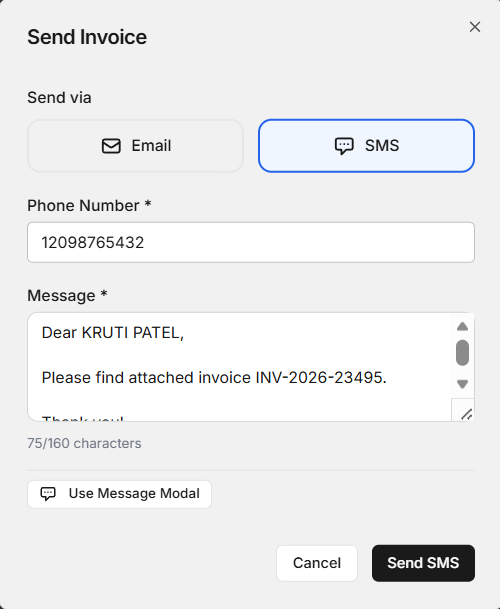
A digital workflow can help staff track each job from arrival to completion. Tire center management software can bring service details, job status, and billing information into a more organized process.
This can reduce the need for repeated calls between the front desk and technicians. Staff can check the job status and share accurate information with customers.
Billing can also become easier when service details are recorded clearly. The final invoice can reflect the work completed and the products used. This gives customers a clearer view of what they are paying for and helps staff avoid avoidable billing mistakes.
5. Use Reports to Make Better Shop Decisions
Running a shop becomes easier when you understand what is happening inside the business. Basic reports can show which services are popular, which products sell often, how much work the team handles, and where delays may happen.
Tire center management software can help turn daily shop activity into useful information. Instead of relying only on memory, owners and managers can review records and look for patterns.
For example, if one tire size sells much faster than others, that information can help with future purchasing. If certain services are more popular during specific months, the shop can prepare staff and inventory before demand increases.
Reports can also help managers review business performance over time. The more organized the data is, the easier it becomes to spot areas that need attention.
How These Five Improvements Work Together
The biggest benefit does not come from using separate tools for every task. It comes from connecting the main parts of your shop workflow.
Customer records support better service. Scheduling helps control the daily workload. Inventory tracking helps your team know what is available. Job tracking keeps work organized. Reports help owners make informed decisions.
When these areas work together, your team can spend less time switching between systems and more time focusing on customers and vehicles.
What to Look for When Choosing a Shop Management System
Not every system will be a good fit for every tire business. Before choosing a platform, think about your shop’s actual daily needs.
Look for a system that is easy for staff to learn and simple enough to use during a busy workday. It should support the core tasks your team handles regularly, rather than adding unnecessary complexity.
When comparing tire center management software, also check whether the system can grow with your business. A small shop today may add more technicians, locations, customers, or inventory later.
Good support is another important factor. If your team has a question, getting help quickly can save time and reduce disruption.
You can also explore the AutoDots Partners page to learn more about the AutoDots ecosystem and its business connections.
How to Get Your Team Ready for a New System
A new system works best when your team understands why it is being introduced. Start by explaining the problems it should solve, such as manual data entry, scheduling confusion, or difficulty finding customer records.
A good tire center management software setup should match the way your employees already work. Train staff using real shop situations. Show them how to create a customer record, schedule a job, update service details, check inventory, and complete billing.
It can also help to introduce the system in clear stages. Give your team time to become comfortable with the main features before adding more advanced processes.
Most importantly, ask your staff for feedback. Technicians and front-desk employees use the system every day, so their experience can reveal small improvements that managers may not notice.
Common Questions
Why should a tire shop use a management system?
A management system can organize customer records, appointments, inventory, job details, billing, and reports in one workflow. This can reduce manual work and make daily operations easier to manage.
Can a management system help reduce missed appointments?
Yes. A system with scheduling and reminder features can help customers remember upcoming visits and can give staff a clearer view of the daily schedule.
Is inventory tracking useful for a small tire shop?
Yes. Even a small shop can benefit from knowing which tire sizes and products are available, which items are moving quickly, and when stock may need to be reordered.
Will my employees need a lot of training?
That depends on the system, but a simple platform should be easy to learn with practical training. Start with the features employees use most often and build from there.
Where can I find more automotive business information?
You can visit the AutoDots Blog for more articles and practical information related to automotive businesses, shop operations, and technology.
Final Thoughts
A well-run tire shop depends on clear information, organized work, and good customer service. When daily tasks are handled manually across different tools, your team can lose time and make avoidable mistakes.
The five improvements covered here offer a practical starting point: organize customer and vehicle records, improve scheduling, keep a closer eye on inventory, track jobs and billing, and use reports to understand the business.
With tire center management software, these everyday processes can become easier to manage and easier for your team to follow. The right system should make work simpler, not harder.
Start with the areas that create the most daily pressure for your team, then build a smoother process around them. A more organized shop can save time, improve customer service, and give your team a clearer way to handle daily work.
Take the Next Step
If your shop is ready to reduce manual work and create a more organized workflow, start by reviewing your current process. Identify where your team spends the most time and where errors happen most often. Then compare those needs with the features available in a modern shop management platform.
A practical system can help your team work with more confidence while giving customers a smoother experience from booking to pickup.