
Clear and accurate billing is an important part of running a successful garage. Customers want to understand what work has been completed, what parts were used, and how much they need to pay. For workshop owners, preparing invoices manually can take time and may lead to missed charges, calculation errors, or delayed payments. Garage Invoice Software UK helps repair businesses organise their billing process, create professional invoices, and keep payment information in one place.
Whether you run a small independent garage or manage a busy vehicle repair centre, a reliable invoicing process can improve the customer experience and support better financial control. The right system can connect invoices with estimates, job records, customer details, and payment updates. This guide explains the main benefits, useful features, and practical points to consider when choosing an invoicing solution for your workshop.
Table of Contents
What Is Garage Invoice Software UK?
Garage invoicing software is a digital tool that helps a workshop prepare, send, manage, and track customer bills. Instead of writing invoices by hand or creating separate documents for every repair, staff can use information already recorded for a vehicle or job. They can add labour charges, parts, service fees, taxes, and discounts before producing a clear invoice.
A good system keeps billing information organised and makes it easier to check which invoices are paid, unpaid, or overdue. Depending on the product, it may also support estimates, job cards, customer records, appointment details, and reports. Using Garage Invoice Software UK can therefore help a garage connect its daily workshop activity with its financial administration.
Why Accurate Garage Invoicing Matters
An invoice is more than a request for payment. It is a record of the service provided and the amount charged. A clear invoice helps customers understand the work carried out and gives the garage a useful record for future visits, accounts, and customer questions.
- Builds customer confidence: Clear descriptions of labour, parts, and other charges help customers understand the bill.
- Reduces avoidable mistakes: Reusing job information can reduce repeated typing and simple calculation errors.
- Supports timely payments: Sending invoices promptly makes it easier for customers to know what they owe.
- Improves record keeping: Digital records make it easier to find previous invoices and review payment history.
- Saves administration time: Staff can spend less time preparing documents and more time supporting workshop operations.
6 Useful Features to Look For
1. Professional Invoice Creation
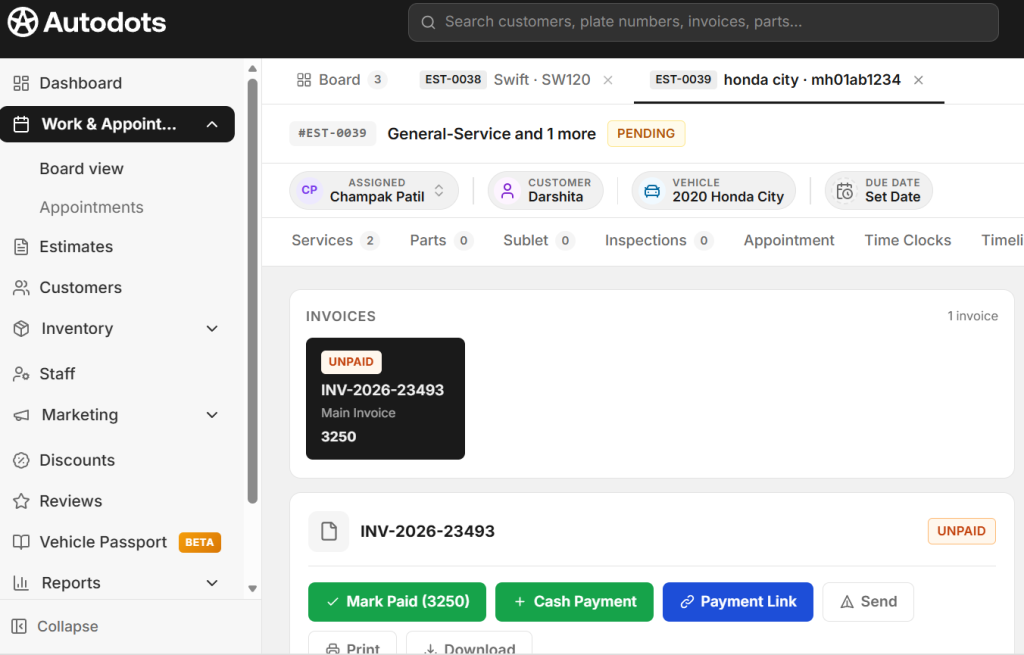
Your invoice should be easy to read and contain the important details of the transaction. Look for a system that lets you include your garage name and contact details, customer information, vehicle details, invoice date, invoice number, work descriptions, parts, labour, applicable taxes, and the final amount due. A consistent layout makes your business look organised and helps customers review charges without confusion.
2. Estimates That Can Become Invoices
Many repairs begin with an estimate. Once the customer approves the work, staff should be able to use the approved details when preparing the final bill. This can reduce duplicate data entry and help keep the agreed work and final charges connected. Check whether the software allows you to update parts or labour when the actual repair differs from the original estimate, while keeping a clear record of changes.
3. Links to Job Cards and Vehicle Records
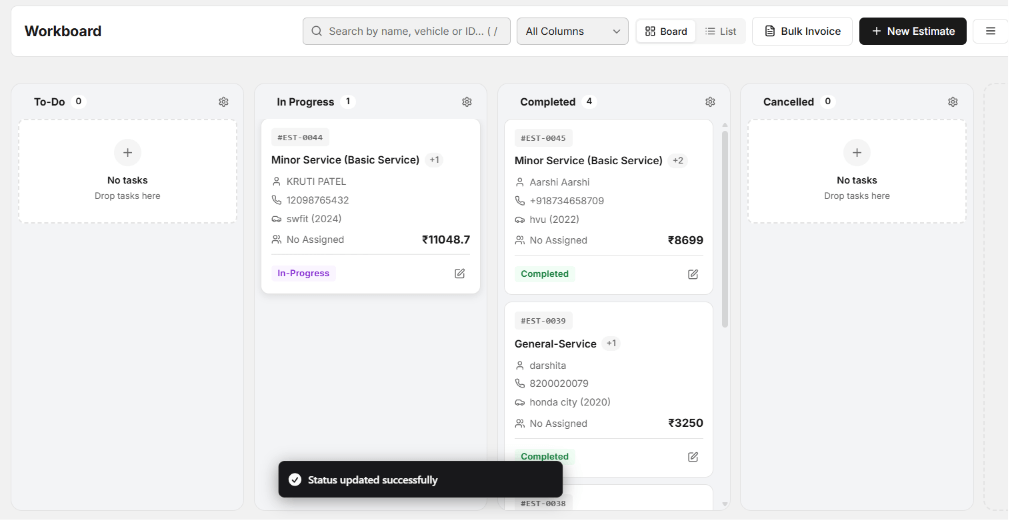
Connecting invoices with job cards helps staff see which repair work has been completed. Vehicle registration details, mileage, service notes, parts used, and labour information can be kept with the relevant job, depending on the system. When a customer asks about an earlier repair, your team can find the related record more easily instead of searching through paper files or separate spreadsheets.
4. Payment Status and Follow-Up
It is useful to see whether an invoice is paid, partly paid, unpaid, or overdue. Some systems also support payment recording, reminders, or links to online payment services. Confirm which payment methods are supported and whether any payment provider charges apply. A clear payment view can help your team follow up politely and maintain more accurate accounts.
5. Customer Communication
Customers appreciate receiving their invoices through a channel they can access easily. Depending on the software and connected services, invoices or payment updates may be shared by email or messaging tools. Check that the system gives you control over customer contact details and that staff follow appropriate privacy and data-handling practices. Keep messages clear, professional, and free from unnecessary technical language.
6. Reports and Business Overview
Reports can help owners review invoiced sales, outstanding balances, and billing activity over a selected period. These figures can support everyday decisions, such as following up overdue accounts or reviewing workshop performance. Make sure you understand what each report includes and whether it can be exported or shared with your accountant. Reports are most useful when staff enter job and payment information consistently. A dependable Garage Invoice Software UK solution should make these records simple to review without adding unnecessary steps.
How Garage Invoice Software UK Can Improve Daily Work
When billing is connected to workshop records, the team can follow a more consistent process from vehicle arrival to final payment. A service adviser can open the customer and vehicle record, create a job, record the work, and prepare an invoice using the details already available. This reduces the need to enter the same information in several places.
For a small garage, even a few minutes saved on each invoice can make a difference during a busy day. For a larger workshop, a shared system can help office staff and technicians work from the same job information. Before choosing Garage Invoice Software UK, map out how your current process works and identify where delays or repeated tasks happen most often.
How to Choose the Right Software for Your Garage
- List your requirements: Decide whether you only need invoicing or also want estimates, job cards, customer records, appointments, stock management, and reporting.
- Check ease of use: Ask staff to try common tasks, such as creating an invoice, finding an older bill, and recording a payment.
- Review costs: Compare subscription fees, user limits, setup costs, payment processing charges, and optional features. Read the terms carefully.
- Ask about support: Find out how training, onboarding, technical help, and software updates are provided.
- Consider data security: Ask how customer and vehicle information is stored, protected, backed up, and accessed by authorised staff.
- Check integrations: If you already use accounting or payment tools, confirm whether the software connects with them and what the integration includes.
When reviewing Garage Invoice Software UK, ask for a demonstration using a typical repair from booking to payment. The best choice is not necessarily the system with the longest feature list. It is the one your team can use correctly every day and that fits your workshop’s size, budget, and working process. A trial or product demonstration can help you test real tasks before making a decision.
How AutoDots Can Help Your Workshop
AutoDots offers digital tools designed to help automotive businesses organise workshop operations. Depending on the plan and available features, garages can manage activities such as job cards, estimates, invoices, appointments, customer information, inventory, and business reports through a connected platform. Keeping these activities together can make it easier for staff to follow a job from booking through repair and billing.
If you are comparing Garage Invoice Software UK options, review how AutoDots fits your actual workflow rather than choosing on invoicing alone. Explore the AutoDots partner program to learn more about the platform and its partner offering. Check the AutoDots pricing page for current plan information, included features, and any applicable terms before making a decision.
You can also read practical automotive business articles on the AutoDots blog to learn more about workshop management, customer service, and digital tools for repair businesses.
Common Invoicing Mistakes to Avoid
- Leaving out repair details: Describe the work and parts clearly so customers can understand the charges.
- Not checking customer information: Confirm names, contact details, and vehicle information before sending the invoice.
- Delaying invoice preparation: Create the bill soon after the work is completed, while job details are still easy to verify.
- Forgetting to update payment status: Record payments promptly so your outstanding balance information stays useful.
- Using inconsistent descriptions: Agree on clear terms for common services and labour entries across the team.
Frequently Asked Questions
What does Garage Invoice Software UK do?
It helps garages create and send invoices, record labour and parts charges, track payment status, and keep billing records organised. Some systems also connect invoices with estimates, job cards, vehicle records, and customer information.
Can invoicing software help a small independent garage?
Yes. A small garage can use digital invoicing to reduce paperwork, prepare consistent bills, and find previous customer records more easily. Choose a plan that matches the number of staff and the features you genuinely need.
Can I create an invoice from a repair job?
Many workshop systems let users create an invoice using information from a job card or estimate. The exact process varies by provider, so check this feature during a demonstration and confirm whether staff can review and edit charges before sending the bill.
Does Garage Invoice Software UK support online payments?
Some products connect with online payment providers, while others only let staff record payments made through separate methods. Ask the supplier which payment options are available, whether additional fees apply, and how payment information is handled.
How should I compare software prices?
Compare the full cost rather than only the advertised monthly price. Check the number of users, included features, onboarding, support, integrations, payment fees, and contract terms. Make sure the package can support your expected workshop needs.
Conclusion
Well-organised invoicing helps a garage present charges clearly, keep accurate records, and manage payments with less administrative effort. The right digital system can connect billing with estimates, job cards, customer details, and workshop activity, giving staff a more consistent way to manage each repair.
Before selecting Garage Invoice Software UK, review your current billing process, identify the features that matter most, and test the software with realistic workshop tasks. A practical solution that your team can use confidently can support smoother daily operations and a more professional customer experience.