
Running a growing vehicle repair workshop involves much more than fixing cars. Garage owners must manage technicians, customer bookings, repair jobs, spare parts, invoices, payments, and daily business performance. When the number of customers and vehicles increases, handling everything through paper records or separate spreadsheets can become difficult. A connected digital system can help bring these activities together.
Advanced Garage Management Software helps workshops organise their operations, reduce repetitive administration, and improve visibility across daily repair work. It can provide tools for managing technicians, tracking vehicle repairs, monitoring inventory, communicating with customers, and reviewing business reports.
For a small garage planning to expand or an established workshop handling a high volume of repairs, choosing the right technology can make everyday work easier. This guide explores eight powerful features, their practical benefits, and what to consider before choosing a solution.
Table of Contents
What Is Advanced Garage Management Software?
Garage management software is a digital platform designed to help automotive repair businesses manage their workshop activities. Basic systems generally focus on essential tasks such as customer records, job cards, estimates, appointments, and invoices. More advanced systems provide additional tools for larger teams and more complex business operations.
These tools may include technician management, advanced inventory controls, automated customer notifications, detailed reporting, fleet management, and multi-location support. The exact features depend on the software provider and subscription plan.
The purpose of Advanced Garage Management Software is to help workshop owners manage more work without making their administrative processes unnecessarily complicated. Instead of searching through separate files, employees can access relevant information through a shared system.
8 Powerful Features for Growing Workshops
1. Digital Job Cards and Repair Workflow Management
Job cards are an important part of workshop operations. They record customer details, vehicle information, reported problems, required repairs, labour details, and parts used during a job.
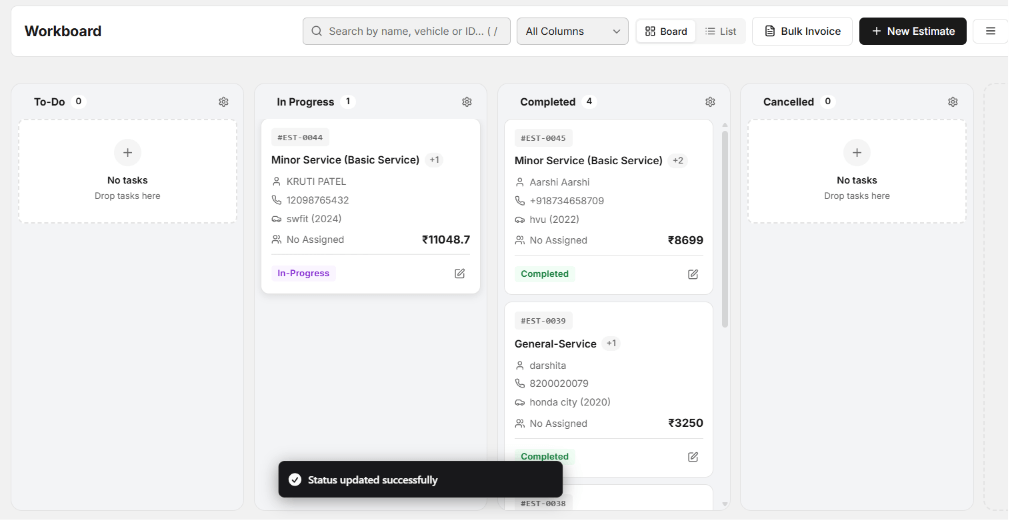
A digital job management system allows staff to create and update repair records without relying on paper documents. Managers can review the status of different vehicles and understand which jobs are waiting, in progress, or completed.
For a growing workshop, this visibility can help prevent missed tasks and improve communication between service advisers and technicians. It also makes it easier to find previous job information when a customer returns.
2. Technician Assignment and Staff Management
As a garage becomes busier, assigning work fairly and keeping track of technician responsibilities becomes more important. Without a clear process, some employees may have too many jobs while others are waiting for work.
Staff management tools can help managers assign repair tasks, organise responsibilities, and review job progress. Depending on the system, features may include individual staff accounts, access permissions, technician schedules, and activity records.
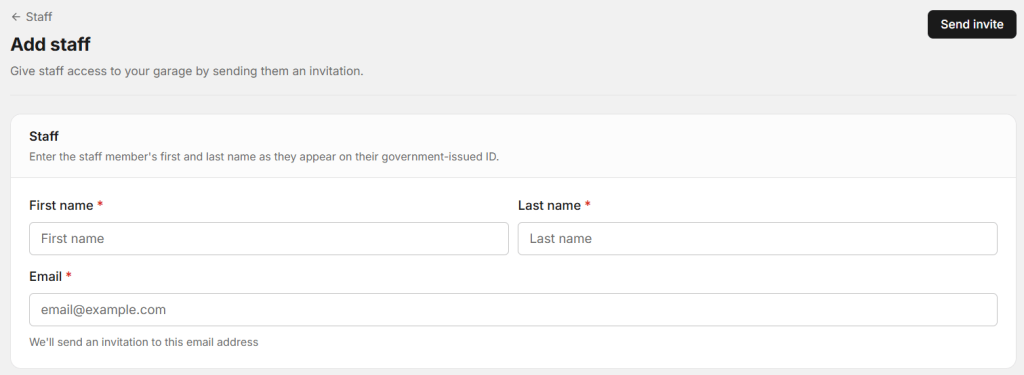
For example, a service adviser can assign a brake inspection to an available technician and update the job status when work begins. Other authorised team members can then check the progress without repeatedly asking for updates.
3. Advanced Inventory and Spare Parts Tracking
Managing spare parts is essential for workshops that handle regular servicing and vehicle repairs. Missing stock can delay jobs, while excessive stock can tie up business money and storage space.
Inventory management tools help garages maintain records of available parts, monitor stock movement, and identify items that need attention. More advanced features may include low-stock alerts, vendor records, purchase order history, and parts tracking.
For example, when the quantity of a commonly used oil filter falls below a selected level, a low-stock alert can help staff plan a reorder. Vendor records can also make supplier information easier to access when purchasing replacement parts.
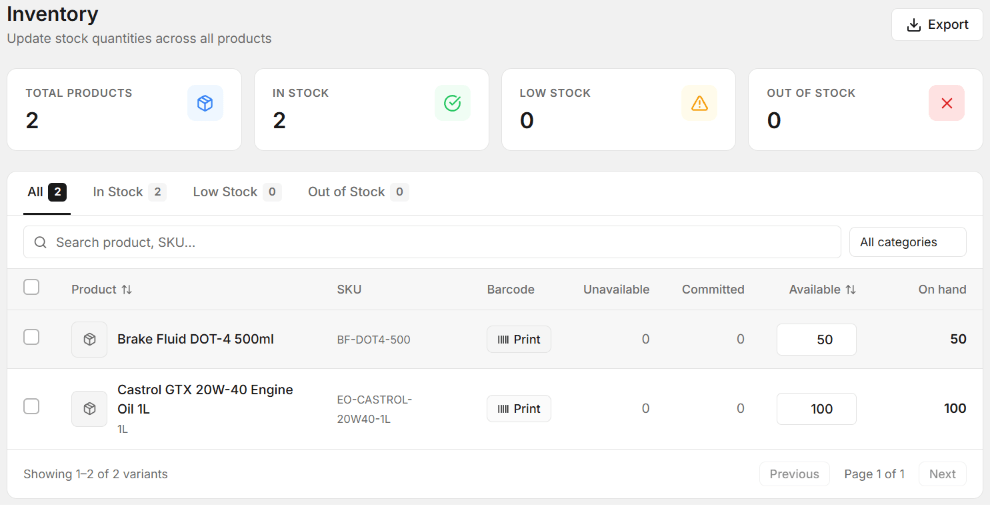
Advanced Garage Management Software can make inventory information more useful when stock records are regularly updated by employees. Accurate records help managers understand what is available before accepting new repair jobs.
4. Automated Customer Notifications and Service Reminders
Good communication is important for building long-term customer relationships. Customers want to know when their vehicle is booked, whether repairs are progressing, and when the vehicle is ready for collection.
Automated notification features can help garages send appointment confirmations, service reminders, and other updates. Depending on the provider, communication may be available through email, SMS, WhatsApp, or connected messaging services.
Service reminders can also encourage customers to return for routine maintenance. Instead of manually checking every customer record, staff may be able to use scheduled reminders to support follow-up communication.
Always check which communication channels are supported, whether message limits apply, and what customer consent or privacy requirements need to be followed.
5. Fleet Management and Vehicle Service History
Some workshops work with individual vehicle owners, while others provide maintenance services to businesses that operate several vehicles. Managing multiple vehicles for one customer can become difficult without organised records.
Fleet management tools can help garages maintain vehicle information, organise service activity, and review previous repair records. A detailed vehicle history can help technicians understand what work has already been completed before recommending further maintenance.
For example, a workshop managing delivery vans may need to review the service history of several vehicles and organise their upcoming maintenance. Keeping this information together can make customer communication and workshop planning easier.
6. Detailed Business Reports and Performance Insights
Business reports help garage owners understand what is happening across their workshop. Instead of relying only on daily observations, managers can review recorded information about jobs, invoices, payments, inventory, and other business activities.
Depending on the software, reports may show revenue trends, outstanding payments, job volumes, stock movement, and staff activity. More detailed reporting can help owners identify busy periods, review operational performance, and make better decisions about resources.
Reports are most useful when employees enter accurate information. For example, if parts costs are missing from repair records, the resulting business figures may not provide a complete picture of workshop performance.
7. Sublet Tracking and External Service Management
Not every repair or specialist service is completed inside the garage. Some workshops use external providers for activities such as specialist machining, vehicle recovery, or other outsourced work.
Sublet tracking tools can help staff record outsourced work and connect it with the relevant repair job. This makes it easier to review external service costs and understand which jobs are waiting for work to be completed by another provider.
For a growing workshop, keeping outsourced work organised can reduce confusion between internal tasks and external services. It can also help staff maintain clearer repair records and prepare accurate customer invoices.
8. API Access, Security, and Multi-Location Management
As a business expands, it may need software that connects with other business tools or supports multiple workshop locations. API access can allow supported systems to exchange information, depending on the provider’s integration options and technical requirements.
Multi-location management can help businesses oversee different branches through a centralised system. Owners may be able to switch between garage locations, review organisation-level information, and manage staff access according to their responsibilities.
Security is equally important. Look for appropriate user permissions, secure account access, data protection measures, and two-factor authentication where available. These controls can help protect customer and business information.
Benefits for Growing Automotive Workshops
When workshop activities are managed through connected digital tools, employees can spend less time searching for information and more time completing useful work. Some important benefits include:
- Better job visibility: Managers can review repair progress and identify jobs that need attention.
- Organised staff responsibilities: Work can be assigned more clearly across technicians and service advisers.
- Improved stock control: Inventory records and alerts can help reduce avoidable parts shortages.
- Consistent customer communication: Notifications and reminders can support a more organised customer experience.
- More informed decisions: Business reports can help owners understand workshop activity and identify areas for improvement.
- Support for expansion: Suitable staff and location management tools can help a business handle additional operational complexity.
How to Choose the Right Software for Your Workshop
Not every garage needs every available feature. Before choosing a system, consider your current workload, team size, customer requirements, and future plans.
- Understand your daily challenges: Identify whether job tracking, staff scheduling, inventory, invoicing, or customer communication takes the most time.
- Check the feature list: Compare the tools included in each subscription instead of relying only on the plan name.
- Review staff limits: Confirm how many employees can access the system and whether additional accounts cost extra.
- Consider integrations: Check whether the platform connects with your existing accounting, payment, or communication tools.
- Review security: Ask how customer records are stored, protected, backed up, and accessed.
- Calculate the total cost: Include subscription fees, setup, optional modules, integrations, and any additional charges.
- Request a demonstration: Test common workshop tasks before deciding whether the system is suitable.
When evaluating Advanced Garage Management Software, focus on the features that solve real operational problems. A system with many tools is not automatically the best choice if your employees find it difficult to use.
How AutoDots Can Help Your Workshop
AutoDots offers different garage management plans designed for businesses with different team sizes and operational needs. Its plan structure includes Auto Basic, Auto Grow, Auto Advance, and Auto Plus.
According to the plan details shared earlier, Auto Advance includes 15 staff accounts, automated customer notifications, sublet tracking, a Passport Gallery for photos and videos, a full reporting suite, API access, and 24/7 dedicated support. These features can be relevant to established garages that need more control over workshop activity and business information.
Auto Plus adds tools for multi-location operations, unlimited staff accounts, an organisation dashboard, a garage switcher, advanced security with two-factor authentication, and onboarding and training. This can be worth reviewing if your business operates multiple branches or expects to expand.
If you are considering Advanced Garage Management Software, compare the features with your actual workshop requirements. Visit the AutoDots pricing page to review current packages, inclusions, and subscription terms. You can also explore the AutoDots partner program to learn more about the platform.
Common Mistakes to Avoid When Choosing Garage Software
- Choosing only by price: A cheaper package may not include the tools your workshop needs.
- Ignoring staff requirements: Check account limits before adding more technicians or service advisers.
- Overlooking inventory features: A workshop with regular parts usage may need more than basic stock records.
- Not checking integrations: Confirm that important external tools can connect with the software if required.
- Skipping staff training: Employees need to understand how to use the system correctly.
- Forgetting future growth: Consider whether the software can support additional employees, jobs, and locations.
Frequently Asked Questions
1. What is the main purpose of Advanced Garage Management Software?
It helps automotive workshops manage repair jobs, technicians, inventory, customers, invoices, and business activity through digital tools. The exact features depend on the provider and selected subscription.
2. Is advanced garage software suitable for a small workshop?
Yes, if the workshop needs features such as detailed inventory controls, customer reminders, or reporting. However, a small garage should compare the cost with the features it will actually use.
3. Can garage software help manage multiple technicians?
Many systems provide staff accounts, job assignment, and workflow tracking. These tools can help managers organise responsibilities and monitor repair progress across a team.
4. Why is inventory management important for a growing garage?
Inventory management helps workshops monitor available parts, identify low stock, and organise purchasing. Accurate stock records can reduce delays caused by missing parts and help avoid unnecessary purchases.
5. Does AutoDots offer advanced workshop management features?
According to the plan details shared earlier, Auto Advance includes automated customer notifications, sublet tracking, a full reporting suite, API access, and other additional tools. Auto Plus adds multi-location management and unlimited staff accounts. Check the official pricing page for current inclusions.
6. How much does advanced garage management software cost?
Pricing varies by provider, staff limits, features, and subscription terms. Compare the regular subscription cost, additional charges, support options, and upgrade conditions before choosing a plan.
Conclusion
Growing workshops need organised processes to manage more customers, vehicles, employees, and repair jobs. Digital job cards, technician assignment, inventory tracking, customer notifications, fleet management, reporting, and multi-location tools can all help improve daily operations.
Choosing Advanced Garage Management Software is about finding the right combination of features, usability, and cost. Review your workshop’s current challenges, compare available plans, and test the software with real tasks before making a decision. The right platform can help your team stay organised and give your business a stronger foundation for future growth.