
Choosing the right garage management software is an important decision for every automotive repair business. A good system can help manage job cards, customer records, appointments, estimates, invoices, payments, and spare parts. However, before selecting a package, garage owners need to understand what they will pay and which features are included.
Basic Garage Software Pricing can vary depending on the number of staff accounts, available tools, workshop size, and subscription conditions. Some plans are designed for solo mechanics and small garages, while others provide additional features for growing workshops and established repair businesses.
In this guide, we explain seven important costs and features to compare, review four AutoDots plans using the supplied pricing information, and share practical tips to help you choose the right package for your garage.
Table of Contents
What Is Basic Garage Software Pricing?
Garage software pricing is the amount a workshop pays to use a digital system for managing its daily operations. Most providers offer different packages based on the tools, user limits, and support included in each subscription.
A basic package may include digital job cards, estimates, invoicing, customer records, and appointment management. Higher packages may add fleet management, advanced inventory, automated notifications, detailed reporting, API access, and multi-location management.
When comparing Basic Garage Software Pricing, do not look only at the monthly subscription. Check the complete feature list, promotional period, regular price, additional charges, and whether the package can support your business as it grows.
7 Costs and Features to Compare Before Buying
1. Monthly Subscription and Promotional Pricing
The monthly subscription is usually the first cost garage owners notice. However, some providers offer introductory discounts for new customers. These promotions can reduce the initial cost, but the regular subscription price may be different after the promotional period ends.
For example, the AutoDots pricing image supplied for this comparison shows introductory pricing of $1 per month for the first three months on Auto Basic and Auto Grow. After the promotional period, the displayed prices are $56 and $119 per month respectively.
Auto Advance is displayed at $199 per month, while Auto Plus is displayed at $349 per month. These figures are based on the supplied pricing image. Confirm the current price, currency, taxes, billing frequency, and promotional conditions on the provider’s pricing page before subscribing.
Always calculate the cost over a full year. A low introductory price may look attractive, but the regular monthly subscription is more important when planning your long-term software budget.
2. Number of Staff Accounts
The number of employees who can access the software can affect the package you need. A solo mechanic may only need one or two accounts, while a busy garage may need separate access for technicians, service advisers, managers, and office staff.
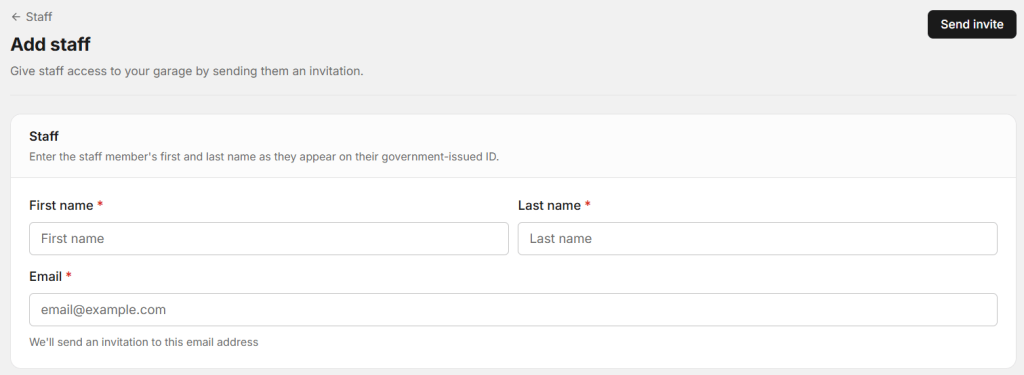
According to the supplied AutoDots plan image, the staff limits are:
- Auto Basic: 2 staff accounts.
- Auto Grow: 5 staff accounts.
- Auto Advance: 15 staff accounts.
- Auto Plus: Unlimited staff accounts.
Before purchasing, check whether additional users can be added and whether they create extra charges. Selecting a package with the right number of accounts can help avoid unnecessary upgrades later.
3. Job Cards, Estimates, and Invoicing
Job cards and invoices are essential tools for most vehicle repair businesses. Digital job cards help staff record customer details, vehicle information, repair descriptions, and work progress. Estimates allow garages to share expected costs before starting a repair, while invoices provide a record of the final charges.
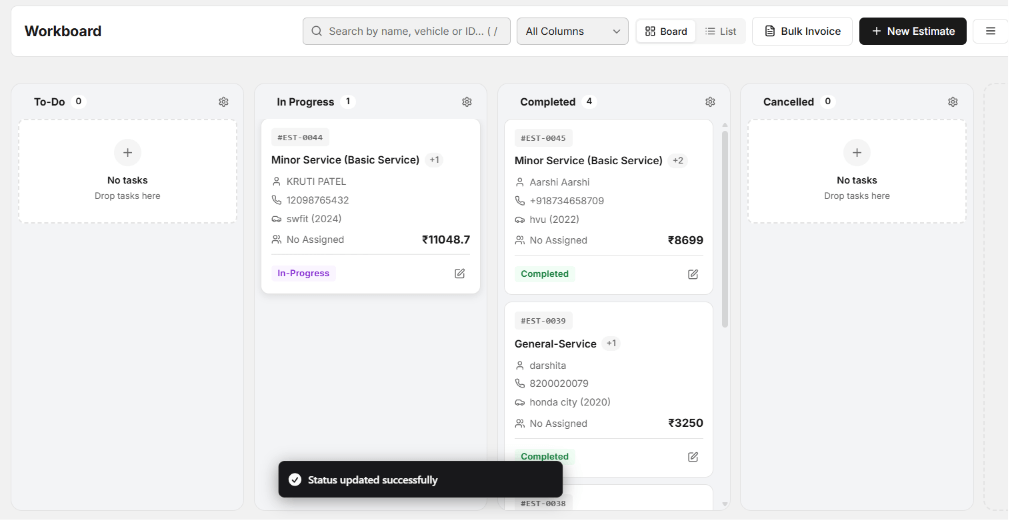
Check whether the package includes unlimited job cards and estimates or places restrictions on their use. Also review whether digital invoicing, payment collection, and PDF exports are available.
The supplied AutoDots comparison shows unlimited job cards and estimates, appointments management, customer database, and invoicing and payments under Auto Basic. These core tools can be useful for small garages that want to move away from paper-based administration.
4. Inventory and Parts Management
Spare parts can represent a significant part of a workshop’s daily expenses. Without organised stock records, employees may struggle to identify available parts, notice low stock, or keep supplier information updated.
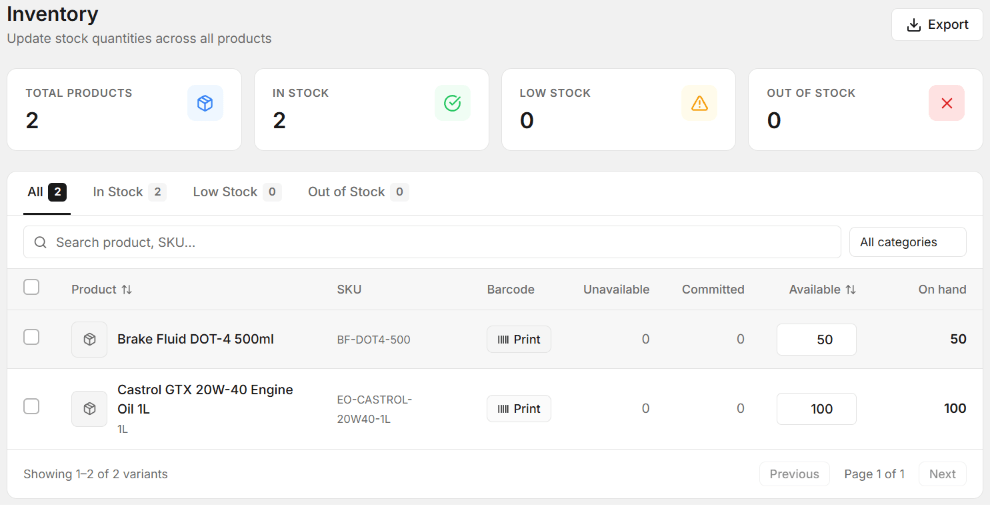
Basic inventory tools can help a garage maintain records of commonly used parts. Advanced inventory features may provide low-stock alerts, vendor information, and additional stock controls.
The supplied AutoDots pricing image lists basic inventory with Auto Basic and advanced inventory with low-stock alerts under Auto Grow. When comparing packages, consider how many parts your workshop stores and how often staff need to reorder items.
5. Fleet Management and Vehicle Service Tracking
Some garages work with individual vehicle owners, while others manage vehicles for businesses and fleet customers. If your workshop handles multiple vehicles for the same customer, fleet management can help organise records and service activity.
Service tracking is also useful for keeping information about completed repairs and maintenance. A vehicle history can help staff review previous work and understand what services may be needed during a future visit.
In the supplied AutoDots comparison, the Fleet Management Module and Service Tracking are listed under Auto Grow. These features may be useful for workshops that are expanding their customer base or handling more complex vehicle management requirements.
6. Reporting, Notifications, and Customer Communication
Reports help workshop owners understand business activity. Depending on the package, reports may provide information about jobs, payments, sales, and other operational details. More advanced reporting can help managers review performance and make better business decisions.

Customer notifications are another useful feature. Automated updates can help customers stay informed about appointments, service progress, or other workshop activity. Check which notification channels are supported and whether message limits or additional charges apply.
The supplied AutoDots image lists automated customer notifications and a full reporting suite under Auto Advance. It also lists priority email and chat support under Auto Grow, along with 24/7 dedicated support under Auto Advance and Auto Plus.
7. Multi-Location Management and Business Support
A single-location garage may not need advanced organisation tools. However, a business with multiple branches may need a shared dashboard to monitor operations across different locations.
Multi-location management can help owners maintain a clearer view of workshop activity. Other useful features may include location switching, centralised reporting, security controls, and onboarding assistance.
The supplied AutoDots image shows multiple garage locations, unlimited staff accounts, an organisation dashboard, and a garage switcher under Auto Plus. It also lists advanced security with two-factor authentication, onboarding and training, and 24/7 dedicated support.
When comparing Basic Garage Software Pricing, think about your expansion plans. You may not need multi-location tools today, but choosing a provider with a clear upgrade path can make future growth easier.
AutoDots Garage Software Plans and Prices
The following comparison is based on the pricing and feature details visible in the plan image you supplied. The introductory offers and monthly prices should be checked against the live pricing page before making a purchase.
| Plan | Displayed Price | Staff Accounts | Best Suited For |
|---|---|---|---|
| Auto Basic | $1/month for first 3 months, then $56/month | 2 | Solo mechanics and small garages |
| Auto Grow | $1/month for first 3 months, then $119/month | 5 | Growing garages |
| Auto Advance | $199/month | 15 | Established garages |
| Auto Plus | $349/month | Unlimited | Multi-location businesses |
Auto Basic
Auto Basic is presented as an option for solo mechanics and small garages. Its listed features include one garage location, two staff accounts, unlimited job cards and estimates, appointment management, customer database, basic inventory, Vehicle Passport, marketplace listing, invoicing and payments, and email support.
It can be a suitable starting point for a small workshop that needs essential digital management tools without immediately requiring advanced business controls.
Auto Grow
Auto Grow includes the Auto Basic features and adds tools for growing workshops. The supplied image lists five staff accounts, fleet management, custom fields, advanced inventory with low-stock alerts, service tracking, marketing campaigns, payment gateways such as Razorpay and Stripe, and priority email and chat support.
This package may suit a garage that has more employees and needs additional control over stock, customer activity, and payments.
Auto Advance
Auto Advance is displayed for established garages. It includes the Auto Grow features along with 15 staff accounts, automated customer notifications, sublet tracking, a passport photo and video gallery, a full reporting suite, API access, and 24/7 dedicated support.
These additional tools may help workshops manage more complex operations and gain better visibility into their business activity.
Auto Plus
Auto Plus is designed for businesses that need multi-location management and unlimited scale. The supplied image lists multiple garage locations, unlimited staff accounts, an organisation dashboard, garage switcher, advanced security with two-factor authentication, onboarding and training, and 24/7 dedicated support.
It may be worth considering for garage groups that want to manage several branches through a more centralised system.
How to Choose the Right Garage Software Package
The best package is not necessarily the most expensive one. It should match your workshop’s actual requirements and provide useful features at a reasonable cost.
- Start with your team size: Count how many employees need individual access to the software.
- List essential features: Identify whether you need job cards, estimates, invoicing, appointments, inventory, or fleet management.
- Review your stock requirements: Decide whether basic inventory is enough or whether low-stock alerts and supplier tools are important.
- Consider customer communication: Check whether reminders and automated notifications can reduce manual follow-up.
- Plan for growth: Think about future staff, additional services, and possible new workshop locations.
- Check support options: Make sure the available support channel and response arrangements suit your business.
Comparing Basic Garage Software Pricing becomes easier when you create a list of must-have features and compare each plan against that list. This approach helps you focus on value rather than simply choosing the lowest displayed price.
How AutoDots Can Help Your Workshop
AutoDots offers four plan levels to support different types of automotive businesses: Auto Basic, Auto Grow, Auto Advance, and Auto Plus. The supplied plan comparison shows a progression from essential garage operations to advanced inventory, reporting, staff capacity, and multi-location management.
For a small garage, Auto Basic provides the listed core tools for job cards, estimates, appointments, customer records, inventory, and invoicing. A growing workshop can review Auto Grow for additional fleet and inventory features. Established garages can consider Auto Advance, while businesses managing several branches can review Auto Plus.
Before selecting a package, compare the current inclusions and confirm the applicable subscription price. Visit the AutoDots pricing page for the latest plan information. You can also explore the AutoDots partner program to learn more about the platform.
Common Pricing Mistakes to Avoid
- Looking only at the introductory price: Always check the regular subscription amount after a promotional offer ends.
- Ignoring staff limits: Confirm how many employees can use the system and whether additional accounts cost extra.
- Paying for unused features: Select tools that support your real workshop activities rather than choosing a higher tier without a clear reason.
- Forgetting additional charges: Ask about taxes, payment processing, integrations, setup, and optional services.
- Not checking upgrade terms: Understand how plan changes work and whether your existing business records remain available.
Frequently Asked Questions
1. How much does basic garage software cost?
The cost depends on the provider, features, staff limits, and subscription terms. Some providers offer introductory discounts, while others charge a regular monthly subscription. Always check the live pricing page for the latest amount.
2. What features should a basic garage software plan include?
A useful entry-level package should ideally include customer records, vehicle information, job cards, estimates, invoices, and appointment management. Basic inventory and payment records can also be helpful for everyday workshop operations.
3. Is a promotional subscription price permanent?
Not necessarily. A promotional price may apply only for a fixed period. Check the number of promotional months and the regular monthly amount that will apply afterwards.
4. Which AutoDots plan is suitable for a small garage?
According to the supplied plan image, Auto Basic is positioned for solo mechanics and small garages. It includes two staff accounts and essential workshop tools. Auto Grow may be worth considering when a garage needs more staff accounts and additional inventory or fleet features.
5. Can I upgrade my garage software plan later?
Upgrade options depend on the provider’s subscription terms. Before subscribing, ask whether you can move to a higher plan, how billing changes, and whether your existing customer, vehicle, and job records will remain available.
6. How do I compare Basic Garage Software Pricing between providers?
Compare the regular monthly price, promotional period, staff accounts, job management tools, inventory features, reporting, support, and additional charges. Make sure you compare similar features rather than looking at subscription prices alone.
Conclusion
Choosing garage software requires more than finding an affordable monthly subscription. Workshop owners should compare the features, staff limits, inventory tools, customer communication options, reporting, and support included in each package.
Understanding Basic Garage Software Pricing helps you plan your budget and select a package that fits your workshop. A small garage may only need essential job management and invoicing tools, while a growing business may benefit from advanced inventory, fleet management, and reporting.
Review the regular subscription price, understand promotional terms, and test the features before making your final decision. The right software should make daily workshop operations easier while supporting your business as it grows.
Useful Links
- Compare AutoDots garage software plans and pricing
- Explore the AutoDots partner program
- Read more automotive workshop management guides
More info at Affordable Garage Management Software