Running an auto repair shop involves much more than repairing vehicles. Your team has to manage customer calls, appointments, vehicle inspections, job cards, repair approvals, spare parts, technician work, billing, payments, and vehicle delivery. When these tasks are handled manually, employees can spend too much time on paperwork and repeated data entry.
If you want to Automate Auto Repair Shop operations, the first step is to identify the tasks that take the most time. Digital tools can help organize these tasks, reduce repeated work, improve communication, and make the workshop easier to manage.
Automation does not mean removing people from the repair process. Technicians still need their skills, service advisors still need to communicate with customers, and managers still need to make important decisions. The purpose of automation is to help the team spend less time on repetitive administration and more time on useful workshop work.
Table of Contents
What Does It Mean to Automate Auto Repair Shop?
Automating an auto repair shop means using digital tools and organized workflows to handle repetitive tasks more efficiently. These tasks can include customer record management, appointment scheduling, job card creation, repair approvals, customer updates, parts tracking, invoicing, and payment management.
A connected system can keep important information in one place. Instead of checking several notebooks, spreadsheets, messages, and files, employees can access the information they need from a structured digital system.
The result is a smoother workflow from the moment a customer books a service to the time the repaired vehicle is delivered.

Why Should an Auto Repair Shop Use Automation?
Manual work can create small delays throughout the day. For example, an employee may spend several minutes searching for a customer’s previous service record. Another employee may need to call a technician to ask about repair progress. Later, the service advisor may enter the same information into another record for billing.
These small tasks may not look serious individually, but they can consume hours when repeated across many vehicles.
When you Automate Auto Repair Shop processes, repetitive tasks can become easier to manage. Employees can find information faster, customers can receive better updates, and managers can get a clearer view of workshop activity.
7 Smart Ways to Save Time and Grow
1. Keep Customer and Vehicle Records Digital
Customer information is one of the most important parts of an auto repair business. A workshop may need to store customer names, phone numbers, vehicle registration details, vehicle models, service history, previous repairs, and other useful information.
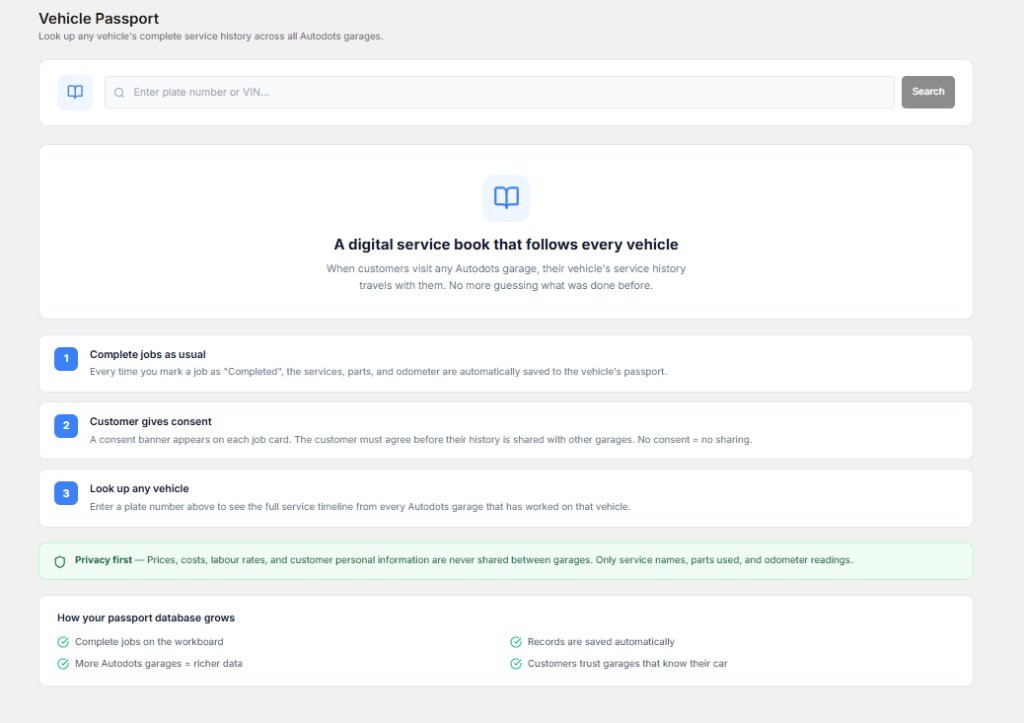
When this information is stored in paper files, employees may spend too much time searching for old records. There is also a greater chance of losing or damaging important information.
Digital customer records make information easier to find. When a customer returns, the service advisor can quickly review the vehicle history and understand previous work.
This creates a stronger foundation to Automate Auto Repair Shop operations because customer information can also support appointments, job cards, service reminders, and billing.
2. Use Digital Appointment Scheduling
Appointment scheduling is another area where automation can save time. A busy repair shop may receive calls throughout the day, and managing all bookings manually can become confusing.
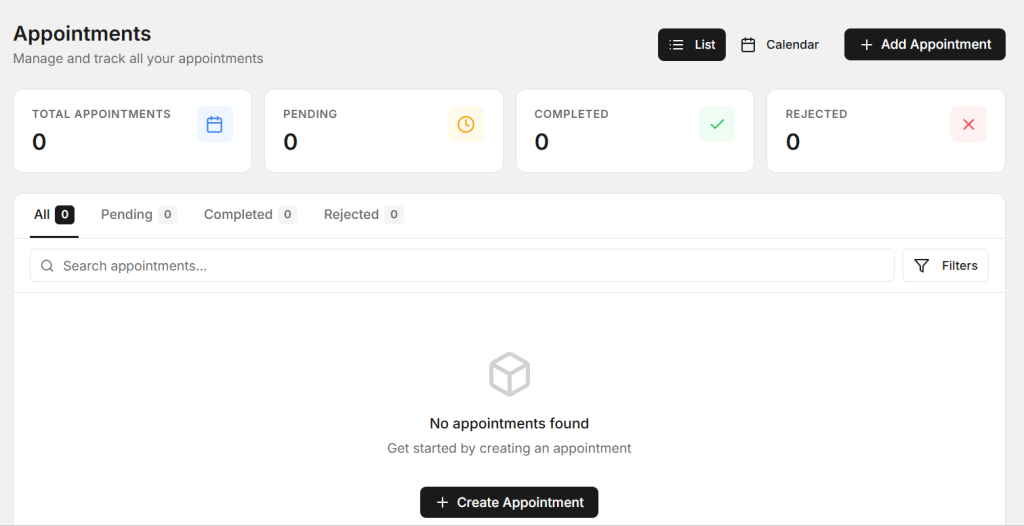
Digital appointment management can help the team see upcoming bookings, customer requirements, and expected vehicle arrivals. This makes it easier to plan technicians and workshop space.
Better scheduling can also reduce overcrowding during busy periods. Customers can receive clearer appointment information, while the workshop can prepare before the vehicle arrives.
3. Create Digital Job Cards
Job cards contain important information about a vehicle’s repair requirements. They can include customer complaints, inspection findings, recommended work, technician notes, parts, labour, and job status.

Paper job cards can be misplaced, damaged, or difficult to update. Employees may also need to walk around the workshop to find the latest information.
Digital job cards make repair information easier to access. Service advisors can check progress, technicians can see the required work, and managers can understand which vehicles are currently being worked on.
Digital job cards are an important part of the process when you Automate Auto Repair Shop activities because they connect customer requirements with workshop operations.
4. Speed Up Repair Approvals
During a vehicle inspection, technicians may find additional repairs that were not included in the original request. The customer normally needs to approve these repairs before the work can begin.

If the approval process depends only on phone calls, the vehicle may remain waiting when the customer is unavailable. This can slow down the repair and reduce workshop productivity.
A digital repair approval process can help service advisors share repair recommendations more clearly and keep track of customer decisions.
When the customer approves the required work, the team can move forward without unnecessary delays. Pending approvals can also be easier to identify and follow up.
5. Improve Customer Communication
Customers want to know what is happening with their vehicles. They may ask whether the inspection is complete, what repairs are required, how much the work may cost, or when the vehicle will be ready.

Handling every update manually can take a lot of service advisor time. Digital communication can make common updates easier to organize.
Appointment confirmations, service reminders, repair updates, and delivery messages can follow a more consistent process.
Better communication can also increase customer confidence. When customers receive timely and clear information, they are more likely to trust the repair shop.
6. Track Parts and Repair Progress
Spare parts can affect the entire repair schedule. If a required part is unavailable, the vehicle may remain inside the workshop while the customer waits.

A digital system can help the team track which parts are required and which vehicles are waiting for them. Service advisors can also get better information when customers ask about delays.
Repair progress can be updated as work moves through different stages. Managers can identify vehicles waiting for inspection, approval, parts, repairs, testing, or delivery.
This makes it easier to Automate Auto Repair Shop workflows and reduce the need for employees to repeatedly ask other team members for updates.
7. Make Billing and Vehicle Delivery Easier
The final stages of a repair are just as important as the inspection and repair process. Billing needs to be accurate, and the vehicle should be ready before the customer arrives for collection.
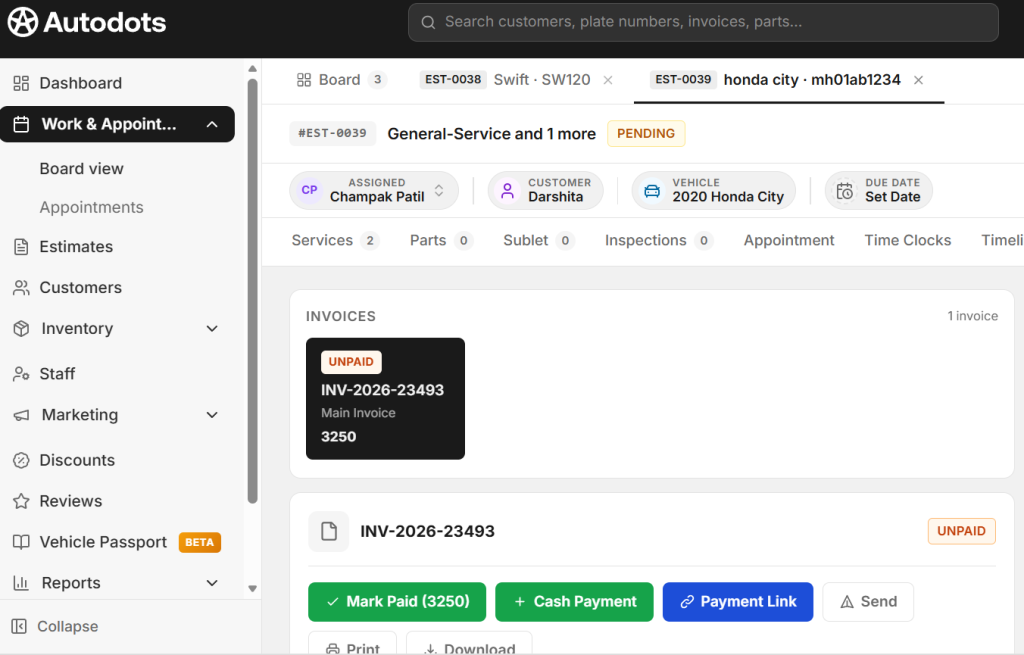
Manual billing can involve repeated calculations and data entry. Employees may need to enter labour charges, parts costs, taxes, discounts, and other information.
Digital billing can organize these details and reduce repeated work. Before delivery, the team can also check whether approved repairs have been completed and whether the final invoice is ready.
A smoother final process can reduce waiting time and create a better customer experience.
How Automation Helps Your Team
The biggest benefit of automation is not only speed. It also gives employees better access to information.
Service advisors can spend less time searching for records. Technicians can get clearer repair information. Managers can see workshop activity more easily. Customers can receive faster updates.
When these improvements work together, the workshop can handle daily operations with less confusion.
- Less paperwork.
- Less repeated data entry.
- Faster access to customer information.
- Better job card management.
- Improved appointment planning.
- Faster repair approvals.
- Better customer communication.
- More organized parts tracking.
- Smoother billing and delivery.
How Automation Can Help Your Shop Grow
Growth is not only about getting more customers. A repair shop also needs the ability to handle more vehicles without creating unnecessary delays.
When processes are organized, the existing team can often manage daily work more efficiently. Employees can spend less time on administration and more time serving customers.
A digital workflow also makes it easier to identify bottlenecks. If many vehicles are waiting for customer approval, parts, or final inspection, managers can see where the problem is happening.
This information can help the shop make better decisions about staffing, scheduling, and workshop capacity.
How AutoDots Can Help Auto Repair Shops
AutoDots provides digital solutions designed for automotive businesses. The platform can help workshops organize customer information, vehicle records, service activities, and other important repair processes.
Instead of managing different tasks through separate paper files and disconnected systems, an organized digital workflow can bring important information together.
For businesses that want to Automate Auto Repair Shop operations, using a solution built for automotive workflows can make the transition easier for employees and managers.
Signs Your Repair Shop Needs Automation
Your shop may benefit from automation if you regularly experience problems such as:
- Employees spend too much time searching for records.
- Paper job cards are frequently lost or damaged.
- Customers call repeatedly for repair updates.
- Vehicles wait too long for customer approval.
- Appointments are difficult to organize.
- Parts-related delays are hard to track.
- Billing takes too much time.
- Managers do not have a clear view of repair progress.
These problems are common in growing repair shops. They do not always mean the team is working poorly. In many cases, the problem is that the existing process depends too heavily on manual work.
How to Start the Automation Process
The best approach is to start with the areas that create the biggest delays. Do not try to change every process on the same day.
Start with customer records and appointment management. Then introduce digital job cards, repair approvals, customer communication, parts tracking, and billing.
Once the team becomes comfortable with one process, move to the next. This makes the transition easier and gives managers a chance to measure the improvement.
Train Your Employees
A digital system is only useful when employees know how to use it. Before introducing new tools, explain how they will help the team.
Technicians should understand how to update repair information. Service advisors should know how to manage customer records and approvals. Managers should know how to monitor workshop progress.
Simple training can help employees feel more comfortable with the change and encourage everyone to follow the same process.
Common Mistakes to Avoid
Automating a Poor Process
Technology cannot automatically fix a confusing workflow. First simplify the process, then move it into a digital system.
Changing Too Much at Once
Introducing many new processes at the same time can create confusion. Start with the most important area and expand gradually.
Not Updating Information
Digital records need to remain accurate. Employees should update customer details, repair status, parts information, and other important records regularly.
Ignoring Team Feedback
Technicians and service advisors work with these processes every day. Their feedback can help identify problems and make the system easier to use.
Frequently Asked Questions
What does it mean to automate an auto repair shop?
It means using digital tools and organized workflows to reduce repetitive manual work in areas such as customer records, appointments, job cards, repair approvals, communication, parts, billing, and vehicle delivery.
How can Automate Auto Repair Shop improve efficiency?
Automate Auto Repair Shop processes by moving repetitive tasks into digital workflows. This can reduce paperwork, improve information access, speed up approvals, and make daily workshop operations easier to manage.
Can small repair shops use automation?
Yes. Small repair shops can start with simple digital tools and expand their use as the business grows. Automation can be useful even with a small team.
Can automation reduce customer waiting time?
Yes. Better appointment scheduling, faster approvals, organized repair tracking, and smoother billing can help reduce unnecessary delays.
Are digital job cards useful?
Yes. Digital job cards keep customer complaints, repair details, technician notes, parts information, and job status organized and easier to access.
How does automation help customer service?
Automation can help service teams provide faster updates, manage appointments more efficiently, track repairs, and respond to customer questions with better information.
How can AutoDots help my repair shop?
AutoDots provides digital solutions that help automotive businesses organize customer records, vehicle information, workshop activities, and service processes in a more structured way.
Conclusion
An auto repair shop can lose valuable time when employees depend heavily on paperwork, repeated data entry, manual approvals, and disconnected information. These tasks may seem small, but they can create significant delays when repeated across many vehicles.
Automate Auto Repair Shop operations by starting with simple improvements such as digital customer records, appointment scheduling, job cards, repair approvals, customer communication, parts tracking, and billing.
AutoDots can help automotive businesses move toward a more organized digital workflow. By reducing repetitive work and making important information easier to access, your repair shop can improve productivity and provide a smoother customer experience.
If you want to explore partnership opportunities with AutoDots, visit the AutoDots partner program.
For more automotive business guides, workshop management tips, and useful industry information, visit the AutoDots blog.