
Choosing garage management software is an important decision for any vehicle repair business. A small workshop may only need digital job cards, estimates, invoices, and customer records. However, as the business grows, it may need better stock control, staff management, customer reminders, detailed reports, and tools for managing multiple locations. Choosing the right plan helps a garage control costs while getting the features it needs.
Understanding Basic vs Advanced Garage Software Plans can help workshop owners avoid paying for tools they do not use or choosing a package that becomes too limited after a few months. The difference is not always about the number of features. It can also involve staff limits, reporting options, customer communication, inventory controls, support, and the ability to manage a growing team.
This guide explains seven important differences, what small and growing garages should consider, and how to compare plans before making a decision.
Table of Contents
What Are Basic and Advanced Garage Software Plans?
A basic garage software plan usually focuses on everyday workshop activities. It may include customer and vehicle records, job cards, estimates, invoices, appointment management, and basic business information. These tools help a garage move away from paper records and manage daily work in a more organised way.
An advanced plan is generally designed for workshops with more employees, higher job volumes, or more complex operations. It may provide additional inventory controls, automated customer communication, advanced reporting, technician management, vehicle history tools, and multi-location support.
Not every software provider uses the same plan names or feature structure. One provider may include inventory in its entry-level package, while another may reserve advanced stock controls for a higher tier. Always compare the actual feature list instead of judging a package by its name alone.
Basic vs Advanced Garage Software Plans: 7 Key Differences
1. Daily Job Management and Workflow Control
Basic plans usually provide the essential tools needed to record repair work. Staff can create job cards, add vehicle details, prepare estimates, and generate invoices. This is often enough for a small garage where the owner manages most jobs and employees communicate directly throughout the day.
Advanced plans may offer a more organised view of the complete workshop workflow. A visual job board, technician assignment, work status tracking, and additional scheduling controls can help managers understand which vehicles are waiting, being repaired, or ready for collection.
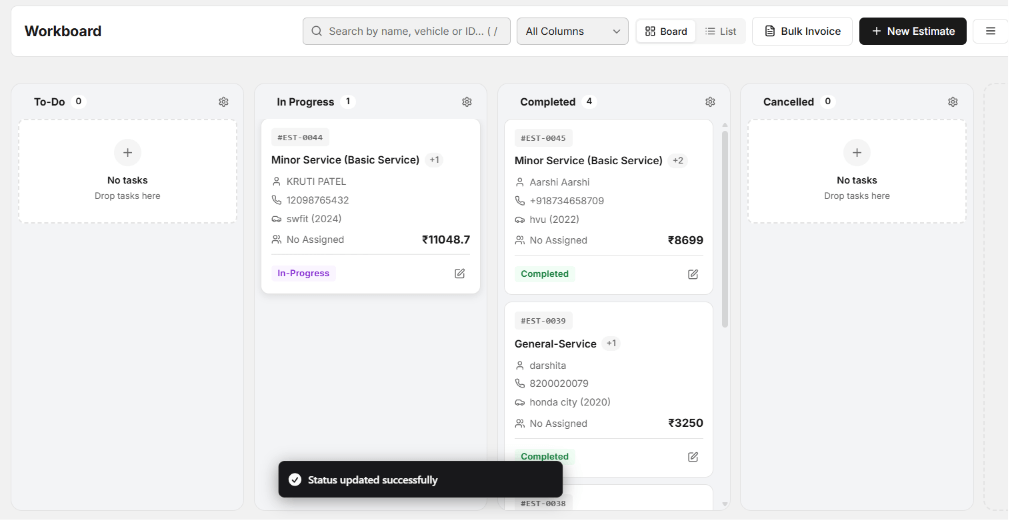
For example, a garage with one or two technicians may manage jobs through a simple list. A workshop with several technicians and service advisers may benefit from assigning jobs and monitoring progress through a shared board.
2. Staff Accounts and Team Management
The number of staff members who can use the software is an important difference between plans. An entry-level package may have a smaller user limit, while a higher package may support a larger team or unlimited staff accounts.
Basic software can work well when only the owner and a small number of employees need access. However, a growing workshop may need separate access for technicians, service advisers, managers, and administrative staff.
Advanced team tools may also include staff permissions, technician assignment, time tracking, or employee performance information. These features can help managers organise responsibilities and understand how work is progressing.
Before upgrading, check whether the provider charges for every additional user. A plan with a low monthly price may become more expensive when several employees need individual accounts.
3. Inventory and Parts Management
Parts management is another area where software packages can differ. A basic plan may provide simple inventory records so staff can keep track of common parts and consumables. This can be useful for a smaller garage with a limited range of stock.
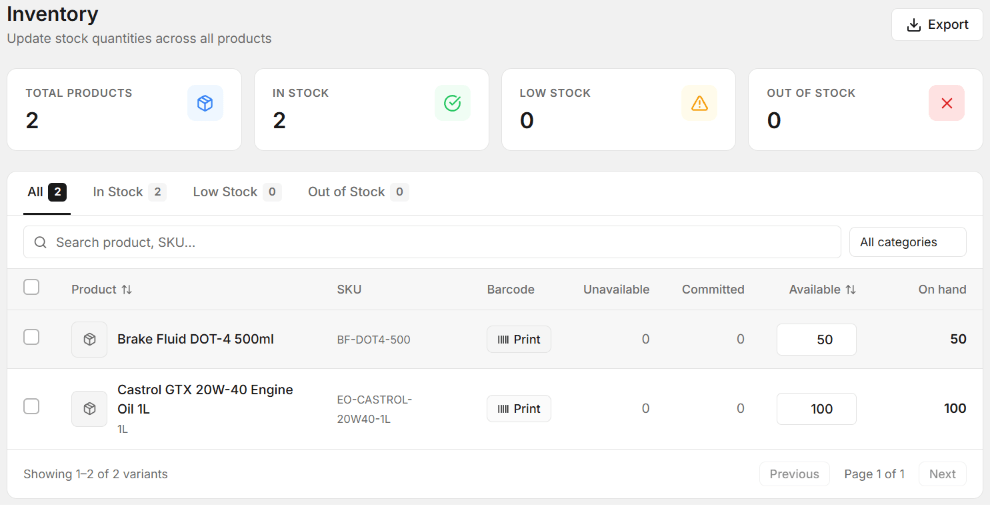
Advanced inventory tools may include low-stock alerts, vendor records, purchase order history, parts reservations, and more detailed stock reporting. These features can help a busy workshop understand which parts are available, which items need ordering, and where stock is being used.
For example, if technicians regularly use filters, brake pads, oils, and other service parts, stock alerts can help staff identify items that need attention before they run out. Vendor management can also make supplier information easier to organise.
When comparing Basic vs Advanced Garage Software Plans, consider how many parts your garage handles every week. A workshop that rarely stores parts may not need advanced inventory controls immediately. A busy repair centre may find them valuable.
4. Customer Communication and Service Reminders
Customer communication helps a garage build trust and encourage repeat visits. Basic plans may provide a customer database and tools for recording contact information, while more developed packages can offer automated reminders and additional communication options.
Service reminders can help customers remember upcoming maintenance. Automated notifications may also keep customers informed about appointments, repair progress, or other workshop updates, depending on the provider’s features and available integrations.
Some systems support messaging services such as WhatsApp, email, or SMS. Check which channels are included, whether message usage has limits, and whether extra charges apply. Good communication tools should save staff time without making customers feel overwhelmed by messages.
Customer communication is another reason to compare Basic vs Advanced Garage Software Plans carefully, especially if your garage depends on repeat customers.
5. Reports and Business Analytics
Basic reports can help garage owners review everyday business activity. They may show invoice totals, job counts, or other standard information. For a small workshop, this can provide a useful overview without requiring complex analysis.
Advanced reporting may provide more detailed information about revenue, expenses, staff activity, inventory, and business performance. Some systems also provide profit and loss reports or comparisons across different periods.
These insights can help owners identify busy periods, review outstanding payments, understand parts usage, and make better decisions about staffing or stock purchases. However, reports are only useful when job details, costs, and payments are entered accurately.
Before selecting Basic vs Advanced Garage Software Plans, check whether the reports provide the information you need to make business decisions.
6. Vehicle History and Additional Workshop Tools
A basic package may store customer and vehicle information alongside job records. This gives staff a convenient way to find previous visits and review earlier repair work.
Advanced tools may add a more detailed vehicle service history, photo or video galleries, custom fields, sublet tracking, or fleet management. These options can be useful for workshops that handle repeat maintenance, commercial vehicles, or more complicated repair jobs.
For example, a detailed service history can help staff review previous work before recommending another repair. A fleet module may be useful for businesses that manage vehicles belonging to commercial customers. The value of these tools depends on the type of work your garage performs.
7. Support, Scalability, and Multi-Location Management
Support arrangements can also change between software tiers. Some plans provide email support, while higher packages may include chat, telephone support, or a dedicated account manager. Check the provider’s response hours and support terms before subscribing.
Scalability is especially important if you expect to add more technicians, increase job volume, or open another workshop. A suitable advanced plan may offer higher staff limits, organisation-level dashboards, and multi-location reporting.
A single-location garage may not need these tools today. However, a business planning to expand should understand the upgrade process, data transfer arrangements, and additional costs before choosing its first package.
Basic vs Advanced Garage Software Plans: Quick Comparison
The following table shows common differences between entry-level and advanced software packages. It is a general guide, not a fixed feature list for every provider.
| Feature | Basic Plan | Advanced Plan |
|---|---|---|
| Job cards and estimates | Core job records | More workflow controls may be available |
| Invoicing | Standard invoice tools | May include additional payment and reporting options |
| Staff accounts | Often a smaller user limit | Higher or unlimited user capacity may be available |
| Inventory | Basic stock records | May include alerts, vendors, and purchase history |
| Customer reminders | May require manual follow-up | Automated reminders may be included |
| Reports | Standard business summaries | More detailed analytics may be available |
| Business expansion | Suitable for simpler operations | May support larger teams and multiple locations |
How AutoDots Plans Compare
AutoDots provides garage management plans named Basic, Grow, Advance, and Plus. Its published plan comparison lists staff limits of 2, 5, 15, and unlimited respectively. The pricing page also lists differences in selected tools and support options across the plans.
For example, the published comparison lists fleet management, automated service reminders, low-stock alerts, vendor management, and purchase order history as unavailable in Basic but included in higher plans. Chat and call support are also listed for higher tiers, while a dedicated account manager and organisation dashboard are shown for Plus.
AutoDots also lists core workshop tools such as digital job cards, estimates, invoicing, customer records, WhatsApp integration, and marketplace listing among its plan inclusions. This can be useful for garages that want workshop management and customer discovery in one platform.
If you are comparing Basic vs Advanced Garage Software Plans, review the current AutoDots feature table to see which package matches your team size and daily requirements. Visit the AutoDots pricing page for the latest plan details, availability, and terms. You can also explore the AutoDots partner program to learn more about working with the platform.
Which Garage Software Plan Should You Choose?
The right plan depends on how your workshop operates today and what you expect it to need in the future.
A Basic Plan May Suit Your Garage If:
- You operate a small independent workshop.
- Only a few employees need software access.
- You mainly need job cards, estimates, and invoices.
- Your stock range is small and easy to manage.
- You are moving from paper records to a digital system for the first time.
An Advanced Plan May Suit Your Garage If:
- You have several technicians or service advisers.
- You need better control over parts and suppliers.
- You want automated customer reminders.
- You need detailed business reports.
- You manage fleet customers or more complex repair work.
- You are planning to expand your team or operate multiple locations.
When reviewing Basic vs Advanced Garage Software Plans, consider whether your current staff can complete daily tasks without unnecessary manual work.
5 Tips Before Upgrading Your Garage Software
- Review your current workload: Check how many jobs your garage handles and how much administration your team completes each day.
- Identify missing features: List the tasks that take too long or are difficult to manage with your current package.
- Calculate the full cost: Include user charges, setup fees, integrations, support, and any optional add-ons.
- Ask for a demonstration: Test real tasks such as assigning a job, checking stock, sending an invoice, and reviewing reports.
- Check upgrade conditions: Ask whether your existing customer, vehicle, and job records will remain available when you change plans.
For a growing workshop, Basic vs Advanced Garage Software Plans should be evaluated against both current requirements and expected business growth.
Common Mistakes When Comparing Software Plans
One common mistake is choosing the cheapest package without checking its user limits. A garage may save money initially but later discover that adding employees increases the monthly cost. Another mistake is paying for advanced tools that the team does not use.
It is also important not to assume that every advanced plan includes the same features. Some providers include inventory management in their entry-level package, while others charge extra for it. Always check the provider’s current feature comparison and confirm important details in writing.
Frequently Asked Questions
What is the main difference between Basic vs Advanced Garage Software Plans?
The main difference is usually the level of control and the number of tools available. Basic plans focus on everyday tasks such as job cards and invoicing, while advanced plans may add inventory controls, automated reminders, detailed reports, staff management, and business expansion tools.
Can a small garage use an advanced software plan?
Yes. A small garage may benefit from advanced features if it handles complex repairs, manages a large parts inventory, or needs detailed reports. The important point is to choose features that solve real business problems.
Is it easy to upgrade from a basic plan?
Many providers offer plan upgrades, but the process and conditions differ. Ask whether your existing records, settings, and user accounts will carry over and whether the new plan starts immediately or at the next billing date.
Should I choose a plan based on staff numbers?
Staff limits are an important factor, but they should not be the only one. Also consider inventory, customer communication, reporting, support, and future growth. Check whether extra users create additional charges.
How often should I review my garage software plan?
Review your package whenever your workshop changes significantly, such as hiring more technicians, adding services, increasing stock, or opening another location. A review every few months can also help you identify unused features or new requirements.
Conclusion
Choosing the right garage management package is about finding a balance between cost, useful features, and future business needs. A basic plan can provide a strong starting point for a small workshop, while an advanced package may offer better control for a larger or growing operation.
Compare staff limits, inventory tools, customer communication, reporting, support, and upgrade conditions before making your decision. Understanding Basic vs Advanced Garage Software Plans will help you select a solution that supports your current workflow without creating unnecessary costs. Choose a system that your team can use confidently and that can grow alongside your garage.