When you register your garage on Autodots, one of the first things you need to do is verify your business. Uploading your garage verification documents is simple — and it unlocks important features like the verified badge and customer payouts. In this guide, you will learn exactly what documents are needed, how to upload them, and how the verification process works on Autodots.
Whether you are new to Autodots or just setting up your account, this step-by-step guide will help you complete your garage verification documents quickly and without any confusion.
Table of Contents
Why Garage Verification Documents Are Important
Verification is not just a formality. It is what separates professional, trusted garages from unverified ones. When you submit your garage verification documents on Autodots, you get access to:
- A verified badge visible to all customers on your profile
- Ability to enable payouts and receive customer payments
- Higher trust from customers who book your services
- Full access to all Autodots features
Without verification, your garage cannot receive payments through the platform. So completing this step is essential for every garage owner on Autodots.
What Documents Do You Need?
Autodots requires two types of garage verification documents to verify your business:
1. Business License
This can be any one of the following:
- Trade license
- GST certificate
- Equivalent business registration document
Accepted file formats: PDF, JPG, PNG
2. Garage Photos
You need to upload at least 3 photos of your garage. These photos should cover:
- Exterior of the garage
- Work bays
- Reception area
These photos help Autodots confirm that your garage is a real, operating business.
How to Upload Garage Verification Documents on Autodots
Uploading your garage verification documents on Autodots is straightforward. Follow these simple steps:
Step 1 — Go to Settings → Documents
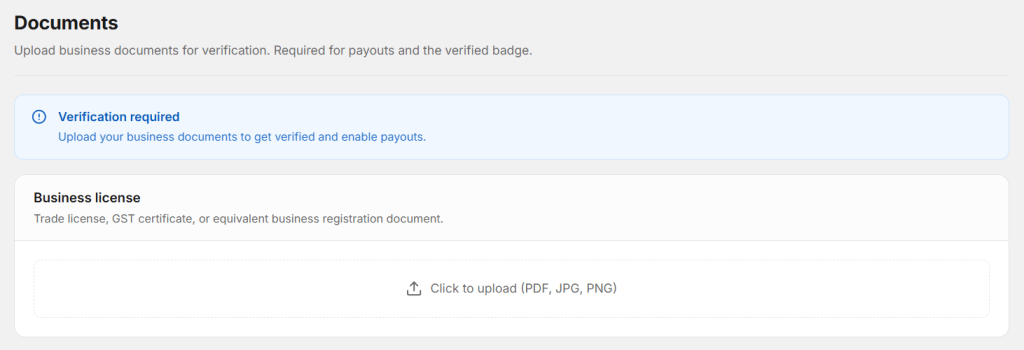
Log in to your Autodots dashboard and navigate to Settings → Documents. You will see a verification required notice at the top of the page.
Step 2 — Upload Your Business License
Click on the upload area under Business License. Select your trade license, GST certificate, or business registration document. Accepted formats are PDF, JPG, and PNG. Make sure the document is clear and readable.
Step 3 — Upload Garage Photos
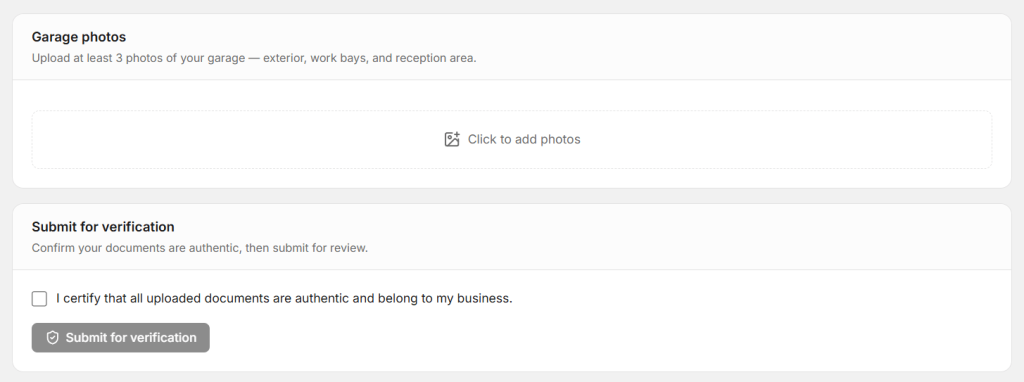
Scroll down to the Garage Photos section. Click to add photos and upload at least 3 photos — one of the exterior, one of the work bays, and one of the reception area. Clear, well-lit photos are recommended for faster approval.
Step 4 — Certify and Submit
Once all documents and photos are uploaded, scroll to the Submit for Verification section. Check the box that says: “I certify that all uploaded documents are authentic and belong to my business.” Then click the Submit for Verification button.
Start using Autodots for free and grow your garage faster
–> autodots.io/partners
How Verification Works on Autodots
After you submit your garage verification documents, here is what happens next:
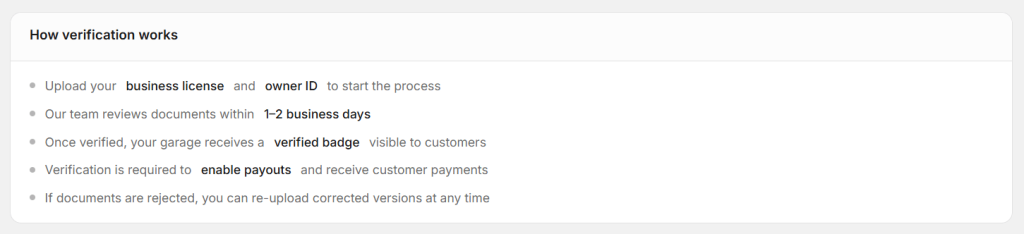
- Upload your business license to start the process
- The Autodots team reviews your documents within 1–2 business days
- Once verified, your garage receives a verified badge visible to all customers
- Verification is required to enable payouts and receive customer payments
- If documents are rejected, you can re-upload corrected versions at any time
The process is fast, transparent, and fully managed by the Autodots team. You do not need to follow up — you will be notified once your verification is complete.
What Happens After Verification?
Once your garage verification documents are approved, your garage profile on Autodots is upgraded immediately. Here is what changes:
- A verified badge appears on your garage profile — customers can see you are a trusted, legitimate business
- Payouts are enabled — you can now receive payments from customers through the Autodots platform
- Your garage appears more credible in listings — verified garages build more customer confidence
Verification is a one-time process. Once done, your garage remains verified as long as your documents are valid.
What If Your Documents Are Rejected?
Sometimes documents may be rejected — this could be due to unclear images, expired documents, or incorrect file types. Do not worry. Autodots allows you to re-upload corrected versions at any time.
Simply go back to Settings → Documents, remove the rejected files, upload the correct ones, and submit again. The review team will process your new submission within 1–2 business days.
Start using Autodots for free and grow your garage faster
–> autodots.io/partners
Tips for Faster Verification
To make sure your garage verification documents are approved quickly, follow these tips:
- Use a clear, high-resolution scan or photo of your business license
- Take garage photos in good lighting — dark or blurry photos may cause delays
- Make sure your business license is valid and not expired
- Use accepted formats only — PDF, JPG, or PNG
- Cover all three areas in photos — exterior, work bays, and reception
Final Thoughts
Uploading your garage verification documents on Autodots is one of the most important steps after registering your garage. It takes just a few minutes, and once approved, it unlocks your verified badge and payment features — giving your garage a professional, trustworthy image on the platform.
Do not delay this step. Verified garages get more customer trust, more bookings, and full access to everything Autodots has to offer.
Ready to take your garage digital? Autodots helps garage owners manage jobs, invoices, inventory and customers — all in one platform. Register your garage free at autodots.io/partners
Looking to grow your garage business?
Want to learn more?
- How to Do Garage Marketing: Complete Guide for Garage Owners (Autodots)
- How to Accept Online Bookings with Autodots: Complete Guide for Garage Owners (2026)
- Garage Customer Notifications: Complete Guide for Workshop Owners
- Garage Tax Management Software: How AutoDots Handles Tax Rates
- Garage Customer Notifications: Complete Guide for Workshop Owners