Every garage owner knows this problem — customers keep calling to ask: “Is my car ready?” or “Has the work started yet?” These calls waste your time and frustrate your staff. The solution is simple: garage customer notifications. When customers get automatic updates at every stage, they stop calling — and they trust your garage more.
In this guide, you will learn everything about garage customer notifications — what they are, why they matter, and how to set them up easily using Autodots.
Table of Contents
What Are Garage Customer Notifications?
Garage customer notifications are automatic messages — sent via email or SMS — that keep your customers informed about their vehicle at every stage of the repair or service process. Instead of calling your front desk, customers receive updates directly on their phone or email.
These notifications are triggered automatically when a specific action happens in your workshop management system. No manual sending required. Your staff focuses on the work — the system handles the communication.
Why Garage Customer Notifications Matter
Running a professional garage is not just about fixing cars. It is about building trust. Here is what happens when you use proper garage customer notifications:
- Fewer phone calls — Customers already know the status, so they do not call
- Better customer experience — Timely updates make customers feel valued
- More 5-star reviews — Happy customers leave positive feedback
- Repeat business — Customers come back to a garage they trust
- Staff saves time — Less time answering calls, more time on actual work
Types of Garage Customer Notifications You Should Send
A complete garage customer notification system covers every stage of the customer journey. Here are the key notifications every workshop should have:
1. Job Created — Vehicle Checked In
The moment a customer drops off their vehicle, send them a confirmation. This tells them: “We have received your vehicle and work will begin shortly.” It sets expectations and gives customers peace of mind from the very start.
Example message: “Hi [Name], your vehicle has been checked in at [Garage Name]. We will keep you updated. Thank you!”
2. Work Started
Notify customers the moment a technician begins working on their vehicle. This is one of the most appreciated notifications because customers often wonder when work actually starts — especially if they dropped the vehicle off in the morning.
Example message: “Hi [Name], our technician has started working on your vehicle. We will update you when complete.”
3. Inspection Complete
After a vehicle inspection, customers need to know the results. Send them a notification when the inspection report is ready. This is especially important if additional work or parts are needed — customers can approve or decline before you proceed.
Example message: “Hi [Name], the inspection of your vehicle is complete. Please check your email for the full report.”
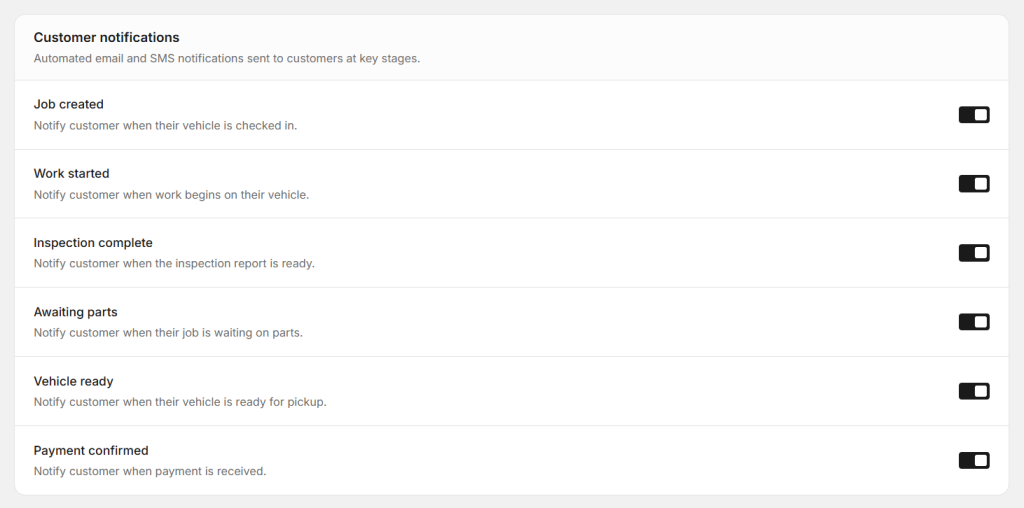
4. Awaiting Parts
If a job is delayed because parts are not available, tell the customer immediately. No one likes surprises. A simple notification explaining the delay keeps customers calm and prevents angry calls.
Example message: “Hi [Name], we are waiting for parts for your vehicle. We will update you as soon as they arrive. Sorry for the delay.”
5. Vehicle Ready for Pickup
This is the notification customers wait for the most. Send it the moment the vehicle is ready. Include your garage address and working hours so they can plan their pickup easily.
Example message: “Great news! Your vehicle is ready for pickup at [Garage Name]. We are open until [Time]. See you soon!”
6. Payment Confirmed
After payment is received, send a confirmation. This acts as a digital receipt and gives customers a professional record of their transaction. It also closes the job on a positive note.
Example message: “Hi [Name], your payment has been confirmed. Thank you for choosing [Garage Name]. We look forward to serving you again!”
Start using Autodots for free and grow your garage faster
–> autodots.io/partners
Workflow Automations That Work With Notifications
Beyond customer messages, smart garages also use workflow automations to reduce manual work inside the workshop. These automations connect different parts of your garage management system automatically.
Appointment to Job Card
When a customer confirms an appointment, a job card is created automatically. No staff member needs to manually create it. This saves time and ensures no appointment is ever missed or forgotten.
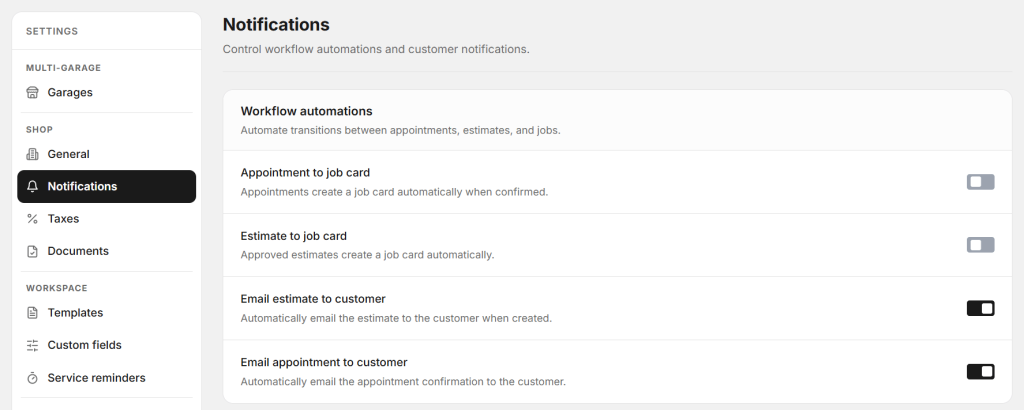
Estimate to Job Card
When a customer approves an estimate, it automatically converts into a job card. Work can begin immediately without any extra steps from your front desk team.
Email Estimate to Customer
When an estimate is created, it is automatically emailed to the customer for review and approval. This speeds up the approval process and gives customers a professional document to review.
How Autodots Handles All Garage Customer Notifications in One Place
Setting up all these notifications manually across different tools is complicated and time-consuming. Autodots brings everything together in one simple dashboard.
With Autodots, you can control every garage customer notification from a single settings page. Turn each notification on or off with one click. No coding. No complicated setup. Just toggle the ones you want and the system handles everything automatically.
Here is what you get with Autodots notifications:
- Automatic email and SMS to customers at every job stage
- Workflow automations for appointments, estimates and job cards
- Multi-garage support — manage notifications across all locations
- Professional message templates built in
- Zero manual work after setup
AutoDots is built specifically for garage owners. Every feature — including the notification system — is designed based on how real workshops operate. You do not need to be a tech expert to use it.
Start using Autodots for free and grow your garage faster
–> autodots.io/partners
Benefits of Using Autodots for Garage Customer Notifications
Garage owners who use AutoDots for customer notifications report clear improvements in their day-to-day operations:
- Up to 60% fewer inbound calls — customers already have the information they need
- Faster job approvals — automated estimate emails get quicker responses
- Higher customer satisfaction — regular updates build confidence and trust
- More professional image — automated messages make your garage look organised and modern
- Better staff productivity — your team focuses on repairs, not phone calls
Getting Started With Autodots Notifications
Setting up garage customer notifications with Autodots takes less than 10 minutes. Here is all you need to do:
- Register your garage free at autodots.io/partners
- Go to Settings → Notifications in your dashboard
- Turn on the notifications you want — Job Created, Work Started, Vehicle Ready, and more
- Enable workflow automations — Appointment to Job Card, Estimate to Job Card
- Done — Autodots handles every customer notification automatically from now on
No technical knowledge needed. No complicated integrations. Just a simple, clean setup that works from day one.
Final Thoughts
Garage customer notifications are no longer a luxury — they are a necessity for any professional workshop. Customers today expect timely updates, clear communication, and a smooth experience. If your garage is still relying on phone calls and manual messages, you are already behind.
Autodots makes it easy to automate every stage of customer communication — from the moment a vehicle is checked in to the final payment confirmation. Set it up once and let the system do the work while you focus on what you do best: running a great garage.
Ready to take your garage digital? Autodots helps garage owners manage jobs, invoices, inventory and customers — all in one platform. Register your garage free at autodots.io/partners
Looking to grow your garage business?
Want to learn more?