Billing is one of the most important parts of running a vehicle repair workshop. After completing a repair or service, the customer wants a clear invoice and a simple payment process. For workshop staff, preparing invoices manually can take time, especially when a job includes many parts, labour charges, and different services. This is where Vehicle Repair Invoice Software can make daily billing easier.
A digital invoicing system can help workshops create clear bills, organize customer information, record repair costs, and keep payment details in one place. Instead of spending extra time checking papers and calculating every amount manually, staff can follow a more organized billing process.
In this blog, we will explore five easy ways Vehicle Repair Invoice Software can help workshops bill customers faster while keeping invoices clear and organized.
Table of Contents

What Is Vehicle Repair Invoice Software?
Vehicle Repair Invoice Software is a digital tool designed to help garages and automotive workshops create and manage invoices for repair and service work. It can help businesses record services, labour, spare parts, prices, taxes, discounts, and final payment amounts.
Instead of creating every invoice from the beginning, workshop staff can use information already recorded during the repair job. This can make billing easier and reduce repeated data entry.
A good invoicing process should be simple for both staff and customers. The workshop should be able to prepare the bill quickly, while the customer should be able to understand exactly what they are paying for.
1. Create Invoices Faster
One of the biggest benefits of Vehicle Repair Invoice Software is that it can reduce the time needed to prepare a customer’s bill. Manual invoices often require staff to write or enter customer details, vehicle information, parts, labour, and service charges separately.
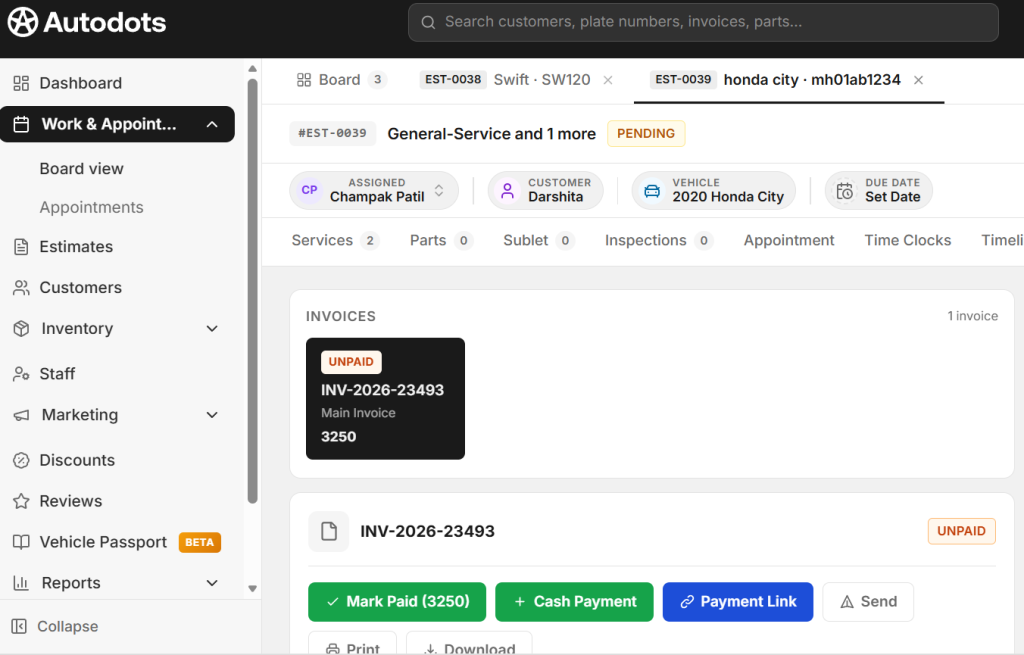
With a digital system, important job information can already be available when the repair is completed. Staff can review the recorded services and parts and use them to prepare the invoice.
This can make the final billing step much faster. It is especially useful for busy workshops where several vehicles may be ready for collection at the same time.
Faster invoice preparation can also help reduce customer waiting time at the front desk. When the bill is ready without unnecessary manual work, staff can focus more on customer service.
2. Keep Repair Charges Clear
A vehicle repair bill can contain many items. A customer may be charged for inspection, labour, spare parts, maintenance services, and additional repair work. If these charges are not presented clearly, customers may have questions about the final amount.
Vehicle Repair Invoice Software can help organize these charges into a clear digital invoice. Services and parts can be listed separately so customers can understand what work was completed.
A detailed invoice can also help workshop staff explain the bill. If a customer asks why the total is different from an earlier estimate, the team can review the listed services and parts and provide a clearer explanation.
Clear billing is not only about getting paid. It can also help build trust between the workshop and its customers.
3. Reduce Manual Calculation Errors
Manual calculations can create problems when an invoice contains multiple items. Staff may need to calculate parts, labour, discounts, taxes, and the final total. Entering one amount incorrectly can affect the entire invoice.
Vehicle Repair Invoice Software can reduce some of these manual calculation steps by using digital billing processes. Depending on the system, totals and other invoice values may be calculated automatically based on the information entered.
This can help staff spend less time checking basic calculations. However, invoices should still be reviewed before they are given to customers to make sure all services, parts, and charges are correct.
Reducing repeated manual work can make the billing process more consistent across the workshop.
4. Keep Customer and Vehicle Details Connected
Good invoices should contain accurate customer and vehicle information. Searching for these details manually can slow down the billing process and may increase the chance of entering incorrect information.
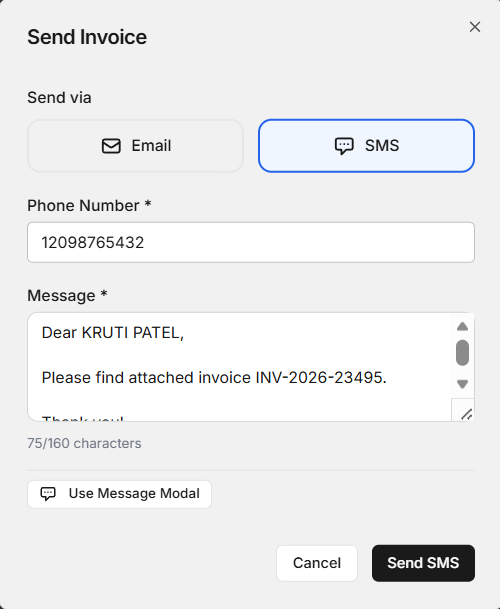
With Vehicle Repair Invoice Software, customer and vehicle records can be connected with repair jobs and invoices when the system supports these features.
For example, staff may be able to find a customer’s record, select the correct vehicle, review the completed job, and prepare the invoice using the existing information. This creates a more connected workflow.
Keeping records connected can also help when the same customer returns for another service. The workshop can find previous information more easily instead of creating every record from scratch.
5. Manage Invoice and Payment Records Easily
Creating an invoice is only one part of billing. Workshops also need to know which invoices have been paid and which payments are still pending.
Vehicle Repair Invoice Software can help keep invoice and payment information organized. Staff can use digital records to review completed invoices and check their payment status, depending on the system’s features.
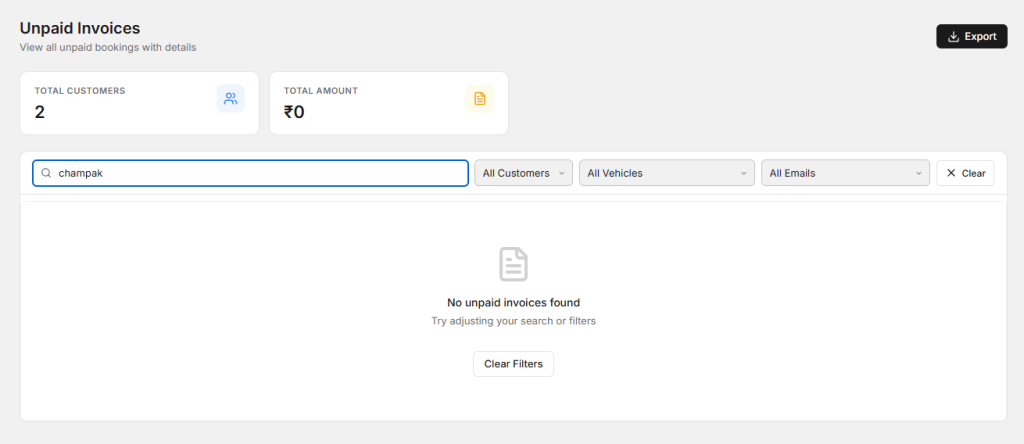
This can make it easier to follow up on unpaid invoices and answer customer questions about previous transactions. It can also help workshop owners keep business records in a more organized format.
When invoices and payments are stored digitally, staff do not need to depend only on paper files to find transaction information.
Why Faster Billing Matters for Workshops
Billing may happen at the end of a repair job, but it can affect the customer’s overall experience. A customer who has already waited for a repair may not want to spend extra time waiting for an invoice to be prepared.
A faster billing process can help workshops handle vehicle collections more smoothly. It can also help staff manage more customers during busy periods.
Faster does not mean rushing through the invoice. The goal is to remove unnecessary manual steps while keeping the bill accurate and easy to understand.
What Should a Good Vehicle Invoice Include?
A useful vehicle repair invoice should provide enough information for the customer to understand the transaction. The exact format may vary by business, but common details can include:
- Workshop name and contact information
- Customer name and contact details
- Vehicle registration or identification details
- Date of the repair or service
- Services completed
- Parts used
- Labour charges
- Applicable taxes or discounts
- Total amount
- Payment status
Keeping these details organized can make invoices easier for customers to read and easier for workshop staff to manage.
How AutoDots Can Help Your Workshop
AutoDots provides digital tools designed to help automotive workshops manage different parts of their daily operations. Workshops can organize areas such as customers, vehicles, services, technicians, job cards, inventory, and invoices through digital processes.
If you are considering Vehicle Repair Invoice Software, it can be useful to look for a platform that connects billing with the wider workshop workflow. This can reduce the need to manage invoices separately from repair jobs and customer records.
You can learn more about workshop opportunities through the AutoDots partner program. For more useful automotive and workshop management guides, visit the AutoDots blog.
Tips to Make Workshop Billing More Efficient
Using digital invoicing is helpful, but the process also depends on how your team records information during the repair. A few simple habits can make billing easier.
- Enter customer details correctly when creating the job.
- Keep vehicle information updated.
- Record every service completed on the vehicle.
- Add parts to the correct repair job.
- Review labour charges before creating the final invoice.
- Check the final invoice before sending it to the customer.
- Update payment status after receiving payment.
- Keep digital records organized for future reference.
These steps can help your team create a consistent billing process and reduce avoidable delays.
Common Billing Mistakes to Avoid
One common mistake is forgetting to include a service or part on the final invoice. This can create confusion and may require the invoice to be corrected later.
Another mistake is entering incorrect customer or vehicle information. Staff should check important details before finalizing the bill.
Workshops should also avoid making invoices difficult to understand. Customers should be able to see the main services, parts, labour, and total amount without having to guess what each charge means.
Finally, make sure your team follows the same billing process. A consistent process makes it easier to train staff and maintain accurate records.
Frequently Asked Questions
What is Vehicle Repair Invoice Software used for?
It is used to create, manage, and organize invoices for vehicle repair and service work. It can help record services, parts, labour, totals, and payment information.
Can invoice software make billing faster?
Yes. Digital invoicing can reduce repeated data entry and manual calculations. If customer, vehicle, and job information is already recorded, staff can use that information when preparing the final invoice.
Can it help reduce invoice mistakes?
Digital billing can reduce some common manual entry and calculation errors. However, staff should always review the invoice before sending it to the customer.
Is digital invoicing useful for small garages?
Yes. Small garages can benefit from organized invoices and payment records. A simple system can help reduce paperwork and make customer billing easier to manage.
Can invoices be connected to repair jobs?
Many workshop management systems can connect invoices with job records. This can help staff use the services, parts, and labour recorded during the repair when preparing the final bill.
Conclusion
Vehicle Repair Invoice Software can help automotive workshops make billing faster, clearer, and more organized. By connecting customer details, vehicle information, repair jobs, parts, labour, invoices, and payment records, digital tools can reduce unnecessary manual work.
A better billing process can also improve the customer experience. When customers receive a clear invoice without unnecessary waiting, the final part of their workshop visit becomes easier and more professional.
The best approach is to choose a simple system that fits your workshop’s daily needs. Keep your records accurate, train your staff, and connect billing with the rest of your repair workflow. With the right process, your workshop can spend less time on manual invoicing and more time serving customers.