Vehicle inspection is an important part of a modern garage. Before a repair starts, technicians need to check the vehicle carefully, identify problems, record findings, and explain the required work to the customer. When inspections are done using paper forms or handwritten notes, the process can become slow and important information may be missed.
car inspection software can make this process easier by helping technicians record inspection results digitally. Instead of using separate papers for every vehicle, the team can keep inspection details, photos, notes, recommendations, and vehicle information in an organized system.
A simple digital inspection process can save time, improve communication, and make it easier for customers to understand the condition of their vehicle. In this guide, we will discuss six smart ways to make car inspections easier and more organized.
Table of Contents
Why car inspection software Can Improve Garage Inspections
A vehicle inspection usually includes many checks. Technicians may inspect tyres, brakes, lights, engine components, fluids, battery, suspension, steering, filters, belts, and other important parts. If these checks are handled manually, technicians may need to write each result on paper and service advisors may later need to transfer the information into another record.
car inspection software can reduce this repeated work by providing a structured digital checklist. Technicians can review inspection items, add findings, include notes, and record the condition of different vehicle components in one place.
The result is a more organized inspection process where information can move more easily from the technician to the service advisor and then to the customer.
6 Smart Ways to Make Inspections Easier
1. Use a Standard Digital Inspection Checklist
A standard checklist helps technicians follow the same inspection process for every vehicle. Without a checklist, a technician may focus mainly on the customer’s complaint and miss other areas that should be checked.
A digital checklist can include common inspection points such as tyres, brakes, lights, battery, engine oil, coolant, suspension, steering, belts, filters, and other components. The checklist can be adjusted according to the type of vehicle or service.
car inspection software can help technicians complete these checks in a structured way. This makes it easier to maintain a consistent inspection process across the garage.
A standard checklist is also useful for new technicians because it gives them a clear process to follow. It can reduce the chance of forgetting important inspection areas during busy working hours.
2. Record Vehicle Information Before Starting
Every inspection should be connected to the correct customer and vehicle. Important information can include the customer’s name, contact details, vehicle registration number, model, mileage, and service request.
When this information is recorded correctly, the inspection report becomes easier to identify later. It also helps service advisors understand which vehicle the inspection belongs to when multiple vehicles are being handled at the same time.

car inspection software can help organize customer and vehicle information before the technician begins the inspection. This can reduce repeated data entry and make it easier to find the vehicle record during future visits.
Keeping accurate vehicle information also creates a useful service history. When the customer returns later, the workshop can review previous inspection records instead of starting from the beginning.
3. Add Photos to Inspection Reports
Photos can make vehicle inspection reports much easier to understand. Some problems are difficult to explain using only written notes. A damaged tyre, cracked component, oil leak, dent, scratch, or worn part can often be shown more clearly with a photo.
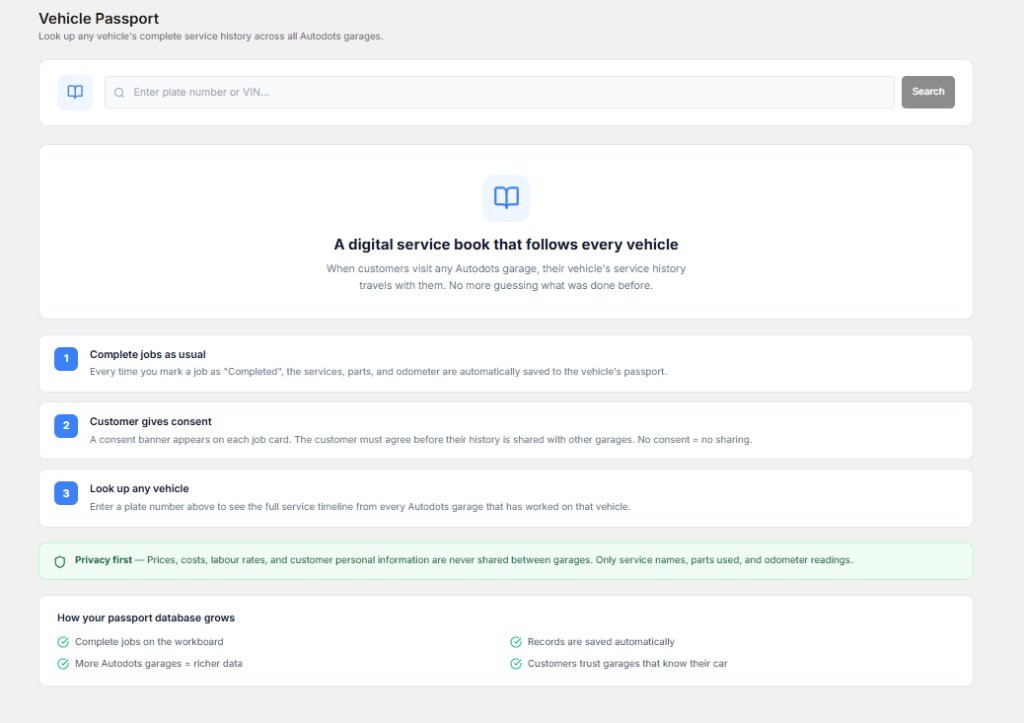
Technicians can capture relevant images during the inspection and attach them to the vehicle record. The service advisor can then use these images while explaining the issue to the customer.
car inspection software can make it easier to keep inspection photos together with the related findings. This creates a more complete report and can improve communication between the workshop and the customer.
Visual information can be especially useful when additional repair work needs customer approval. Instead of simply saying that a component is damaged, the service advisor can show the customer what was found.
4. Make Inspection Results Easy to Understand
Inspection results should be simple enough for both technicians and customers to understand. A workshop can use clear condition statuses such as good, needs attention, or requires immediate repair where appropriate.
Technicians can also add short notes when more information is needed. The goal is to make the report simple without removing important technical details.
car inspection software can help organize inspection results into a clear report. Service advisors can review the findings and explain the important points to the customer without searching through handwritten notes.
Simple reports can also reduce confusion during the billing and delivery process because customers can understand which services were recommended and why.
5. Connect Inspection Results With Job Cards
Inspection is usually the first major step before repair work begins. After inspecting the vehicle, technicians may recommend repairs, maintenance work, or replacement of certain parts.

If inspection information is kept separately from the job card, service advisors may need to copy the same details manually. This creates extra work and can increase the chance of missing information.
car inspection software can support a connected workflow where inspection findings can be used along with job card information. This helps the team move from inspection to repair planning more smoothly.
For example, if a technician finds worn brake pads during an inspection, the finding can be recorded clearly. The service advisor can review it, explain the issue to the customer, receive approval when required, and include the approved work in the repair process.
6. Keep Inspection History for Future Visits
Inspection information can become valuable long after the current service is completed. A vehicle may return to the same garage several times, and previous inspection records can help technicians understand its maintenance history.
The workshop can review earlier findings, recommendations, photos, and service information before starting a new inspection. This can help identify recurring problems and check whether previous recommendations were completed.
car inspection software can help keep these records organized so service advisors and technicians can access useful information when the customer returns.
A proper history also makes the workshop look more organized. Customers can see that the garage has kept track of their vehicle instead of treating every visit as a completely new case.
How Digital Inspections Save Technician Time
Technicians already spend most of their time inspecting and repairing vehicles. They should not have to spend unnecessary time handling paperwork after every inspection.
Digital inspection forms can reduce the amount of manual writing required. Technicians can select inspection items, add notes, record conditions, and capture photos directly during the inspection process.
This can help the service advisor receive information faster. It also reduces the need to rewrite the technician’s notes into another system.
When the inspection workflow is simple, technicians can focus more on checking the vehicle properly and less on administrative tasks.
How Better Inspections Improve Customer Trust
Customers may not always understand technical vehicle problems. When a service advisor tells them that a component needs repair, they may naturally want to know why.
A clear inspection report can make this conversation easier. Photos, simple notes, condition statuses, and recommendations can help customers understand what the technician found.
This type of transparency can make customers more comfortable when deciding whether to approve additional work. It also reduces the chance of confusion about why a particular service was recommended.
Connect Inspection With the Complete Garage Workflow
A vehicle inspection should not be treated as an isolated activity. It is connected to appointment booking, vehicle check-in, job cards, technician work, spare parts, billing, and final delivery.
When these activities are connected, information can move through the workshop more smoothly. Customer and vehicle details can be available during inspection, while inspection findings can support job card creation and repair planning.
The same information can later help with billing and service history. This reduces repeated data entry and gives the workshop a better view of the complete repair process.
Benefits of a Better Inspection Process
- Faster inspection reporting
- Less paperwork
- Standard inspection checklists
- Better vehicle records
- Easier photo documentation
- Clearer repair recommendations
- Better communication with customers
- Improved job card information
- Useful inspection history
- Less repeated data entry
- Better workshop organization
These benefits can help garages create a more consistent inspection process while making daily work easier for technicians and service advisors.
Keep Inspection Reports Simple
An inspection report should provide useful information without becoming unnecessarily complicated. Customers should be able to understand the important findings without needing technical knowledge.
Use clear descriptions and avoid unnecessary technical terms when explaining problems to customers. If a technical term is required, add a short explanation of what it means and why it matters.
car inspection software can help present inspection information in an organized format, making it easier for the service team to explain findings and recommendations.
A simple report can also make the approval process easier because customers can quickly understand which issues are urgent and which items may simply need monitoring.
Use Inspection Data to Improve Workshop Operations
Inspection records can provide more than information about individual vehicles. Over time, the garage can review inspection data to identify common problems and frequently recommended repairs.
For example, if technicians regularly find worn tyres or battery problems, the workshop can use this information to improve its inspection checklist and stock planning.
Managers can also identify areas where technicians may need additional training. Regular review of inspection information can help improve the quality and consistency of the overall inspection process.
How AutoDots Can Help Modern Garages
AutoDots provides digital solutions designed to help automotive businesses organize their daily workshop activities. Modern tools can help teams manage customer information, vehicle services, appointments, job cards, inspections, inventory, billing, and other important operations.
car inspection software can be useful for garages that want to reduce paper-based inspection work and create a more organized process for recording vehicle conditions, photos, notes, and recommendations.
Businesses interested in automotive technology and partnership opportunities can explore the AutoDots partner program to learn more.
For more automotive business guides, workshop tips, and useful technology information, visit the AutoDots blog.
Simple Tips to Improve Car Inspections
Start by creating a checklist that matches the services your garage commonly provides. Keep the checklist practical so technicians can complete it without unnecessary steps.
Train technicians to record findings consistently. If certain problems require photos, make photo capture part of the normal inspection process.
Service advisors should review inspection results before contacting customers. This helps them explain the findings clearly and answer basic questions about recommended repairs.
Keep inspection information connected with the vehicle history. This allows the workshop to use previous findings during future visits and gives technicians more information about the vehicle.
Common Car Inspection Mistakes to Avoid
One common mistake is checking only the problem mentioned by the customer. A complete inspection should review other important vehicle components as well.
Another mistake is writing unclear notes. A short but useful description can help another employee understand what the technician found.
Workshops should also avoid keeping inspection photos separately from the vehicle record. Photos are more useful when they are connected with the correct inspection and customer.
Finally, do not ignore previous recommendations. Reviewing old inspection records can help the workshop identify issues that still need attention and avoid repeating the same checks without useful context.
Frequently Asked Questions
What is car inspection software?
Car inspection software is a digital tool that helps garages and technicians record vehicle inspection results, checklists, photos, notes, condition details, and repair recommendations in an organized way.
How can car inspection software make inspections easier?
car inspection software can make inspections easier by providing digital checklists, reducing paperwork, allowing photo capture, organizing findings, and connecting inspection information with job cards and vehicle history.
Can small garages use digital inspection tools?
Yes. Small garages can use digital inspection tools to reduce paperwork, create consistent inspection reports, keep vehicle history, and communicate repair recommendations more clearly to customers.
Why are inspection photos useful?
Inspection photos can provide clear visual information about problems such as damaged parts, worn components, leaks, dents, or other visible issues. They can help customers understand why a repair may be recommended.
Can inspection results be connected to job cards?
Yes. Connecting inspection results with job cards can help the workshop move from inspection to repair planning without repeatedly entering the same information.
Conclusion
A good vehicle inspection process helps garages identify problems, plan repairs, communicate with customers, and maintain useful service records. Manual inspection methods can become difficult to manage as the number of vehicles increases.
car inspection software provides a practical way to organize digital checklists, inspection findings, photos, notes, recommendations, and vehicle history. It can also help connect inspection information with job cards and other parts of the garage workflow.
The goal is simple: make inspections easier for technicians, make reports clearer for customers, and keep important vehicle information organized. With a structured inspection process and suitable digital tools, garages can save time, improve communication, and provide a better service experience.