
Managing spare parts is one of the most important jobs in a workshop. A garage may keep filters, brake parts, engine parts, oils, bulbs, belts, batteries, and many other items. When stock is tracked manually, it becomes easy to lose items, order too much, or run out of parts needed for a repair. Auto Parts Inventory Management Software can help workshops keep stock information organized and make daily inventory work easier.
A good inventory process helps a workshop know what is available, what has been used, what needs to be reordered, and which parts are moving slowly. This can save staff time and support better purchasing decisions.
In this guide, we will look at eight smart ways Auto Parts Inventory Management Software can help you control stock and build a more organized workshop.
Table of Contents
What Is Auto Parts Inventory Management Software?
Auto Parts Inventory Management Software is a digital system that helps garages and automotive businesses manage spare parts and stock. It can keep records of parts, quantities, purchases, usage, and other inventory information in one place.
Instead of depending only on notebooks or spreadsheets, workshop teams can use digital records to find parts faster and keep stock information updated. The exact features depend on the software, but the main goal is to make inventory easier to control.

1. Keep All Parts Information in One Place
Workshops often have hundreds or thousands of parts. Finding the correct item can become difficult when information is spread across different files or paper records.
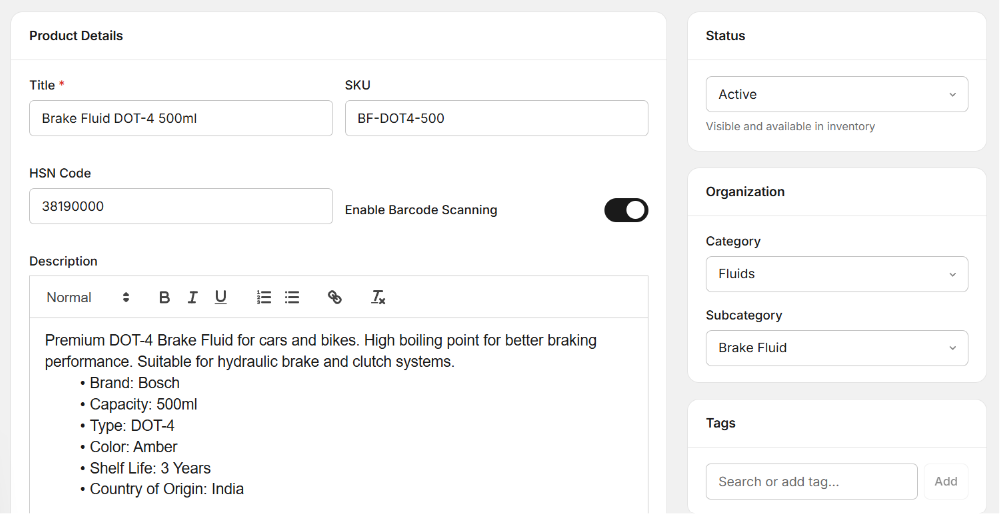
Auto Parts Inventory Management Software can help create a central record for your stock. You can store part names, part numbers, quantities, prices, suppliers, and other useful details.
A central record makes it easier for staff to search for an item before placing a new order. It can also reduce confusion when different team members manage stock.

2. Track Stock Levels More Clearly
Knowing how much stock you have is essential. If a workshop does not have enough of a commonly used part, a repair may be delayed while staff wait for a new delivery.
With Auto Parts Inventory Management Software, stock quantities can be recorded and updated as parts are received or used. This gives the team a clearer view of available inventory.
Regular stock updates can also help managers notice which items are becoming low. This makes it easier to plan purchases before a shortage affects workshop work.
3. Reduce Overstocking
Running out of parts is a problem, but keeping too much stock can also create problems. Money can become tied up in items that are not used often, and storage space can become crowded.
Auto Parts Inventory Management Software can help workshop owners review stock movement and identify parts that are used frequently or slowly.
This information can support better purchasing decisions. Instead of ordering large quantities without checking usage, managers can review their records and plan orders based on actual workshop needs.
4. Make Reordering Easier
Reordering parts can take time when staff need to check shelves manually and contact suppliers without clear records. A structured inventory process can make this task easier.
Using Auto Parts Inventory Management Software can help your team identify low-stock items and maintain supplier information. Some systems may also support stock alerts or reorder levels.
A clear reorder process helps reduce the chance of forgetting important parts. It can also make purchasing more consistent across the workshop.
5. Connect Parts With Repair Jobs
Parts are not only stored in the workshop; they are also used in repair and service jobs. If stock is not connected with workshop jobs, it can be difficult to understand where parts have gone.
Auto Parts Inventory Management Software can help record parts used for specific repair jobs when the system supports job and inventory integration.
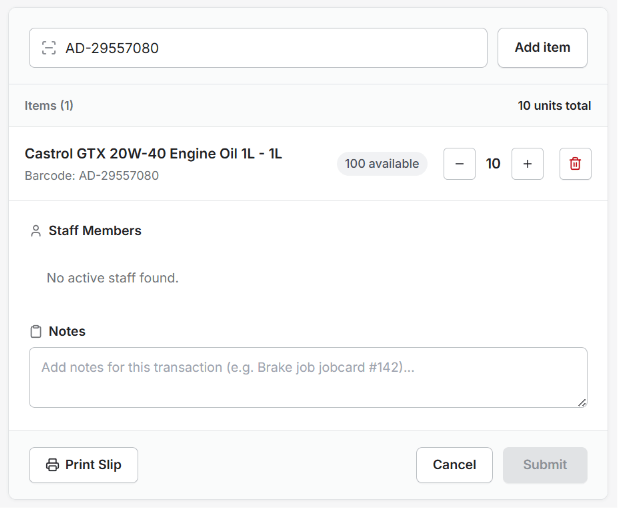
This can give workshop managers a clearer picture of which parts are being used and for which vehicles. It can also make the job record more complete by connecting parts with the services performed.
6. Improve Parts Search and Identification
Automotive parts can have similar names, different sizes, and different part numbers. Choosing the wrong item can waste time and may cause a repair delay.
A digital inventory system can make part information easier to search. Staff can use stored details such as part numbers, descriptions, brands, or other identifiers to find the right item.
Auto Parts Inventory Management Software can therefore make it easier for staff to locate parts and check availability before starting or planning a repair.
7. Understand Fast-Moving and Slow-Moving Stock
Not every part in your inventory moves at the same speed. Oil filters, air filters, brake components, and other common items may be used regularly, while some specialized parts may remain on the shelf for a long time.

Auto Parts Inventory Management Software can help you review stock activity and understand which items are moving quickly and which are not.
This information can help managers make smarter purchasing decisions. Fast-moving items may need more regular replenishment, while slow-moving items may need closer review before another purchase is made.
8. Keep Better Inventory Records
Good stock control depends on accurate records. When inventory information is updated regularly, managers can make decisions using a clearer picture of current stock.
A digital inventory system can help maintain records of stock changes, purchases, usage, and other inventory activity.
Better records can also make it easier to investigate differences between expected and actual stock. If something is missing, the team can review recent inventory activity and check what happened.
Why Good Parts Management Matters
Parts management affects many areas of a workshop. If the right parts are available at the right time, technicians can complete jobs with fewer interruptions. Better stock records can also help front-desk staff answer customer questions about parts and repair work.
Good inventory control can also support business planning. Workshop owners can understand where money is being spent on stock and which items are most important to daily operations.
Features to Look for in an Inventory System
When choosing a digital inventory system, focus on features that solve real problems in your workshop. The system should be easy for staff to use and simple to update.
- Part names and part numbers
- Stock quantity tracking
- Supplier information
- Purchase and receiving records
- Parts used on repair jobs
- Low-stock alerts or reorder levels
- Search and filtering tools
- Inventory reports
The best setup will depend on the size of your garage and the number of parts you manage. A small workshop may need a simple inventory process, while a larger business may need more detailed controls.
How AutoDots Can Help Your Workshop
AutoDots provides digital tools that can help automotive workshops organize different parts of their daily operations. Depending on the tools you use, a workshop can manage information related to customers, vehicles, services, technicians, job cards, inventory, and invoices.
If you are considering Auto Parts Inventory Management Software, a connected workshop platform can help you bring parts management closer to your repair and service workflow.
You can learn more through the AutoDots partner program. For more useful automotive and workshop management guides, visit the AutoDots blog.
Simple Tips to Improve Stock Control
- Give every part a clear name or identification number.
- Update stock whenever parts are received.
- Record parts when they are used on a job.
- Check fast-moving items regularly.
- Review slow-moving stock before placing new orders.
- Keep supplier details updated.
- Perform regular physical stock checks.
- Train staff to follow the same inventory process.
Small improvements can make inventory management easier over time. The most important thing is to keep records accurate and make stock updates part of the normal workshop routine.
Common Inventory Mistakes to Avoid
One common mistake is waiting until stock is completely finished before reordering. This can create delays for customers and technicians. Another mistake is ordering too much stock without checking actual usage.
Workshops should also avoid keeping duplicate records in different places. If one spreadsheet shows a different quantity from the physical shelf, staff may not know which information is correct.
Regular updates, clear part identification, and one reliable inventory record can help reduce these problems.
Frequently Asked Questions
What is Auto Parts Inventory Management Software?
It is a digital tool that helps automotive businesses manage spare parts, stock quantities, purchases, usage, suppliers, and other inventory information.
Can inventory software help prevent stock shortages?
It can help staff monitor stock levels and identify items that are running low. This can support earlier purchasing and reduce the risk of some stock shortages.
Can it help reduce excess inventory?
Yes. By reviewing stock movement and usage, managers can better understand which parts are used often and which items move slowly. This can support more careful purchasing.
Can parts be linked to repair jobs?
Some workshop systems allow parts to be connected with job cards or repair records. This can help teams understand which parts were used for a particular vehicle or service.
Is digital inventory useful for small garages?
Yes. Even a small workshop can benefit from organized records when it manages many different parts. The system should match the garage’s size, workflow, and stock needs.
Conclusion
Auto Parts Inventory Management Software can help garages organize parts information, monitor stock levels, plan purchases, connect parts with repair jobs, and maintain better inventory records.
The goal is not simply to store more data. The goal is to make stock information easy to find and useful for daily decisions. When your team knows what is available, what is being used, and what needs to be ordered, it becomes easier to keep repair work moving.
Start with the inventory problems that cause the most delays or extra costs in your workshop. Then build a simple digital process that your whole team can follow consistently. With the right approach, better stock management can support a more organized and efficient automotive business.