
Managing spare parts is one of the most important tasks in a busy automotive workshop. A workshop may handle engine oil, filters, brake pads, batteries, spark plugs, belts, bulbs, sensors, tyres, and many other products every day. If these parts are not managed properly, employees may spend too much time searching for products, checking quantities, or placing unnecessary orders.
Workshop Inventory Software can make parts management easier by keeping important inventory information organized in one place. Instead of depending on notebooks, spreadsheets, or memory, workshop teams can use a digital process to track products, stock quantities, purchases, usage, and other inventory activities.
Good inventory management is not only about knowing how many parts are available. It also means knowing which products are moving quickly, which items are rarely used, when to reorder stock, and where each part is stored. In this guide, we will discuss nine simple ways to make workshop parts management easier.
Table of Contents
Why Parts Management Is Important for Workshops
Spare parts have a direct effect on vehicle repair work. If a technician needs a particular product and it is not available, the repair may be delayed. This can increase workshop workload and may also affect the customer’s delivery time.
Workshop Inventory Software can help service teams keep better records of available parts and understand how inventory is being used. When stock information is easy to access, employees can make faster decisions during daily workshop operations.

Good inventory control can also help prevent unnecessary purchases. Instead of ordering products without checking current stock, managers can review existing quantities and recent usage before placing an order.
9 Ways to Make Parts Management Easier
1. Keep All Part Information in One Place
The first step toward easier inventory management is keeping clear information about every product. Important details may include part name, part number, brand, quantity, supplier, purchase price, selling price, and storage location.
Workshop Inventory Software can help keep this information organized. Employees can search for a product quickly instead of checking multiple files or asking another team member for information.
Clear product records are especially useful when a workshop has similar-looking parts. Correct names and part numbers can help reduce mistakes when selecting products for vehicle repairs.

2. Track Parts Coming Into the Workshop
New inventory arrives regularly from suppliers. When products are received, the quantity and product details should be checked and recorded properly.
If incoming stock is not recorded, the system may show less inventory than the workshop actually has. This can create confusion during purchasing and stock checking.
A proper receiving process should include checking the delivered products, confirming quantities, and updating the inventory record as soon as possible. This keeps stock information more accurate.
3. Record Every Part Used for Repairs
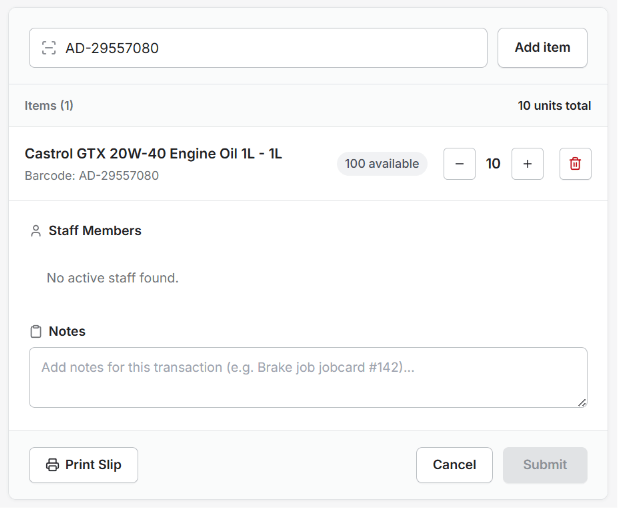
Parts leave inventory whenever they are used for customer vehicles. These products should be recorded against the relevant repair job so that the available quantity remains updated.
For example, if a technician uses an air filter during a service, that item should be removed from the available stock record. This also helps the workshop understand which products are being used most often.
Workshop Inventory Software can support a connected process where parts used during repairs are easier to record and track.
4. Set Minimum Stock Levels
Some products are used much more frequently than others. Common maintenance parts may need regular restocking because they are used on many vehicles.
Setting minimum stock levels can help the workshop know when a product needs attention. When the quantity reaches the selected level, the purchasing team can review the requirement and arrange new stock.
This approach can reduce the risk of running out of important parts during busy periods. It also helps the workshop avoid waiting until a product is completely finished before thinking about the next order.
5. Identify Fast-Moving and Slow-Moving Parts
Not every product moves at the same speed. Some parts may be used every day, while others may remain on the shelf for several weeks or months.
Fast-moving products should be monitored regularly because they can run out quickly. Slow-moving products should be purchased carefully because excessive stock can take up space and keep money tied up in inventory.
Reviewing usage patterns helps managers understand which products need regular attention and which items can be ordered only when required.
6. Organize Physical Storage
Digital records are helpful, but physical storage also needs to be organized. Employees should be able to find a part quickly after checking its information.
Use clear shelves, bins, labels, and storage sections. Similar products should be kept in suitable locations, and frequently used items can be placed where employees can access them easily.
When physical storage matches the information in the inventory records, employees can spend less time searching for products and more time working on customer vehicles.
7. Manage Returns and Damaged Parts
Not every product received by a workshop will be used immediately. Some parts may be returned to suppliers, replaced because of an issue, or damaged during storage.
These changes should be recorded properly. If a damaged product is still counted as usable stock, the system may show a higher quantity than what is actually available for repairs.
A clear process for returns, replacements, and damaged products helps maintain more reliable inventory information.
8. Connect Inventory With Billing
Spare parts and billing are closely connected. When a part is used for a customer repair, the same information may be required while preparing the final invoice.
Entering the same product information several times can increase manual work and create opportunities for errors. A connected process can make it easier to include the correct parts and quantities on the customer’s bill.
Workshop Inventory Software can help workshops connect parts usage with repair and billing activities, making the overall process more organized.
9. Review Inventory Reports Regularly
Inventory data becomes more useful when managers review it regularly. Reports can show current stock, product usage, fast-moving items, slow-moving products, and purchasing activity.
These details can help workshop owners make better decisions. For example, if a particular filter is used frequently, the workshop may need to maintain a higher stock level. If another product has not moved for a long time, future purchases can be reviewed.
Workshop Inventory Software can make inventory information easier to review and help managers understand where improvements are needed.
How Better Inventory Management Saves Time
Manual inventory management can take a lot of time. Employees may need to search through notebooks, spreadsheets, shelves, or old purchase records before finding the information they need.
A digital inventory process can make product information easier to search and update. This can help employees quickly check whether a part is available and where it is stored.
Saving a few minutes on individual inventory tasks can make a meaningful difference when the workshop handles many vehicles every day.
How Better Parts Control Can Reduce Repair Delays
A repair can sometimes stop because a required part is not available. This may force technicians to wait or service advisors to contact suppliers during the repair process.
Better inventory planning helps the workshop understand which products are commonly needed. By monitoring these parts and maintaining suitable quantities, the workshop can reduce avoidable stock shortages.
Good inventory control therefore supports the complete repair process, from vehicle inspection to final delivery.
Benefits of Organized Workshop Inventory
- Better visibility of available parts
- Faster product searches
- Reduced stock shortages
- Better purchasing decisions
- Less unnecessary inventory
- Improved parts usage tracking
- Better repair planning
- More organized billing
- Better use of storage space
- Reduced manual work
These benefits can help workshops maintain a smoother daily operation and give employees better control over spare parts.
How AutoDots Can Help Modern Workshops
AutoDots provides digital solutions designed to help automotive businesses organize their daily workshop operations. Modern tools can help teams manage customer information, vehicle services, appointments, job cards, inventory, billing, and other important activities.
Workshop Inventory Software can be useful for workshops that want to reduce manual stock work and create a more organized process for managing spare parts and inventory information.
Businesses interested in automotive technology and partnership opportunities can explore the AutoDots partner program to learn more.
For more automotive business guides, workshop tips, and useful technology information, visit the AutoDots blog.
Simple Tips for Better Parts Management
Start by checking your current inventory records. Make sure product names, part numbers, quantities, prices, and storage locations are correct.
Next, create a simple routine for recording stock movements. Products received from suppliers should be added, while products used for repairs should be removed from available stock.
Employees should also update records when products are returned, damaged, or adjusted. Keeping information updated every day is easier than trying to correct several weeks of records later.
It is also useful to review inventory regularly and compare digital quantities with the physical stock on shelves. This can help identify missing, damaged, or incorrectly recorded products.
Common Inventory Problems to Avoid
One common problem is relying on memory. Employees may remember popular products, but this becomes difficult when the inventory grows.
Another problem is ordering new products without checking existing quantities. This can create unnecessary stock and reduce available storage space.
Workshops should also avoid using unclear product names or duplicate part numbers. Clean product records make it easier for everyone to understand what is available.
Finally, do not ignore slow-moving products. Regularly reviewing these items can help managers make better purchasing decisions and prevent inventory from becoming unnecessarily large.
Frequently Asked Questions
What is workshop inventory software?
Workshop inventory software is a digital solution that helps automotive workshops manage spare parts, stock quantities, product information, purchases, usage, and inventory records.
How can Workshop Inventory Software make parts management easier?
Workshop Inventory Software can help organize product records, track stock movement, monitor quantities, identify fast-moving parts, manage purchases, and connect parts with repair jobs.
Can small workshops use inventory software?
Yes. Small workshops can use digital inventory tools to reduce paperwork, organize spare parts, monitor stock levels, and make daily operations easier to manage.
Why should parts be linked with repair jobs?
Linking parts with repair jobs helps the workshop understand which products were used for each vehicle. It can also make stock updates and billing more accurate.
How can a workshop reduce excess inventory?
A workshop can reduce excess inventory by reviewing product usage, identifying slow-moving parts, setting suitable stock levels, and checking current quantities before placing new orders.
Conclusion
Managing spare parts properly is essential for an efficient automotive workshop. Without accurate inventory information, workshops can face stock shortages, unnecessary purchases, repair delays, and extra manual work.
Workshop Inventory Software provides a practical way to organize parts information, track stock movement, manage minimum stock levels, connect inventory with repairs and billing, and review useful inventory reports.
By following simple inventory practices and using suitable digital tools, workshops can save time, control costs, improve repair planning, and provide better service to customers. The main goal is simple: know what parts you have, know how they are being used, and make sure the right products are available when technicians need them.