
Running an established auto repair business requires more than skilled mechanics and quality tools. As customer numbers grow, managing repair orders, appointments, staff, invoices, spare parts, and payments becomes more complicated. Auto Repair Software for Established Businesses can help bring these daily activities together in one organised system. It allows workshop owners and managers to improve their workflow, reduce manual work, and maintain better control over business operations.
Table of Contents
Why Established Auto Repair Businesses Need Better Management
A growing workshop usually handles several vehicles and customers at the same time. Staff members need accurate job information, mechanics need clear repair instructions, and customers expect regular updates. Managing everything through paper records, phone calls, and separate spreadsheets can create confusion.
Using Auto Repair Software for Established Businesses helps create a more organised working environment. Important information can be stored in one place, making it easier for authorised employees to access customer details, vehicle history, service records, and payment information.
A connected system also helps managers understand what is happening inside the workshop. They can review pending jobs, check completed repairs, monitor staff activities, and identify areas that need improvement.
8 Essential Features to Look For
1. Digital Job Card Management
Job cards contain important information about each repair. They may include customer details, vehicle information, reported problems, inspection notes, required parts, labour charges, and repair instructions.
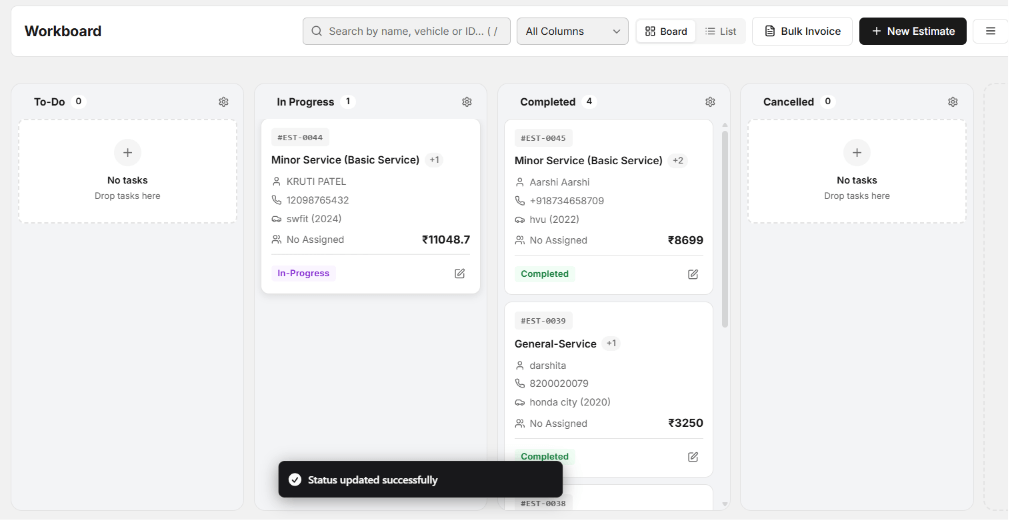
Digital job cards make this information easier to create, update, and access. Instead of searching through paper files, staff can check the relevant repair details through the system. Managers can also follow job progress and understand which vehicles are waiting for inspection, repair, or delivery.
For a busy workshop, Auto Repair Software for Established Businesses should make job management simple and consistent. A clear digital process can reduce missing information and help employees complete their responsibilities more efficiently.
2. Appointment Scheduling
Appointment management is important when a workshop receives regular service bookings. Without a proper schedule, multiple customers may arrive at the same time, creating unnecessary waiting and pressure on employees.

Appointment scheduling tools help staff record customer bookings, vehicle details, service requirements, and preferred dates. Managers can review upcoming appointments and plan workshop capacity more effectively.
Good scheduling also helps customers receive a clearer booking experience. Staff can check available time slots and reduce the possibility of overlapping appointments.
3. Estimates and Invoicing
Customers usually want to understand the expected repair cost before approving work. Creating estimates manually can take time, especially when a job includes several spare parts and labour charges.
Estimate and invoicing features help workshops prepare professional cost details. Employees can record parts, labour, taxes, discounts, and other relevant charges. Once the repair is completed, the estimate can help guide the final invoice.
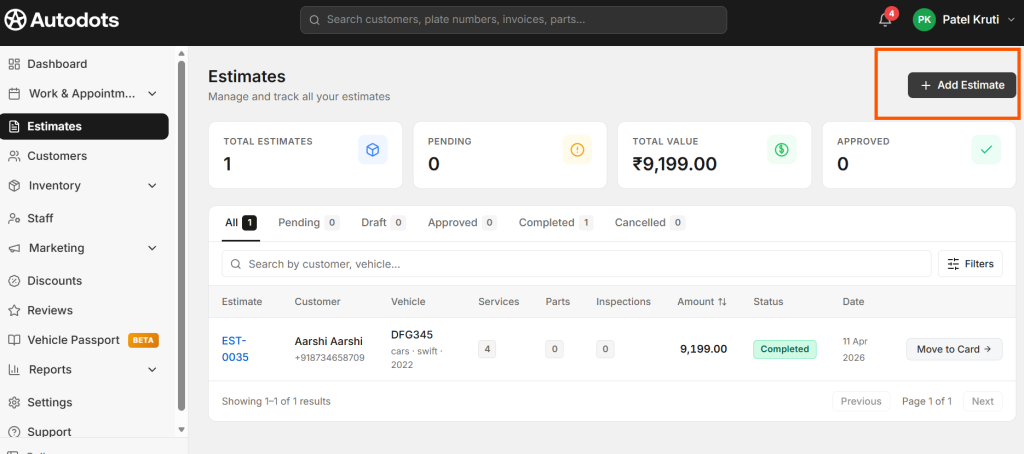
Accurate billing improves transparency and makes payment records easier to maintain. Auto Repair Software for Established Businesses should support a clear process from the initial estimate to the final customer payment.
4. Customer and Vehicle History
Customer information is valuable for workshops that want to build long-term relationships. A useful management system should allow staff to maintain customer contact details, vehicle information, previous repairs, service dates, and related records.
When a returning customer visits, employees can review the vehicle’s previous service history. This may help them understand earlier repair work and discuss relevant maintenance needs with the customer.
Keeping organised records can also support follow-up communication. Workshops can contact customers about upcoming maintenance, pending approvals, or completed work when appropriate.
5. Spare Parts and Inventory Control
Spare parts are essential to daily repair operations. If important items are unavailable, repairs may take longer and customers may need to wait. Poor stock records can also lead to unnecessary purchases or excess inventory.
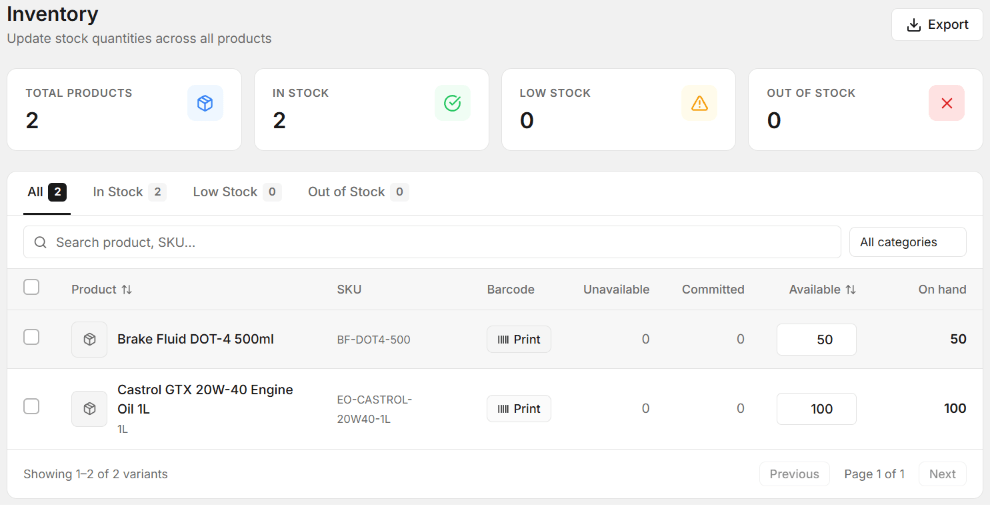
Inventory management tools help workshops record available parts, stock movement, purchases, and usage. Managers can review inventory information and identify items that may need to be reordered.
A connected system makes it easier to understand how parts are being used across repair jobs. This can support better purchasing decisions and reduce avoidable stock problems.
6. Staff and Workshop Workflow Management
Established businesses often have multiple mechanics, service advisors, and administrative employees. Each person may handle different responsibilities, so clear task allocation is important.
Workflow management features help managers assign jobs, review progress, and understand which tasks are pending. Employees can follow the information provided for each repair and keep relevant job details updated.
Auto Repair Software for Established Businesses can support better coordination by keeping job information and work status organised. Managers can spend less time asking for manual updates and more time improving workshop operations.
7. Reports and Business Performance
Business reports help owners understand how their workshop is performing. Depending on the available software features, reports may cover invoices, revenue, repair activity, customer records, inventory, and other operational information.
Reviewing these records regularly can help managers identify busy periods, monitor outstanding payments, and understand common business expenses. Reports can also support planning when the business wants to expand its services or improve its processes.
Reliable information makes business decisions more practical. Instead of depending only on memory, owners can use recorded activity to review performance and identify opportunities for improvement.
8. Customer Communication and Updates
Customers appreciate clear communication when their vehicles are being repaired. They may want to know whether inspection is complete, whether additional work is required, or when the vehicle will be ready.

Communication tools can help staff share relevant updates and maintain customer records. Some platforms also provide messaging integrations that support communication through commonly used channels. Businesses should check which channels and features are included in their selected plan.
Regular updates can reduce repeated phone calls and help customers feel informed throughout the repair process.
How to Choose the Right Software for Your Workshop
Before selecting Auto Repair Software for Established Businesses, owners should review their current workflow and identify the problems they want to solve. A workshop that struggles with inventory may need stronger stock management, while a business with many daily bookings may prioritise appointment scheduling.
Consider these points before making a decision:
- Ease of use: Employees should be able to understand the system without unnecessary complexity.
- Essential features: Check whether it supports job cards, estimates, invoices, customer records, and inventory.
- Business size: Choose a solution that can support your current team and operational requirements.
- Pricing: Compare subscription costs, available plans, and any additional charges.
- Support: Check what customer assistance and onboarding options are available.
- Data access: Understand how information is stored, protected, and accessed by authorised users.
It is also useful to request a demonstration before purchasing. A practical trial can help employees understand the workflow and show whether the system suits the workshop’s daily requirements.
How AutoDots Can Help Your Workshop
AutoDots provides digital tools designed to help automotive workshops manage important business activities. Workshops can explore features such as digital job cards, estimates, invoicing, appointment scheduling, customer management, inventory management, and business reports, depending on the available plan.
For established workshops looking to organise their operations, Auto Repair Software for Established Businesses should make everyday tasks easier to manage. AutoDots gives automotive businesses an option to explore a more connected approach to workshop management.
Workshop owners can review the AutoDots partner program to learn more about joining the platform. Before choosing a subscription, compare the available features and details on the AutoDots pricing page.
Common Mistakes to Avoid When Selecting Workshop Software
Choosing a system only because it has a low monthly price can lead to problems if it does not support the workshop’s actual requirements. Owners should compare features, usability, support, and long-term value rather than looking at price alone.
Another common mistake is ignoring employee training. Even a useful system may not deliver the expected results if staff members do not understand how to use it. Introduce the software gradually, explain each important process, and give employees time to become comfortable with it.
Businesses should also avoid moving all records without checking their accuracy. Review customer details, vehicle information, inventory records, and outstanding invoices before transferring data into a new platform.
Frequently Asked Questions
1. What is workshop management software?
Workshop management software is a digital system that helps automotive businesses organise activities such as repair orders, customer records, appointments, estimates, invoices, and inventory.
2. Is Auto Repair Software for Established Businesses suitable for large workshops?
It can be suitable when the selected platform supports the workshop’s team size, job volume, operational processes, and reporting requirements. Businesses should confirm these details before choosing a plan.
3. Can workshop software help reduce manual work?
Yes. Digital records and connected workflows can reduce repeated data entry, paper-based tracking, and time spent searching for information. The results depend on how the software is configured and used.
4. Does workshop software include inventory management?
Some platforms include inventory features for recording spare parts, stock movement, and purchases. Always check the feature list of the plan you are considering.
5. How can I compare software pricing?
Compare the monthly or yearly subscription, included features, staff limits, support options, and additional charges. Choose a plan based on your actual business requirements.
Conclusion
Managing an established repair workshop requires organised processes, accurate records, and good communication between employees and customers. Digital tools can help bring important activities together, from appointment scheduling and job cards to inventory and invoicing.
Auto Repair Software for Established Businesses can support a more organised workshop when the selected solution matches the company’s needs. Take time to compare available features, involve employees in the selection process, and choose a system that can support your business as it continues to grow. To explore more automotive business tips and workshop management information, visit the AutoDots automotive blog.