Getting customers to approve repairs quickly is a common challenge for auto repair shops. A technician may find an important issue during an inspection, but the vehicle can remain in the workshop while the service advisor waits for the customer’s response. Repeated phone calls, unclear estimates, and delayed messages can slow down the entire repair process.
Digital Repair Estimate Approval Software helps workshops organize repair estimates and customer communication in a more convenient way. Instead of depending only on paper documents and phone calls, service advisors can share clear repair details digitally and track customer decisions more easily.
When customers understand the problem, the recommended repair, and the expected cost, they can make better decisions. In this guide, we will explore seven smart ways to improve repair approvals, reduce waiting time, and create a better customer experience.
Table of Contents
Why Faster Repair Approvals Matter for Auto Repair Shops
Repair approval is an important step between vehicle inspection and repair work. Even when technicians are ready, a job may be delayed until the customer agrees to the estimated cost. These delays can affect technician schedules, workshop space, and vehicle delivery times.
Using Digital Repair Estimate Approval Software can help service advisors share estimates, explain recommended work, and keep approval records organized. It also helps workshops follow up with customers without losing track of pending decisions.
The goal is not to pressure customers into accepting every repair. The goal is to provide clear information so they can make an informed decision with confidence.
7 Smart Ways to Get Customers to Approve Repairs Faster
1. Prepare Clear and Detailed Repair Estimates
Customers are more likely to approve a repair when they understand exactly what they are paying for. A confusing estimate with technical terms and unclear charges can create doubt and lead to more questions.
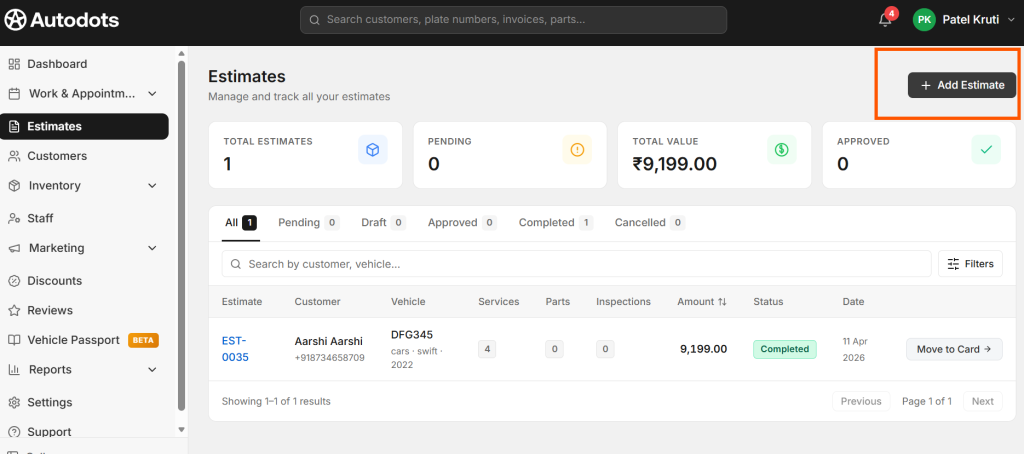
Make sure every estimate clearly explains:
- The problem found during vehicle inspection.
- The recommended repair or service.
- The required spare parts and their costs.
- Labour charges, taxes, and applicable discounts.
- The estimated total repair cost.
Digital Repair Estimate Approval Software can help your team prepare estimates in a structured format and share the information with customers. A clear estimate helps customers understand the repair before they make a decision.
2. Explain Why Each Repair Is Necessary
Customers may not understand automotive terms or know why a particular part needs attention. Simply telling someone that a component needs replacement may not be enough to gain their trust.
Explain the issue in simple language. For example, if the brake pads are worn, describe how this can affect braking performance and why replacement may be recommended. If a repair is urgent, explain the reason clearly without creating unnecessary fear.
You can also separate essential repairs from maintenance recommendations that may be planned for later. This allows customers to understand their options and prioritize their spending.
When repair explanations are connected with the estimate, Digital Repair Estimate Approval Software can support a more transparent approval process and reduce repeated conversations.
3. Send Estimates Digitally for Convenient Review
Calling customers repeatedly is not always practical. They may be working, driving, or unable to discuss a repair at that moment. Paper estimates can also be difficult to review when customers are away from the workshop.
Digital communication makes it easier to send repair information through available channels such as email or WhatsApp. Customers can review the estimate when it is convenient for them and contact the service advisor if they have questions.
With Digital Repair Estimate Approval Software, workshops can make estimate sharing and approval tracking part of a more organized digital workflow. Depending on the system, customers may be able to respond digitally, while the service team records the decision against the repair job.
4. Make the Approval Process Simple
Even when customers agree with a repair, a complicated approval process can delay their response. If they must print a document, sign it, scan it, or make several phone calls, they may postpone the decision.

Make it easy for customers to understand what they need to do next. Share the estimate, provide clear instructions, and offer a convenient way to communicate their decision.
When selecting Digital Repair Estimate Approval Software, check whether it supports the approval workflow your workshop needs. Depending on the product, useful options may include digital estimate sharing, approval status tracking, and records of customer responses.
Always confirm the customer’s approval before starting additional work that was not included in the originally authorized repair.
5. Follow Up at the Right Time
Some customers do not respond immediately because they are busy or need time to consider the estimate. Without a follow-up process, these pending jobs can be forgotten.
Create a simple follow-up routine for estimates that have not received a response. For example, a service advisor can send a polite reminder after an appropriate interval and offer to answer any questions about the repair or cost.
Keep the message helpful rather than pushy. A useful follow-up might say:
Hello! We have shared the estimate for your vehicle. Please let us know if you have any questions about the recommended repairs or charges. We will be happy to explain the details before proceeding.

Digital Repair Estimate Approval Software can help the service team identify pending estimates and organize follow-up tasks, depending on the features available in the system.
6. Keep Inspection Photos and Repair Details Organized
Sometimes, customers find it difficult to understand a repair because they cannot see the problem themselves. A clear inspection photo or short explanation can help them understand what the technician has found.
Where appropriate, share photos of worn parts, visible damage, or other inspection findings. Explain what the image shows and why the repair is recommended. Make sure the image is relevant and does not expose another customer’s personal information.
Keep inspection notes, repair recommendations, estimates, and approval records connected to the correct vehicle and job. This makes it easier for service advisors to answer questions and reduces confusion when several vehicles are being handled at once.
A well-organized digital process gives customers better information and helps the workshop maintain a clear record of the work discussed.
7. Track Approval Status Before Starting Repairs
When a workshop handles many vehicles, it can be difficult to remember which estimates have been approved, declined, or left unanswered. Without a clear record, employees may waste time checking messages or asking colleagues for updates.
Use a consistent status system, such as:
- Estimate prepared: The repair details and expected cost are ready.
- Approval pending: The customer has not yet responded.
- Approved: The customer has authorized the listed work.
- Declined: The customer has chosen not to proceed with the proposed work.
- Updated estimate required: New findings or changed costs need customer review.
Digital Repair Estimate Approval Software can make it easier to organize these statuses and identify which jobs are ready to move forward. This helps service advisors coordinate with technicians and plan work more effectively.
Common Repair Approval Mistakes to Avoid
Even a digital process needs good communication. Avoid these common mistakes when managing repair approvals:
- Using unclear descriptions: Explain repair needs in language customers can understand.
- Hiding costs: Clearly list parts, labour, taxes, and the expected total.
- Repeatedly contacting customers: Use polite, well-timed follow-ups instead of sending too many messages.
- Starting extra work without permission: Record approval before completing additional repairs.
- Failing to update estimates: Explain changes in repair scope or price and obtain updated approval when needed.
- Losing approval records: Keep customer decisions linked to the correct job and vehicle.
For additional guidance on written estimates and repair charges, read the Federal Trade Commission’s auto repair basics guide. It explains why customers should receive clear repair information and written estimates before work proceeds.
How Digital Repair Estimate Approval Software Improves Workshop Efficiency
A connected digital workflow can help service advisors manage estimates without relying on scattered paperwork and messages. When customer details, vehicle information, inspection findings, estimates, and approval records are organized together, the team can find the information it needs more easily.
Digital Repair Estimate Approval Software can support several everyday workshop activities:
- Preparing and sharing estimates more efficiently.
- Keeping recommended repairs and expected costs clear.
- Tracking customer responses and pending approvals.
- Reducing repeated data entry and manual follow-ups.
- Maintaining a record of authorized repair work.
- Helping service advisors coordinate with technicians.
Available features vary by software, so review the workflow and communication options before choosing a solution for your business.
How AutoDots Can Help Your Workshop
Auto repair workshops need a clear way to manage customers, vehicles, job cards, repair estimates, and daily service activities. AutoDots provides digital workshop management tools that can help businesses organize important operational information.
By improving the way repair details and estimates are managed, your team can make customer communication more consistent and keep job information easier to access. When evaluating Digital Repair Estimate Approval Software, look for a workflow that helps your team move from inspection to estimate, customer decision, approved repair, and final billing with less manual effort.
Want to explore the platform? Register for AutoDots to get started. You can also explore more auto repair workshop guides on the AutoDots Blog for practical tips on improving daily operations.
Frequently Asked Questions
1. What is Digital Repair Estimate Approval Software?
Digital Repair Estimate Approval Software is a digital solution that helps auto repair workshops prepare and share repair estimates, communicate recommended work, and organize customer approval records. The exact features depend on the software provider.
2. How can digital estimates help customers approve repairs faster?
Digital estimates can help customers review repair descriptions and expected costs more conveniently. Clear information and easy communication can reduce unnecessary back-and-forth conversations.
3. Can customers approve repairs remotely?
Some systems support remote approval through digital communication or approval features. Check that your selected software supports the method you want to use and that customer decisions are recorded properly.
4. Does digital approval remove the need for customer communication?
No. Digital tools can make communication easier, but service advisors should still explain important repair findings, answer questions, and clarify cost changes before additional work begins.
5. What should an auto repair estimate include?
A useful estimate should explain the recommended work, required parts, labour charges, applicable taxes or discounts, and expected total cost. It should also make any important conditions clear to the customer.
6. How do workshops manage pending approvals?
Workshops can use a clear approval status process to identify estimates that are waiting for a customer response. A digital system may help staff organize follow-ups and keep decisions connected to each repair job.
Conclusion
Faster repair approvals begin with clear estimates, honest explanations, convenient communication, and a simple process for customers to respond. When workshops organize inspection details and approval records properly, they can reduce avoidable delays and help customers make informed decisions.
Digital Repair Estimate Approval Software can support this process by helping your team share estimates, track responses, organize repair details, and keep approval information accessible. Combine the right digital workflow with helpful customer service to create a smoother experience for both customers and employees.
Start by improving one step at a time: make estimates easier to understand, follow up politely, and record every repair decision clearly. These simple changes can help your workshop work more efficiently and build stronger customer trust.