Running an automotive repair shop involves much more than fixing vehicles. Every day, your team has to manage customer details, vehicle information, service appointments, job cards, technician tasks, spare parts, invoices, payments, and delivery updates. When these activities are handled manually, small mistakes can quickly turn into bigger problems.
Automotive Repair Shop Software can help bring these daily activities into a more organized process. Instead of keeping information in notebooks, separate spreadsheets, or different files, a workshop can manage important records in one digital system. This can save time, reduce repeated work, and help employees understand what needs to be done.
A good software solution is not only useful for large workshops. Small and growing garages can also benefit from better organization. In this guide, we will discuss eight smart ways to improve your automotive repair business and create a smoother experience for both employees and customers.
Table of Contents
Why Modern Repair Shops Need Better Management
Customers expect quick service, clear communication, accurate estimates, and simple billing. At the same time, workshop owners need to control costs and make sure technicians have the information they need.
Automotive Repair Shop Software can help connect different parts of the workshop workflow. From the first appointment to the final invoice, important information can be recorded and updated as the vehicle moves through the service process.
A connected workflow can also reduce the amount of manual data entry. When employees do not have to enter the same customer or vehicle information again and again, they can spend more time on customer service and workshop operations.
8 Smart Ways to Improve Your Business
1. Organize Customer and Vehicle Information
Customer information is one of the most important assets of a repair shop. A workshop may need to store the customer’s name, contact details, vehicle model, registration number, service history, and previous repair information.
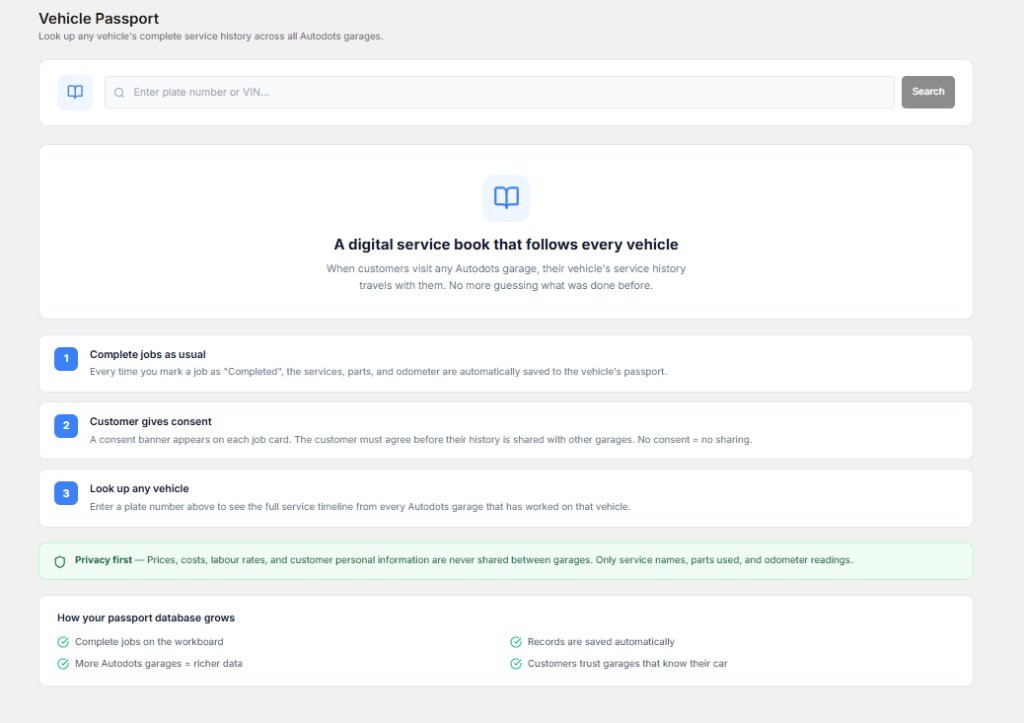
Keeping this information organized makes it easier to understand each customer’s requirements. When the customer returns, the service advisor can check previous records instead of asking the same questions again.
Automotive Repair Shop Software can help keep customer and vehicle records together. This makes it easier for the team to find information when a customer calls, books an appointment, or visits the workshop.
2. Make Service Appointments Easier
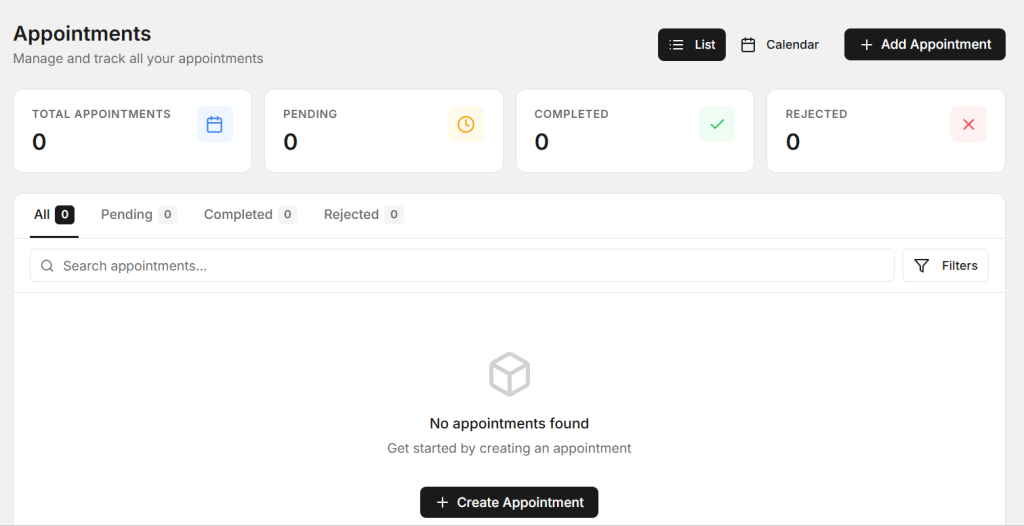
Appointment management can become difficult when bookings are handled through phone calls, messages, notebooks, and different calendars. Employees may accidentally book too many vehicles for the same time or forget to update a changed appointment.
A structured appointment process can help the workshop understand how many vehicles are expected each day. Service advisors can also plan the workload according to the available technicians and workshop capacity.
Automotive Repair Shop Software can make appointment information easier to organize and access. A clear schedule can reduce confusion and help the workshop provide a better customer experience.
3. Use Digital Job Cards
Job cards are an important part of vehicle repair. They can include customer complaints, inspection findings, repair instructions, technician notes, parts used, labor details, and job status.

Paper job cards can become difficult to manage when a workshop handles many vehicles. They may be misplaced, damaged, or difficult to find when an employee needs older information.
Digital job cards can keep repair information organized and make it easier for service advisors and technicians to review the current work. Updates can also be recorded as the repair progresses.
4. Improve Technician Task Management
Technicians need clear information before starting a repair. If instructions are unclear, they may spend time asking service advisors for details or waiting for approvals.
A better process can assign specific tasks to technicians and show the current status of each job. Managers can see which jobs are waiting, in progress, completed, or ready for inspection.
Automotive Repair Shop Software can support better task organization by connecting technician activities with job cards and vehicle records. This can make it easier to understand the overall workshop workload.
5. Control Spare Parts Better
Spare parts can have a major impact on repair time. A technician may be ready to complete a job, but the vehicle may have to wait if the required part is unavailable.

The workshop should keep clear information about available parts, frequently used products, suppliers, and stock levels. Fast-moving parts should receive special attention so they can be reordered before they run out.
A digital process can also connect parts with specific repair jobs. This helps the team understand which parts were used and makes it easier to include them in the final invoice.
6. Speed Up Billing and Payments
Billing is the final important step before a vehicle is delivered. Customers expect invoices to clearly show the services, labor, spare parts, taxes, and total amount.
Manual billing can take extra time when employees have to collect information from different records. It can also increase the chance of entering the wrong quantity or price.
Automotive Repair Shop Software can help organize service and parts information so the billing process becomes easier. When the invoice reflects the actual work completed, customers can understand what they are paying for.
7. Improve Customer Communication
Customers want to know what is happening with their vehicle. They may want updates about inspection results, repair approval, additional work, parts availability, or expected delivery time.
Poor communication can create frustration even when the actual repair work is good. Service advisors should have access to current job information so they can provide useful updates.
Automotive Repair Shop Software can help keep repair information organized, allowing service teams to communicate more clearly with customers. Better communication can build trust and encourage customers to return for future service.
8. Use Reports to Make Better Decisions
Workshop data can tell owners a lot about their business. Useful reports may include completed jobs, daily sales, parts usage, technician performance, service types, customer visits, and outstanding payments.
Without proper reports, owners may have to rely on assumptions when making business decisions. A clear report can show where the workshop is performing well and where improvements may be needed.
Automotive Repair Shop Software can help organize business information and make useful reports easier to review. This can support better planning and help owners understand the real performance of their workshop.
How Digital Management Can Save Time
Manual processes often require employees to enter the same information multiple times. For example, customer details may first be written during booking, entered again on a job card, and then typed again while preparing an invoice.
A connected digital workflow can reduce this repeated work. Once information is recorded, it can be used across different stages of the repair process.
This can save time for service advisors, managers, technicians, and billing staff. Even small time savings can become valuable when the workshop handles many vehicles every day.
How Better Management Can Improve Customer Experience
A customer’s experience starts before the vehicle enters the workshop. Easy appointment booking, clear communication, organized service, and transparent billing all contribute to how customers see the business.
When employees can quickly access vehicle and service information, they can answer customer questions more confidently. When repair progress is properly recorded, customers can receive better updates.
A professional process can make customers feel that their vehicle is being handled carefully. This can help build trust and encourage repeat visits.
Benefits of Using a Digital Repair Shop System
- Better customer record management
- More organized vehicle service history
- Easier appointment scheduling
- Digital job card management
- Better technician task tracking
- Improved spare parts control
- Faster invoice preparation
- Better customer communication
- Useful business reports
- Less manual paperwork
These benefits can help a repair shop create a more consistent workflow and reduce the daily confusion that comes with disconnected records.
How AutoDots Can Help Modern Repair Shops
AutoDots provides digital solutions designed to help automotive businesses manage important workshop activities. Modern tools can help teams organize customer information, vehicle services, appointments, job cards, inventory, billing, and other daily operations.
Automotive Repair Shop Software can be useful for workshops that want to reduce manual work, improve workflow visibility, and manage their business activities in a more organized way.
Businesses interested in automotive technology and partnership opportunities can explore the AutoDots partner program to learn more.
For more automotive business guides, workshop tips, and useful technology information, visit the AutoDots blog.
Simple Tips for Improving Your Repair Shop
Start by identifying the areas where your team loses the most time. It could be appointment management, searching for customer records, preparing job cards, finding spare parts, or creating invoices.
Once you identify the main problem, create a simple process for that activity. Make sure every employee follows the same process so information remains consistent.
It is also important to train your employees properly. A digital tool works best when everyone understands how to use it and why accurate information matters.
Review your workshop process regularly. As the business grows, the number of customers, vehicles, technicians, and parts may increase. Your management process should be able to handle this growth without creating unnecessary complexity.
Common Problems Repair Shops Should Avoid
One common problem is keeping customer information in different places. When records are spread across notebooks, phones, and spreadsheets, employees may struggle to find the latest information.
Another problem is not updating job status. If a vehicle is already repaired but the record still shows it as pending, service advisors may give customers incorrect information.
Workshops should also avoid ignoring inventory records. A missing spare part can delay an otherwise simple repair.
Finally, avoid treating billing as a completely separate process. Service details, parts, and labor should be properly recorded so the final invoice is accurate.
Frequently Asked Questions
What is automotive repair shop software?
Automotive repair shop software is a digital solution that helps workshops manage customer information, vehicle records, appointments, job cards, technicians, spare parts, billing, and other daily activities.
How can Automotive Repair Shop Software improve a workshop?
Automotive Repair Shop Software can help organize workshop operations, reduce paperwork, improve job tracking, manage inventory, simplify billing, and provide better access to customer and vehicle information.
Can small repair shops use digital software?
Yes. Small repair shops can use digital management tools to organize their daily work, reduce manual records, improve customer communication, and create a more professional workflow.
Can software help manage spare parts?
Yes. A digital system can help workshops record parts, monitor stock quantities, track parts used for repair jobs, and make purchasing decisions easier.
Can repair shop software improve customer service?
Yes. Better access to customer and vehicle information can help service advisors provide faster updates, explain repairs clearly, and create a smoother overall customer experience.
Conclusion
Running an automotive repair shop becomes easier when daily activities follow a clear and connected process. Customer records, appointments, job cards, technician tasks, spare parts, billing, communication, and reports all play an important role in workshop success.
Automotive Repair Shop Software provides a practical way to bring these activities into a more organized workflow. By reducing manual work and keeping important information easier to access, workshops can save time and improve their daily operations.
The goal is not simply to use more technology. The goal is to create a process that is easy for employees to follow, easy for managers to monitor, and convenient for customers. With the right digital approach, repair shops can improve efficiency, provide better service, reduce confusion, and create a stronger foundation for business growth.