
Managing service appointments can become difficult when a garage receives bookings through phone calls, messages, walk-ins, and handwritten notes. As the number of customers grows, the team needs a simple way to organize appointment details, vehicle information, service requests, and available time slots.
Vehicle Service Booking Software can help garages create a more organized booking process. Instead of checking different messages or notebooks, the team can manage appointment information in one place and prepare for upcoming vehicles more easily.
A better booking process can save time for service advisors, reduce confusion, improve customer communication, and help the workshop manage its daily workload. In this guide, we will look at six smart ways digital booking can simplify garage appointments.
Table of Contents
Why Garage Booking Management Matters
A service appointment is the first step in the customer’s workshop journey. If the booking process is slow or confusing, the customer may have a poor first impression of the garage.
Vehicle Service Booking Software can help make this first step easier by organizing customer requests, vehicle information, service requirements, and appointment times through a structured process.
When bookings are organized properly, the workshop can also prepare technicians, service advisors, and required resources before the vehicle arrives.
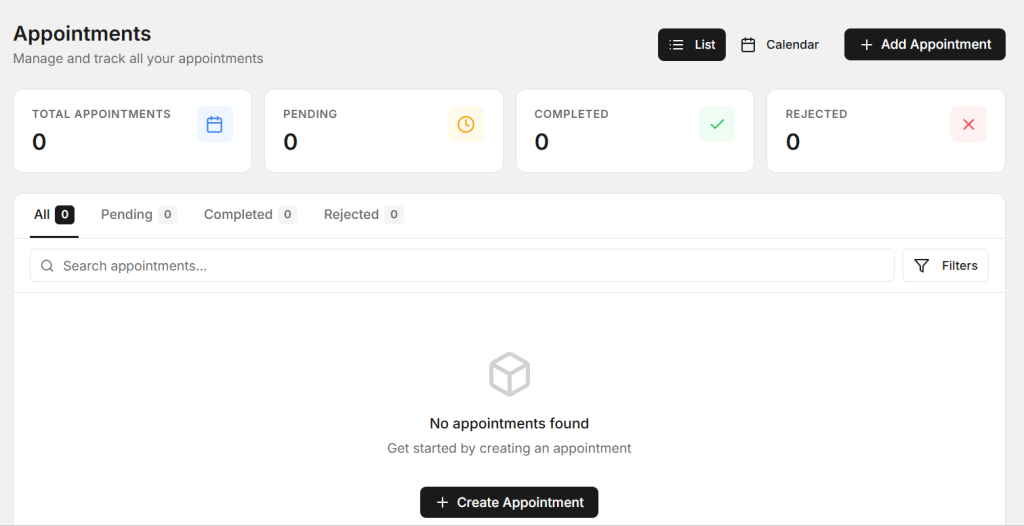
6 Smart Ways to Simplify Garage Bookings
1. Let Customers Book Services More Easily
Customers want convenience when scheduling a vehicle service. Many people may not have time to call a garage during working hours. They may prefer to request an appointment when they are free.
A digital booking option gives customers another simple way to request a service. They can provide basic details such as their name, contact information, vehicle details, required service, and preferred appointment time.
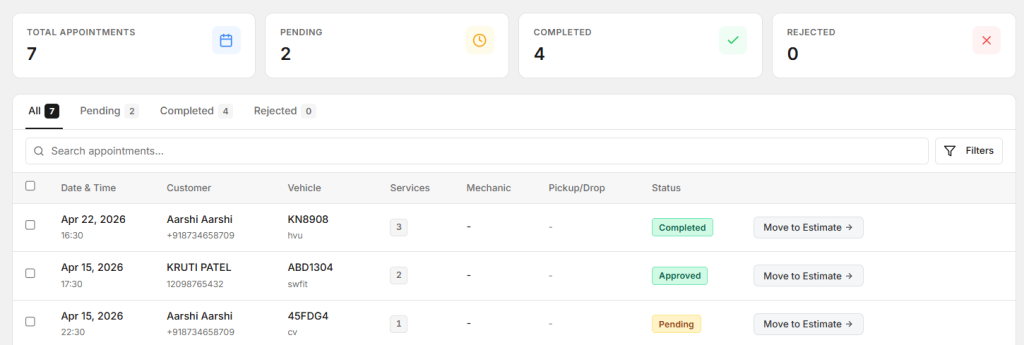
Vehicle Service Booking Software can organize these requests and make the information available to the garage team. This reduces the need to depend completely on phone calls and handwritten appointment notes.
A simple booking process can also make it easier for new customers to contact your garage.
2. Keep All Appointments Organized
When appointments come from different channels, it can be difficult to maintain a clear schedule. One customer may call, another may send a message, while someone else may walk into the garage.
Keeping appointment information in one organized system can help the service team understand the day’s workload. Employees can see which vehicles are expected and what services they have requested.
With Vehicle Service Booking Software, the garage can maintain a clearer appointment schedule and reduce the risk of double-booking or missing important booking information.
This can make daily workshop planning easier and give service advisors better visibility.
3. Collect Vehicle Information Before the Visit
Knowing basic vehicle information before the customer arrives can help the garage prepare for the appointment. Useful information can include the vehicle model, registration number, mileage, and requested service.
For example, a customer may book an oil service, brake inspection, AC check, tyre service, or general vehicle inspection. If the garage knows this information in advance, the team can prepare for the expected work.

Vehicle Service Booking Software can help collect these details during the booking process and keep them connected with the customer’s record.
This can reduce repeated questions during vehicle check-in and make the initial service process faster.
4. Reduce Missed Appointments
Missed appointments can create empty workshop time and make daily planning difficult. Customers may forget appointments, especially when they book several days in advance.
A structured digital booking process can make appointment details easier to track. The garage can maintain customer contact information and booking details in one place.
Depending on the system, reminders and follow-up communication can also help customers remember their scheduled service.
Using Vehicle Service Booking Software can help the team maintain better visibility of upcoming appointments and reduce avoidable booking problems.
5. Connect Bookings With Job Cards
The booking process should not stop when the customer arrives at the garage. The information collected during booking can be useful when creating the vehicle’s job card.

A job card can contain the customer’s complaint, requested service, inspection findings, technician notes, spare parts, labor, and repair status.
When booking information is connected with the job card, employees may not need to enter the same customer and vehicle information again.
Vehicle Service Booking Software can support a more connected process where appointment information becomes part of the vehicle’s service journey.
This can help service advisors and technicians understand what the customer originally requested.
6. Use Booking Information to Plan Your Workshop
Appointments can provide useful information about expected workshop demand. Owners can review how many vehicles are booked each day and which services are requested most often.
This information can help the garage plan technician availability, service capacity, spare parts, and working hours.
For example, if a particular day has many service bookings, the workshop can plan additional resources where possible. If certain services are frequently requested, the garage can make sure the required equipment and parts are available.
Vehicle Service Booking Software can help organize booking information so workshop owners can use it for better planning and decision-making.
Make the Booking Process Mobile-Friendly
Many customers use smartphones when searching for automotive services. A booking process should therefore be easy to use on a mobile screen.
Customers should be able to understand the available service options, enter their information, and select a preferred time without dealing with complicated pages.
A simple mobile booking experience can remove unnecessary steps and make it easier for customers to complete their appointment request.
Give Customers Clear Service Options
Customers should understand what they are booking. Service names should be simple and easy to recognize.
For example, a garage can provide options such as general service, oil change, brake inspection, AC service, tyre service, battery check, or vehicle inspection.
Clear options can help customers choose the correct service and give the workshop better information before the vehicle arrives.
Keep Customer Records Connected
Every appointment can provide useful customer and vehicle information. When the same customer returns, the garage should be able to find their previous record easily.
A connected customer record can include contact information, vehicle details, appointment history, previous repairs, and service history.
This can save time during future bookings and help the service advisor provide a more personalized experience.
Improve Communication After Booking
Booking confirmation is only one part of good customer communication. Customers may also need information about their appointment, vehicle check-in, repair progress, or expected delivery time.
A clear communication process can reduce uncertainty and help customers feel more confident about leaving their vehicle at the garage.
The workshop team can review the booking details before contacting the customer, which helps ensure that the information provided is accurate.
Benefits of Better Garage Booking Management
- Easy service appointment scheduling
- Better visibility of upcoming bookings
- Less manual appointment work
- Reduced booking confusion
- Better customer communication
- Fewer missed appointments
- Faster vehicle check-in
- Better preparation before service
- Improved workshop planning
- More organized customer records
How AutoDots Can Help Automotive Businesses
AutoDots provides digital solutions designed to help automotive businesses manage important workshop activities. These can include customer management, vehicle records, appointments, job cards, inspections, spare parts, invoicing, and other daily operations.
Vehicle Service Booking Software can help garages organize appointments and connect booking information with the wider service workflow. This can reduce repeated work and make it easier for the team to prepare for upcoming vehicles.
Automotive businesses interested in partnership opportunities can explore the AutoDots partner program.
For more practical automotive business guides and workshop tips, visit the AutoDots blog.
Simple Steps to Improve Your Booking Process
Start by reviewing how customers currently book services. Identify whether bookings are coming through phone calls, messages, walk-ins, websites, or other channels.
Next, decide which information the workshop needs before a vehicle arrives. Keep the booking process focused on useful customer and vehicle details.
Make the booking option easy to find and simple to use. A mobile-friendly process can also make it easier for customers to schedule appointments from their phones.
Finally, connect appointment information with the rest of the workshop process. The booking details should help with vehicle check-in, job cards, inspections, repairs, and billing.
Common Garage Booking Problems to Avoid
One common problem is relying only on phone calls and handwritten notes. This can make it difficult to maintain an accurate appointment schedule when the garage becomes busy.
Another problem is accepting more bookings than the workshop can handle. Proper scheduling should consider technician availability, workshop capacity, and expected repair time.
Garages should also avoid asking customers for the same information multiple times. Connecting customer, vehicle, and booking records can reduce repeated data entry.
Finally, do not make the booking form unnecessarily long. Ask for the information that the workshop actually needs and keep the customer experience simple.
Frequently Asked Questions
What is Vehicle Service Booking Software?
Vehicle Service Booking Software is a digital solution that helps garages manage service appointments, customer details, vehicle information, requested services, and workshop schedules.
Can booking software help garages get more appointments?
Yes. A simple digital booking process can make it easier for customers to schedule services at a convenient time. This can reduce the effort required to contact the garage and may encourage more booking requests.
Can customers book services online?
Yes. Depending on the system, customers can provide their contact details, vehicle information, requested service, and preferred appointment time through an online booking process.
Can booking software reduce missed appointments?
A structured booking system can keep appointment details organized and support reminder or follow-up processes. This can help customers remember their scheduled service.
Can booking information be used for job cards?
Yes. When booking information is connected with the workshop workflow, customer and vehicle details can help the team prepare job cards and understand the customer’s service request before the vehicle arrives.
Conclusion
Garage bookings should be simple for customers and easy for the workshop team to manage. When appointments are handled through phone calls, messages, and paper notes, important information can become difficult to track.
Vehicle Service Booking Software can help simplify appointment scheduling, organize customer and vehicle information, reduce missed bookings, and connect appointments with the wider workshop process.
Start by making your booking process simple, collecting useful vehicle details, keeping appointments organized, and connecting bookings with job cards and customer records. With a clear process and the right digital tools, your garage can manage bookings more efficiently and provide customers with a smoother service experience.