
Managing spare parts becomes difficult when an auto parts business or workshop handles many products every day. Parts can be received from suppliers, moved between storage areas, used for vehicle repairs, returned, replaced, or sold to customers. Without proper tracking, it can become difficult to know where a part is, how many units are available, and when new stock should be ordered.
Auto Parts Tracking Software can help businesses keep better control over their parts and make daily inventory work more organized. Instead of depending only on paper records, spreadsheets, or memory, teams can use digital records to track products from purchase to final use.
Good parts tracking is not only about knowing the current quantity. It is also about understanding product movement, usage, storage, suppliers, and customer jobs. In this guide, we will discuss eight simple ways to track every part and improve inventory control.
Table of Contents
Why Tracking Auto Parts Is Important
A workshop may have hundreds or even thousands of different parts. Some products may look similar but have different part numbers or vehicle compatibility. If the wrong product is selected, it can cause repair problems, returns, and additional work.
Auto Parts Tracking Software can help organize important product information so employees can find the right part more easily. It can also help teams understand how much stock is available before promising a repair or placing a new order.
Better tracking can save time, reduce unnecessary purchases, and help the workshop keep important parts available.

8 Simple Ways to Track Every Part
1. Create a Clear Record for Every Part
Start by creating a proper record for each product. Important details can include the part name, part number, brand, quantity, purchase price, selling price, supplier, and storage location.
Auto Parts Tracking Software can keep these details organized in one place. Employees can search for a product quickly instead of checking different notebooks or spreadsheets.
Clear records are especially useful when a business handles similar-looking products. Accurate part numbers and descriptions can help employees choose the correct item.

2. Use Part Numbers Consistently
Part numbers are important because many automotive products have similar names. Two products may look almost identical but have different specifications or vehicle applications.
Use consistent part numbers throughout purchasing, storage, repair jobs, and billing. This can reduce confusion and make it easier to identify products.
When the same part number is used across different records, employees can search and track the product more efficiently.
3. Track Every Stock Movement
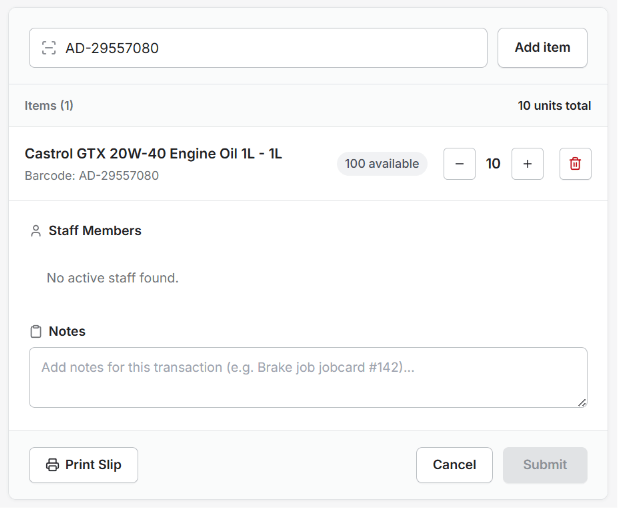
Parts can move several times before they are finally used. Products may arrive from suppliers, move into storage, be transferred to another location, or be used during a repair.
Every important stock movement should be recorded. If a part is removed from inventory but the record is not updated, the system may show an incorrect quantity.
Auto Parts Tracking Software can help businesses record incoming and outgoing stock in a more organized way. This gives employees a clearer view of the current inventory.
4. Organize Parts by Storage Location
Knowing that a part is available is useful, but employees also need to know where it is stored. Searching through shelves for a product can waste valuable workshop time.
Create clear storage locations for different categories of parts. Shelves, bins, or sections can be labelled using product names, part numbers, or category names.
A digital record can also include storage information so employees can find a product faster. This becomes especially useful as the inventory grows.
5. Connect Parts With Vehicle Repair Jobs
When a part is used for a customer vehicle, it should be connected with the relevant repair job. This helps the workshop understand which products were consumed and why.
For example, if a brake component is used during a customer’s repair, the inventory record can be updated while the part is added to the job. This reduces the chance of forgetting to adjust the stock quantity.
Auto Parts Tracking Software can support a connected process where parts information is linked with workshop jobs, making inventory and billing easier to manage.
6. Monitor Fast-Moving Parts
Some products are used much more frequently than others. Common filters, oils, brake parts, spark plugs, bulbs, and other maintenance products may need regular restocking.
Identify these fast-moving products and monitor their quantities more closely. Setting suitable minimum stock levels can help prevent unexpected shortages.
When the workshop knows which products move quickly, purchasing becomes easier. The team can plan orders based on actual usage instead of guessing.
7. Track Returns and Damaged Parts
Not every product that leaves storage is permanently used. Parts may be returned because the wrong item was ordered, a repair was cancelled, or the product was not required.
Some products may also become damaged while being stored or handled. These changes should be recorded properly so the available stock remains accurate.
A proper tracking process should distinguish between usable stock, returned products, damaged items, and other stock adjustments. This gives managers a more realistic picture of what can actually be used.
8. Review Parts Reports Regularly
Inventory reports can help business owners understand how parts are moving. Useful information may include current quantities, frequently used products, slow-moving items, purchase activity, and parts used for customer jobs.
Regular reviews can reveal problems before they become serious. For example, a product that is frequently running out may need a higher stock level, while a slow-moving item may need more careful purchasing.
Auto Parts Tracking Software can help organize this information and make it easier for owners and managers to review their inventory.
How Better Parts Tracking Saves Time
Searching for parts manually can take a lot of time, especially when the workshop is busy. Employees may need to check several shelves, call another staff member, or look through old records.
Digital tracking can reduce this work by keeping product details in an organized system. Employees can search for the part and check its available quantity and other useful information.
This can help service advisors and technicians spend more time on vehicle repairs and customer service instead of searching for inventory details.
How Parts Tracking Helps Prevent Stock Shortages
A stock shortage can delay a vehicle repair and affect the customer’s expected delivery time. It can also force the workshop to make urgent purchases.
Tracking product usage helps managers understand which parts are frequently consumed. When these products reach a planned minimum level, the purchasing team can review the requirement and arrange new stock.
Auto Parts Tracking Software can make this process more organized by keeping current stock information available to the team.
How Parts Tracking Can Reduce Overstock
Having too many parts can also create problems. Slow-moving products may remain in storage for a long time and use money and space that could be used for other business needs.
By reviewing stock movement, owners can identify products that are not being used regularly. This can help them make more careful purchasing decisions.
The goal is to maintain enough inventory to support regular work without filling the storage area with products that are rarely required.
Benefits of Better Auto Parts Tracking
- Better visibility of available stock
- Faster product searches
- Reduced risk of stock shortages
- Better purchasing decisions
- Improved parts organization
- Better repair planning
- More accurate inventory records
- Easier billing and job tracking
- Better control over returns and damaged products
- Reduced manual inventory work
These benefits can help workshops and auto parts businesses create a more reliable inventory process.
Keep Product Information Updated
Inventory tracking only works well when product information is kept updated. If prices, quantities, suppliers, or part numbers change, the records should also be updated.
Employees should have a clear process for adding new products and changing existing information. Duplicate records should also be avoided because they can make stock quantities difficult to understand.
A clean product database makes searching, purchasing, stock checking, and billing easier.
Connect Inventory With Billing
Parts tracking and billing are closely connected. When a product is used for a customer repair, the same information may be required on the final invoice.
If employees have to enter the part information separately in inventory and billing records, they may spend more time doing repetitive work. It can also increase the chance of entering incorrect quantities or prices.
Auto Parts Tracking Software can support a more connected process where parts used for repairs can be included in the billing workflow.
How AutoDots Can Help Modern Automotive Businesses
AutoDots provides digital solutions designed to help automotive businesses organize their daily operations. Modern workshop tools can help teams manage customer information, vehicle services, appointments, job cards, inventory, billing, and other important activities.
Auto Parts Tracking Software can be useful for businesses that want to reduce manual inventory work and create a clearer process for managing spare parts.
Businesses interested in automotive technology and partnership opportunities can explore the AutoDots partner program to learn more.
For more automotive business guides, workshop tips, and useful technology information, visit the AutoDots blog.
Simple Tips for Better Parts Tracking
Start with the parts you use most often. Make sure their names, part numbers, prices, quantities, and storage locations are correct.
Next, create a simple routine for recording every stock movement. Products received from suppliers should be added, while products used for repairs should be removed from available stock.
Review inventory regularly and compare digital records with physical quantities. If there is a difference, find the reason and correct the record.
It is also useful to train employees on the importance of updating inventory immediately. Delayed updates can make even accurate records unreliable.
Common Parts Tracking Problems to Avoid
One common problem is relying only on memory. This may work when a business has very few products, but it becomes difficult as inventory grows.
Another problem is using different names or part numbers for the same product. This can create duplicate records and make stock levels difficult to understand.
Businesses should also avoid ignoring damaged or returned products. If these items remain listed as usable stock, the available quantity may appear higher than it actually is.
Finally, do not wait until a part is completely out of stock before reviewing purchasing needs. Regular monitoring can help prevent shortages and repair delays.
Frequently Asked Questions
What is auto parts tracking software?
Auto parts tracking software is a digital solution that helps businesses organize spare parts, track stock movement, monitor quantities, manage product information, and understand parts usage.
How can Auto Parts Tracking Software help a workshop?
Auto Parts Tracking Software can help workshops track incoming and outgoing products, find parts faster, monitor stock levels, connect parts with repair jobs, and maintain more accurate inventory records.
Can small garages use parts tracking software?
Yes. Small garages can use digital parts tracking tools to reduce manual records, organize spare parts, monitor frequently used products, and improve daily workshop operations.
Why should part numbers be tracked?
Part numbers help employees identify the correct product, especially when several parts have similar names or appearances. Consistent part numbers can reduce confusion and ordering mistakes.
Can parts tracking improve customer service?
Yes. Better parts tracking can help workshops know whether required products are available, which can support better repair planning and more accurate information about expected vehicle completion.
Conclusion
Tracking every spare part properly can make a big difference in how efficiently an automotive business operates. Without reliable inventory information, businesses can face stock shortages, excess inventory, misplaced products, repair delays, and unnecessary manual work.
Auto Parts Tracking Software provides a practical way to organize product records, track stock movement, connect parts with repair jobs, monitor fast-moving products, manage returns, and review inventory reports.
By following simple tracking practices and using suitable digital tools, workshops and auto parts businesses can save time, control inventory costs, improve repair planning, and keep the right products available when they are needed. A well-organized parts tracking process creates a stronger foundation for efficient daily operations and better customer service.