Running a modern garage in the UK involves more than repairing vehicles. Garage owners and managers must handle customer bookings, vehicle inspections, repair jobs, estimates, invoices, spare parts, staff schedules, and payments. Managing all these activities manually can create delays, paperwork, and communication problems. The right Auto Repair Shop Software UK solution can help garages organise daily operations and provide a better experience for customers.
As customer expectations continue to change, vehicle owners increasingly value clear estimates, convenient bookings, regular repair updates, and transparent invoices. Digital tools can help independent garages and larger repair businesses manage these expectations. In this guide, we will explore five essential features to look for when selecting garage management software in the UK.
Table of Contents
Why Do UK Garages Need Digital Management Software?
Many garages still use paper job cards, spreadsheets, notebooks, and phone calls to manage their daily work. These methods can become difficult to maintain when the number of customers and repair jobs increases.
A suitable Auto Repair Shop Software UK platform can bring several important business activities together. Instead of searching through different files, staff can access organised information and follow a more consistent process.
Digital workshop management can help businesses:
- Organise customer and vehicle records.
- Schedule service appointments and manage bookings.
- Create digital job cards for repair work.
- Prepare estimates and customer invoices.
- Monitor spare parts and inventory.
- Keep customers updated about repair progress.
- Review workshop activity and business performance.
These improvements can reduce repetitive administration and help employees focus on their responsibilities. However, the benefits depend on choosing software that matches the size, workflow, and requirements of your garage.
5 Essential Features of Auto Repair Shop Software UK
1. Digital Job Cards and Repair Order Management
Job cards are an important part of garage operations. They record the customer’s complaint, vehicle details, inspection findings, required repairs, parts, labour, and work completed. When these records are managed on paper, information can be misplaced or become difficult to read.
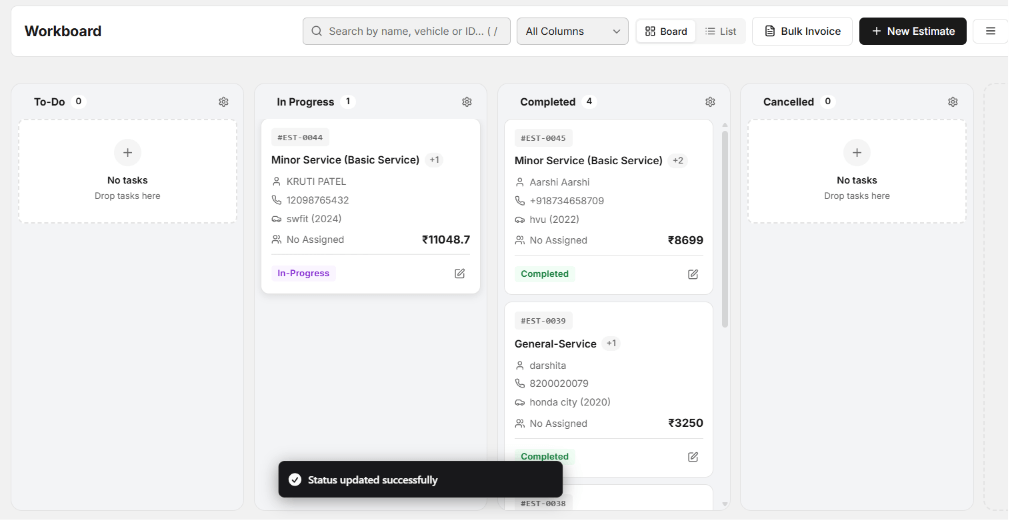
One of the most useful features of Auto Repair Shop Software UK is digital job card management. It allows garage staff to create and update repair records in a more organised way.
Important job card capabilities include:
- Recording customer and vehicle details.
- Adding reported vehicle problems and inspection notes.
- Listing required repair tasks and replacement parts.
- Tracking job progress and work status.
- Maintaining repair history for future visits.
For example, when a customer brings a vehicle in for brake repairs, the service advisor can create a job record with the vehicle information and reported issue. The technician can then refer to the same record while carrying out the work.
This process helps reduce confusion between the front desk and workshop team. It also gives managers a clearer view of which jobs are waiting, in progress, or completed.
2. Customer Management and Vehicle History
Building strong customer relationships is important for every independent garage. Customers are more likely to return when a business understands their vehicle history, communicates clearly, and provides organised service.
A good garage management platform should help staff maintain customer profiles and vehicle records. This makes it easier to find information during repeat visits and understand previous work completed on a vehicle.
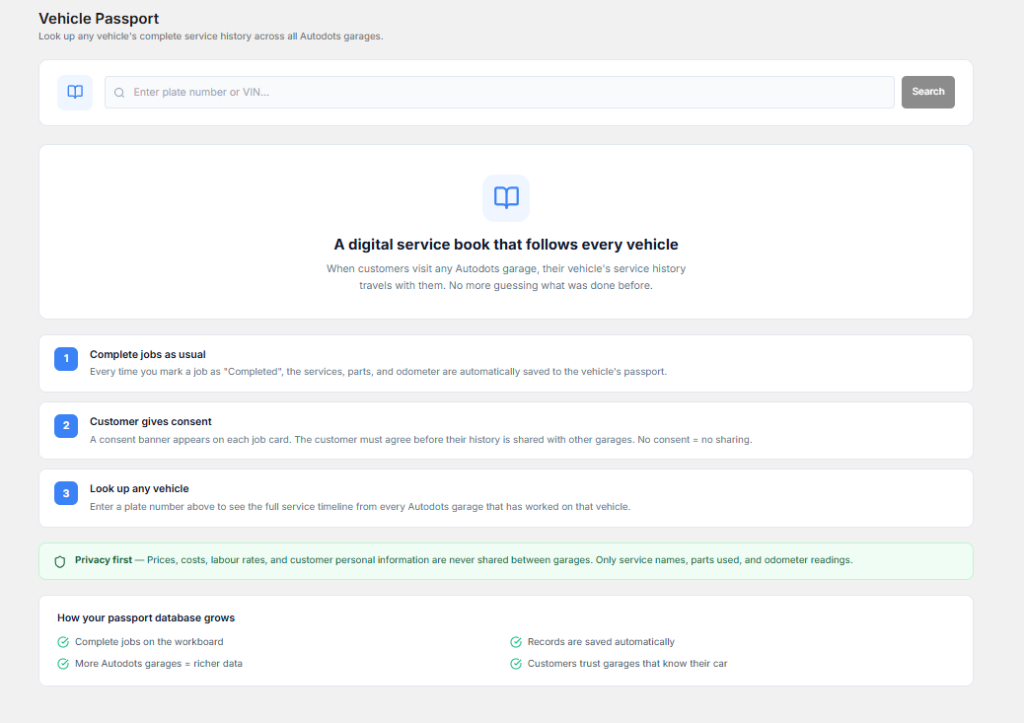
Look for customer management features such as:
- Customer contact information and communication records.
- Vehicle registration and identification details.
- Previous repair and service history.
- Notes about customer requirements.
- Records of estimates, invoices, and completed work.
For example, if a customer returns with the same vehicle, staff can review its previous service records instead of asking the customer to explain every detail again. This can make conversations more useful and help the garage provide a more consistent service.
When comparing Auto Repair Shop Software UK options, check how easily employees can search for customers and vehicles. Also review how the platform handles access permissions and protects personal information.
3. Estimates, Invoicing, and Payment Management
Clear pricing is essential for building customer trust. Before starting repair work, garages often need to explain the expected labour, parts, and other charges. Preparing estimates manually can take time and may lead to calculation or documentation errors.
Software with estimate and invoicing tools can help garages prepare professional documents and maintain better billing records.
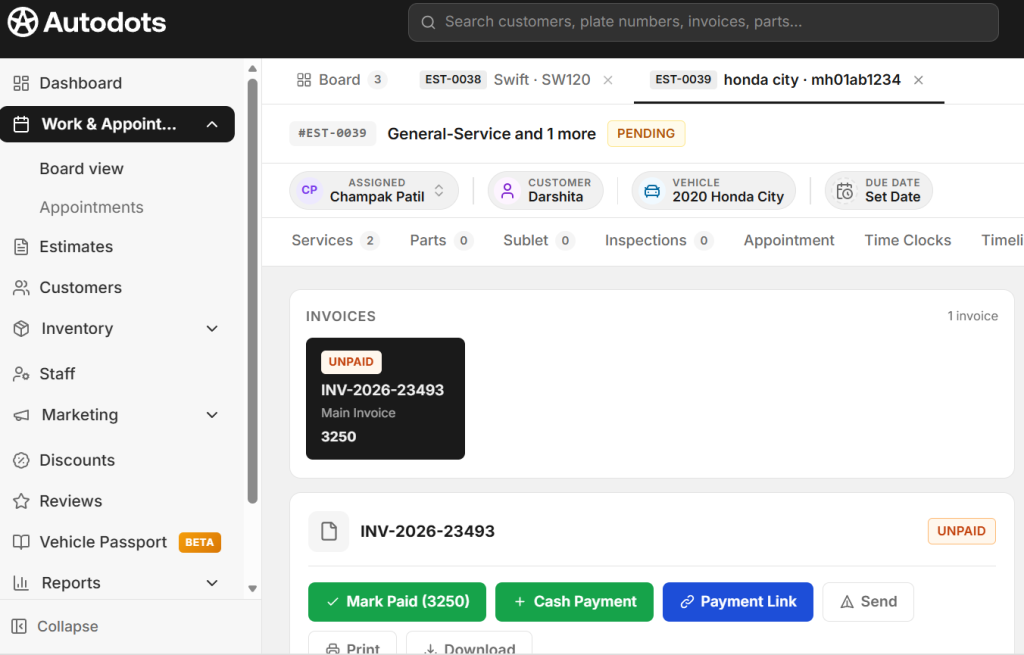
Useful billing features include:
- Creating estimates for repair and maintenance work.
- Recording labour charges and parts costs.
- Updating estimates when approved work changes.
- Generating invoices for completed jobs.
- Tracking paid and outstanding invoices.
- Maintaining digital billing records.
For UK businesses, it is important to check whether the software supports the VAT and invoicing processes relevant to the business. Garages should also confirm whether the platform offers the accounting integrations they need.
Before choosing Auto Repair Shop Software UK, ask the provider to demonstrate how estimates become invoices and how changes are recorded. This can help you understand whether the billing workflow suits your existing process.
4. Inventory and Spare Parts Management
Spare parts are essential to everyday garage operations. A workshop needs the right parts available at the right time to complete repairs efficiently. Poor stock management can lead to missing parts, unnecessary purchases, delayed jobs, and additional costs.
Inventory management tools can help garage owners maintain better control over stock and understand which parts are being used regularly.
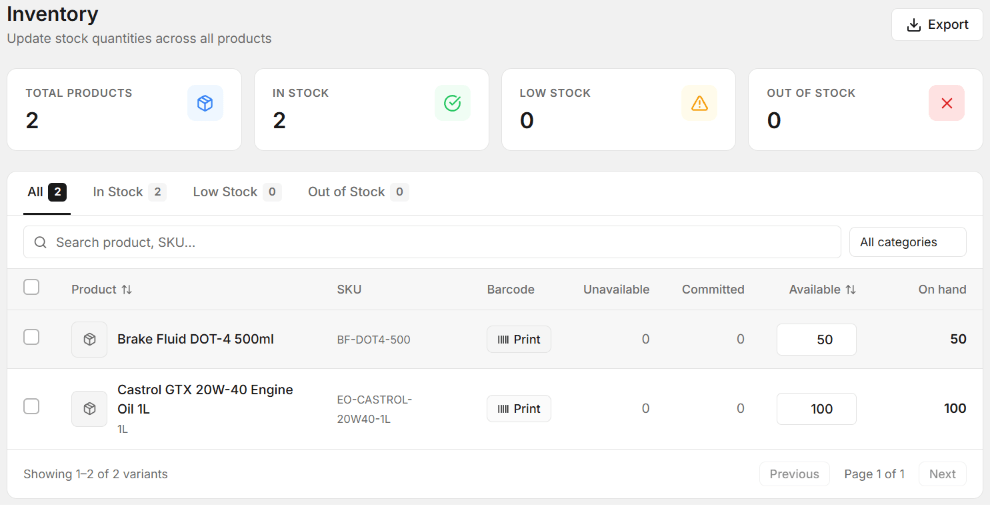
Important inventory features include:
- Recording spare parts and product details.
- Monitoring available stock quantities.
- Updating inventory when parts are used.
- Identifying items that need to be reordered.
- Maintaining supplier and purchase information.
- Reviewing stock movement and usage records.
For example, if a garage regularly replaces oil filters, inventory records can help staff understand how many are available and when additional stock may be needed. This makes it easier to plan purchases and avoid unnecessary delays.
When evaluating Auto Repair Shop Software UK, check whether inventory can be connected to repair jobs. Linking parts usage with job records can make it easier to understand where stock is going and maintain more accurate workshop records.
5. Appointment Scheduling and Customer Communication
Managing bookings is another important responsibility for garage owners. Customers may contact the workshop by phone, email, website forms, or messaging services. Without a clear booking process, appointments can overlap or important requests can be missed.
Appointment scheduling tools help staff organise bookings and plan workshop workloads. Customer communication features can also make it easier to share updates about estimates, approvals, and repair progress.
Useful scheduling and communication capabilities include:
- Recording customer appointment requests.
- Viewing upcoming bookings and workshop schedules.
- Managing changes to appointment times.
- Recording customer communication.
- Sending reminders or repair updates where supported.
- Coordinating bookings with available workshop capacity.
For example, when a customer books a service appointment, staff can record the vehicle details and expected work. The workshop can then plan its workload more effectively.
Before selecting a platform, check which communication channels and integrations it supports. Do not assume that every provider includes automatic reminders or every messaging service in its standard plan.
How to Choose the Right Garage Software in the UK
Choosing software is an important business decision. The best platform is not necessarily the one with the largest number of features. It is the one that solves your workshop’s main problems and is easy for your team to use.
Understand Your Garage Requirements
Start by reviewing your current processes. Identify where your team spends the most time and which activities create the most mistakes. A small independent garage may need simple job cards, customer records, and invoicing, while a larger workshop may require staff management, inventory controls, and detailed reporting.
Check Ease of Use
Garage employees have different responsibilities and levels of technical experience. The software should have a clear interface and practical workflows. Ask for a demonstration and test common tasks such as creating a job card, finding a vehicle record, and preparing an invoice.
Compare Pricing and Plans
Review monthly or annual subscription costs, user limits, setup fees, integrations, and additional charges. A low starting price may not include every feature your business requires. Calculate the total cost before selecting a plan.
Review Support and Data Protection
Check what onboarding, training, and customer support are available. UK garages should also consider how providers handle personal information and whether their data practices support the business’s obligations under applicable UK data protection requirements, including UK GDPR where relevant.
How AutoDots Can Help Your Workshop
AutoDots is a platform worth exploring if you want to organise important garage activities through a digital system. Its workshop-related capabilities include digital job cards, customer management, estimates, invoicing, appointment scheduling, inventory management, and business reporting.
These tools can help businesses reduce dependence on scattered paperwork and maintain more organised records. For example, digital job cards can help staff follow repair work, while customer and vehicle records make information easier to access during repeat visits.
If you are comparing Auto Repair Shop Software UK platforms, consider whether AutoDots matches your team’s workflow, business requirements, and budget. Check its current availability, supported features, integrations, and plan details before making a decision.
Explore the AutoDots partner program to learn more about the platform. You can also review the AutoDots pricing page for available plans and pricing information.
For more information about automotive businesses, workshop operations, and digital management ideas, visit the AutoDots automotive blog.
Common Mistakes to Avoid When Buying Garage Software
Even a useful platform may not deliver the expected results if it is selected without proper planning. Keep these common mistakes in mind:
- Choosing only by price: Check whether the plan includes the features your garage actually needs.
- Ignoring employee feedback: Involve technicians and service advisors who will use the software daily.
- Not checking integrations: Confirm compatibility with accounting tools and other services used by your business.
- Skipping product demonstrations: Test the main workflows before purchasing a subscription.
- Ignoring staff training: Give employees enough time to learn the new system.
- Overlooking data security: Review permissions, backups, and the provider’s data protection practices.
Frequently Asked Questions
1. What is Auto Repair Shop Software UK?
It is a digital platform that helps UK garages manage repair jobs, customer records, vehicle history, estimates, invoices, appointments, and spare parts. The available features depend on the software provider and subscription plan.
2. Is garage management software suitable for small workshops?
Yes. Small independent garages can use digital tools to organise customer records, repair jobs, and billing. They should choose a plan that matches their current team size and operational needs.
3. Can garage software help improve customer service?
Yes. Organised vehicle records, clear estimates, appointment scheduling, and timely repair updates can help garages communicate more effectively with customers.
4. What should UK garages check before purchasing software?
Garages should review pricing, included features, ease of use, customer support, data protection, VAT-related invoicing requirements, and compatibility with existing business tools.
5. Does AutoDots offer workshop management features?
AutoDots provides workshop-related tools such as digital job cards, customer management, estimates, invoicing, appointment scheduling, and inventory management. Check the official website for current features and plan availability.
Conclusion
Digital management tools are becoming an important part of modern garage operations. Features such as digital job cards, customer management, invoicing, inventory control, and appointment scheduling can help workshops organise their work and provide a more consistent customer experience.
Before selecting a platform, understand your business requirements, compare available features, review pricing, and test the software with your team. The right solution should simplify daily tasks, improve access to information, and support the long-term growth of your garage.