
Modern automotive workshops handle many tasks every day. Mechanics inspect vehicles, diagnose problems, repair parts, update job cards, and communicate with customers. When these tasks are managed manually, it can become difficult to keep everything organised. Important information may be missed, repair jobs may get delayed, and customers may have to wait longer than expected.
A Workshop App for Mechanics can help simplify daily workshop activities by bringing important information and tasks into a digital system. Depending on its features, it can help mechanics track repair jobs, access vehicle details, organise work, and communicate more effectively with the workshop team.
In this blog, we will explore six powerful ways a workshop app can help mechanics work smarter, save time, and improve the customer experience.
Table of Contents
Why Do Modern Mechanics Need Digital Tools?
Mechanics need more than technical skills to complete repair jobs successfully. They also need accurate information, clear instructions, access to vehicle history, and a reliable way to track their work.
Paper job cards and separate spreadsheets can make these tasks harder. A mechanic may need to search through files to find a customer’s details or ask another employee for an update about a spare part. These small delays can affect the entire workshop schedule.
Digital tools help organise information so that authorised employees can find the details they need more easily. A well-designed Workshop App for Mechanics can support better coordination between mechanics, service advisors, and workshop managers.
6 Powerful Ways to Work Smarter
1. Manage Repair Jobs More Efficiently
Every repair job follows a series of steps, from vehicle check-in to inspection, repair, quality checks, and final delivery. If these steps are not tracked properly, mechanics may lose time trying to understand which tasks are pending and which vehicles need immediate attention.

A digital job management system can help the team organise repair work and view the current status of each vehicle. When the app supports job assignment and status updates, mechanics can understand their responsibilities without depending entirely on verbal instructions.
Useful job management features may include:
- Viewing assigned repair jobs.
- Checking vehicle and customer information.
- Recording inspection findings.
- Updating job progress.
- Identifying pending tasks.
For example, a mechanic can check which vehicle requires inspection before starting the next repair. The workshop manager can also review unfinished jobs and identify work that needs attention.
Using a Workshop App for Mechanics can make job responsibilities clearer and help the workshop maintain a more organised daily schedule.
2. Access Vehicle Information Quickly
Accurate vehicle information helps mechanics make better repair decisions. Details such as registration information, previous service records, reported problems, and inspection notes can provide useful context before work begins.
Searching through paper records can take time, especially when a customer has visited the workshop several times. Important information may also be difficult to find if different employees maintain separate files.
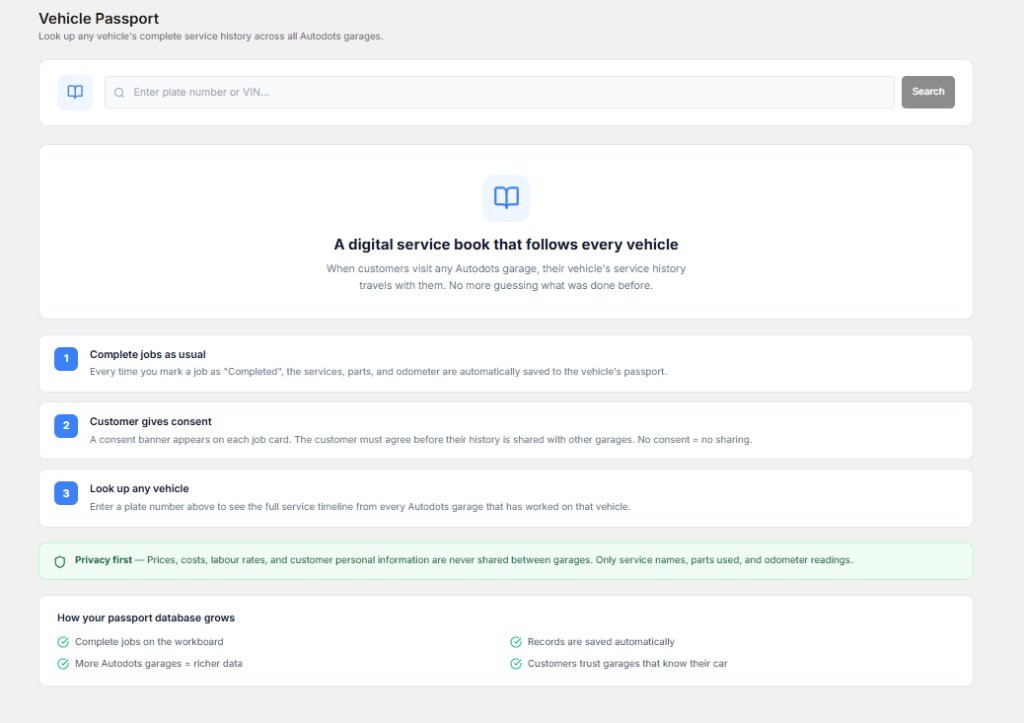
A digital workshop app can make vehicle information easier to access when it includes customer profiles and service history features. Mechanics can review available records before inspecting a vehicle and avoid asking customers to repeat information unnecessarily.
Organised vehicle records can help mechanics:
- Understand previous repair work.
- Review earlier inspection notes.
- Identify recurring vehicle problems.
- Check customer-reported concerns.
- Maintain consistent service records.
For example, if a customer reports the same unusual noise after a previous repair, the mechanic can review the recorded work and inspection notes before investigating the issue again.
A reliable Workshop App for Mechanics can support this process by keeping relevant information organised and available to authorised users.
3. Improve Communication Across the Workshop Team
Communication is important when several employees work on different vehicles at the same time. Mechanics may need to ask service advisors about customer approvals, inform managers about repair delays, or request parts from the inventory team.
When updates are shared only through verbal conversations, important details can be forgotten. One employee may believe that a task is complete while another person is still waiting for an update.

Digital workflows can help teams share job information and record important changes. Depending on the app, employees may be able to update repair status, add notes, or view task assignments.
To improve communication, your workshop should:
- Record important repair findings clearly.
- Update job status when work progresses.
- Inform the right person about delays.
- Record requests for additional parts.
- Document customer approval before additional work begins.
Clear communication can reduce confusion and help everyone understand what needs to happen next. It also helps workshop managers coordinate work when the garage becomes busy.
4. Reduce Paperwork and Repeated Data Entry
Mechanics and workshop employees often spend time completing job cards, recording inspection results, and updating service documents. Although these records are necessary, repeated manual entry can reduce the time available for productive work.
Digital tools can simplify paperwork when they provide electronic job cards, reusable vehicle records, digital inspection forms, and other relevant features. Information can be recorded once and accessed later by authorised employees.
A digital process may help your workshop:
- Reduce dependence on paper job cards.
- Keep inspection notes organised.
- Reduce duplicate data entry.
- Find records more quickly.
- Maintain consistent documentation.
For example, instead of writing the same vehicle details on multiple forms, an employee may be able to use an existing digital vehicle profile when creating a new repair job.
A Workshop App for Mechanics can help reduce administrative effort when the available features match your team’s daily workflow. However, employees should still check the accuracy of every record they enter.
5. Track Spare Parts and Repair Requirements
Spare parts play an important role in completing repair jobs on time. If a required part is unavailable, a vehicle may remain in the workshop while the team waits for a replacement. Poor stock records can also lead to unnecessary purchases or delays caused by missing items.
Some workshop apps include inventory management features or connect with separate inventory systems. These tools can help staff check available stock, record parts used for repairs, and identify items that need to be reordered.

Useful inventory activities include:
- Checking whether a required part is available.
- Recording parts used for a repair.
- Monitoring stock quantities.
- Identifying frequently used components.
- Flagging parts that need replenishment.
For example, if a vehicle needs new brake pads, the team can check stock before confirming the expected repair timeline. If the part is unavailable, the workshop can arrange an order and update the customer about the delay.
When inventory features are available, a Workshop App for Mechanics can help connect repair requirements with parts information and improve coordination between technicians and stock managers.
6. Improve Productivity and Customer Service
Workshop productivity is not simply about completing more repairs. It also involves reducing avoidable delays, maintaining repair quality, using staff time wisely, and keeping customers informed throughout the service process.
Digital tools can help managers understand how jobs move through the workshop. When job tracking and reporting features are available, they can review unfinished work, identify repeated delays, and make better decisions about task assignments.
Mechanics can also benefit from clearer job instructions and easier access to vehicle records. This can reduce the time spent searching for information and help them focus on the repair itself.
To improve productivity and customer service:
- Set clear priorities for repair jobs.
- Keep job statuses updated.
- Record inspection findings accurately.
- Inform customers about important delays.
- Complete final checks before returning vehicles.
A Workshop App for Mechanics can support a more consistent repair process by making important job information easier to manage. Better records and timely updates can also help service advisors answer customer questions more accurately.
How to Choose the Right Workshop App
Not every workshop needs the same software. A small garage may require basic job tracking and vehicle records, while a larger service centre may need inventory management, employee scheduling, reporting, and customer communication tools.
Before selecting an app, consider the following factors:
- Ease of use: Mechanics should be able to learn the main features without unnecessary difficulty.
- Essential features: Look for job tracking, vehicle history, inspections, and other tools relevant to your operations.
- Mobile compatibility: Check whether the app works on the devices your team uses.
- Data security: Review access permissions, authentication, backups, and data handling practices.
- Internet access: Find out whether key features require a constant internet connection.
- Pricing: Compare subscription costs, user limits, and additional charges.
- Training and support: Check what help is available during setup and everyday use.
It is also useful to involve mechanics in the selection process. They understand the practical challenges of daily repair work and can help identify features that will genuinely save time.
Common Mistakes to Avoid When Using a Workshop App
Choosing the right app is only the first step. Your team also needs a consistent process for using it. Avoid these common mistakes:
- Skipping training: Show employees how to update jobs and record repair information correctly.
- Leaving records incomplete: Make sure important inspection findings and job updates are recorded.
- Ignoring staff feedback: Ask mechanics which features are useful and where the workflow can improve.
- Choosing too many features: Start with tools that solve your most important problems.
- Neglecting data security: Use suitable permissions and follow the provider’s security recommendations.
Start with a few essential features and review how well they work for your team. Once employees become comfortable with the system, you can introduce more advanced tools where they provide real value.
How AutoDots Can Help Your Workshop
Modern automotive businesses need organised processes to manage repair jobs, vehicle records, customer details, and everyday workshop activities. AutoDots provides an automotive-focused platform for businesses exploring digital workshop management.
When evaluating AutoDots, consider the available features that match your workshop’s needs. Look for ways to improve job visibility, organise operational information, and create more consistent workflows. Confirm the current features, integrations, and pricing directly before making a decision.
You can learn more about business opportunities through the AutoDots partner program. For more ideas about automotive technology and workshop operations, visit the AutoDots automotive blog.
Frequently Asked Questions
What is a Workshop App for Mechanics?
A workshop app is a digital tool that helps automotive workshops manage tasks such as repair job tracking, vehicle records, inspections, and team coordination. Its exact capabilities depend on the software and the selected plan.
Can a workshop app help mechanics save time?
Yes. An app can reduce time spent searching for records, repeating data entry, and checking job progress manually. The benefits depend on how well the software fits the workshop’s workflow and how consistently employees use it.
Is a workshop app useful for a small garage?
Yes. A small garage can use digital tools to organise repair jobs, maintain vehicle histories, and reduce paperwork. The best option is one that meets the garage’s main needs without adding unnecessary complexity or cost.
Can mechanics use workshop apps on mobile devices?
Many workshop solutions offer mobile-friendly access or dedicated apps, but device compatibility varies. Check whether the chosen software supports your team’s phones or tablets and whether its important features are available on those devices.
How can a workshop measure the benefits of an app?
A workshop can compare job completion times, unfinished jobs, record accuracy, paperwork requirements, and customer feedback before and after introducing the app. These measures can help managers understand where the system is making a difference.
Conclusion
Mechanics work best when they have clear instructions, accurate vehicle information, organised repair jobs, and good communication with their team. Digital tools can make these everyday tasks easier and reduce the time spent managing paperwork and searching for information.
A Workshop App for Mechanics can help improve job tracking, organise vehicle records, strengthen team communication, reduce repeated data entry, support parts management, and improve the customer experience when the right features are available.
Start by identifying the biggest challenges in your workshop. Choose an app that fits your needs, train your team, and keep records updated. With consistent use and regular improvements, your workshop can work more efficiently and provide a more reliable service to customers.