
Taking your workshop online can make it easier for customers to find your business, learn about your services, and contact you for vehicle repairs. Many garage owners still manage their daily work through notebooks, phone calls, WhatsApp messages, and spreadsheets. These methods may work for a small number of customers, but they can become difficult to manage as the workshop grows.
Garage Registration is a simple first step for workshop owners who want to create a digital presence and organize their garage online. With the right setup, you can add your garage details, services, team information, inventory, job cards, and other important workshop information in one place.
In this guide, we will explain five easy steps that can help you take your workshop online and create a more organized process for managing customers and daily garage activities.
Table of Contents
Why Should You Take Your Garage Online?
Customers are increasingly using the internet to find nearby garages and compare available services. They may search for a mechanic, car service, oil change, AC repair, inspection, or other vehicle services before deciding where to go.
A digital garage profile can make your business easier to discover. Instead of depending only on people who already know your workshop, an online presence can help new customers learn about your services and contact you.
Garage Registration can also be useful for the workshop itself. A digital platform can help you move important activities away from paper records and scattered messages.
For example, customer information, vehicle details, job cards, invoices, and service history can be managed through a more organized workflow. This can save time and make everyday work easier for your team.
5 Easy Steps to Get Your Workshop Online
1. Create Your Garage Account
The first step is to create an account for your workshop. The process should be simple and should not require complicated technical knowledge.
When you start Garage Registration, keep some basic information ready. This can include your garage name, owner or manager name, mobile number, email address, city, and workshop location.
Using accurate information is important because these details may be used when customers search for your workshop. Make sure your phone number and location are correct so potential customers can contact or find you without confusion.
According to the AutoDots setup guide, garage owners can begin by creating an account and providing basic workshop information. The setup can then continue from the garage dashboard.
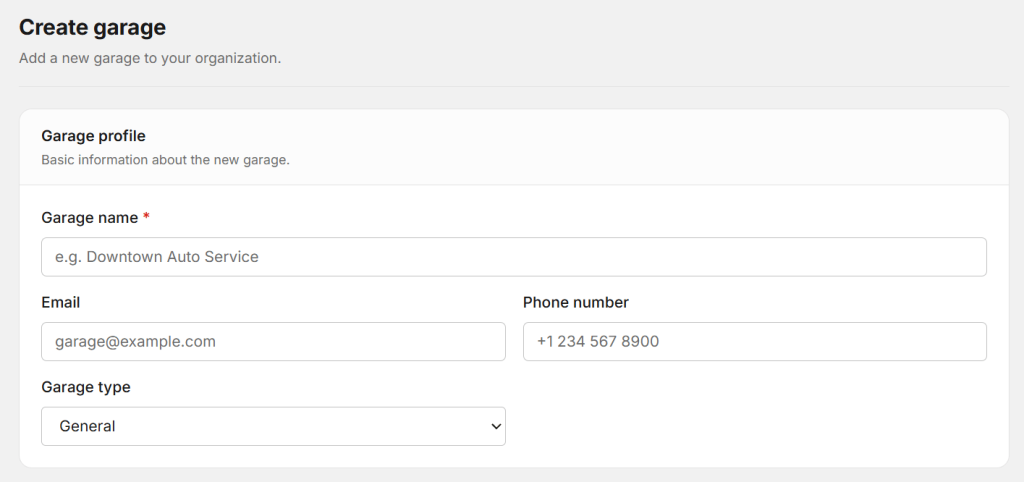
For a detailed step-by-step reference, you can also read the complete guide to setting up a garage on AutoDots.
2. Complete Your Garage Profile
After creating your account, the next step is to complete your workshop profile. This is important because your profile gives customers an idea of what your garage offers.
Add your complete address, contact number, operating hours, workshop description, and photos if available. Good photos can help customers understand your workshop before they visit.
You should also explain what your garage specializes in. For example, your workshop may focus on general car service, AC repair, brake service, engine repair, tyre service, vehicle inspection, or other automotive services.
A complete profile can make your business look more professional and can help customers decide whether your workshop is suitable for their needs.
During Garage Registration, do not worry about making every part of the profile perfect on the first day. You can start with the most important information and improve the profile over time.
3. Add Your Services and Pricing
Customers should be able to understand what services your garage provides. A service list makes it easier for people to know whether you can handle their vehicle requirements.
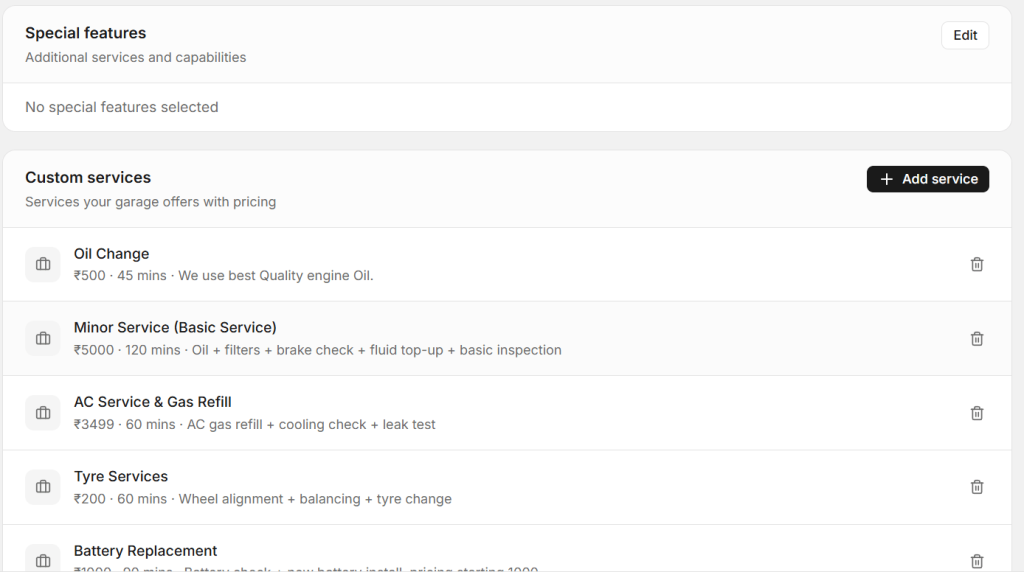
Start by adding your most common services. These might include:
- General car service
- Oil and filter change
- Brake inspection and repair
- AC service and repair
- Battery replacement
- Tyre and wheel service
- Vehicle inspection
- Engine diagnostics
Where possible, provide clear pricing or starting prices. Customers often want to understand the expected cost before booking a service.
Garage Registration becomes more useful when your online profile gives customers enough information to make a decision without having to call the workshop for every basic question.
You can also update your services and prices later as your workshop changes its offerings.
4. Add Your Workshop Team and Inventory
A garage is not only about customers and services. Your technicians and spare parts also play an important role in daily operations.
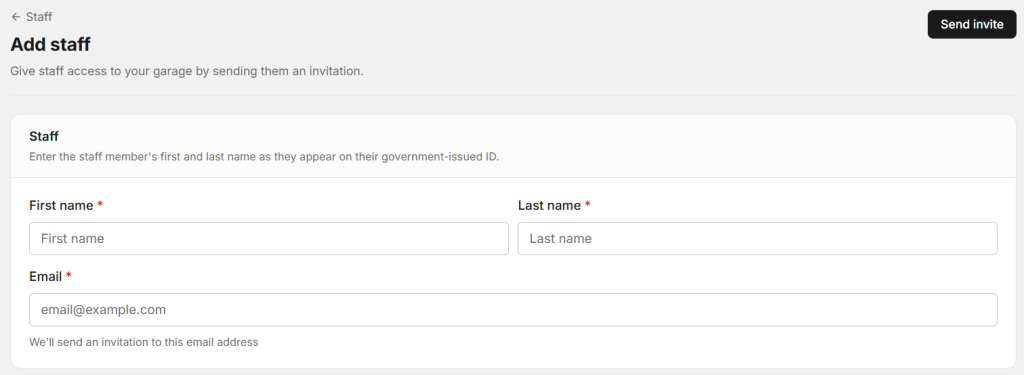
If your digital platform supports staff management, add your technicians and service advisors. Give each team member the appropriate role and access level. This can help everyone understand their responsibilities.
For example, technicians may need access to assigned jobs and repair details, while service advisors may need to manage customer information and appointments.
You can also start adding your most commonly used spare parts to your inventory. Begin with items such as oil filters, brake pads, spark plugs, coolant, wiper blades, and other frequently used products.
Keeping inventory information organized can help your team understand what is available and what needs to be reordered.
When you complete Garage Registration and continue with staff and inventory setup, your workshop can move toward a more connected digital process.
5. Start Managing Jobs Digitally
Once your garage profile, services, team, and basic inventory are ready, you can start managing actual workshop jobs digitally.

Create a job card when a customer brings a vehicle for service. Add the customer’s information, vehicle registration number, vehicle model, requested service, technician, inspection details, and other relevant notes.
A digital job card can help the entire team understand what needs to be done. Technicians can see assigned jobs, service advisors can check progress, and managers can review the status of vehicles in the workshop.
Digital job cards can also reduce the need for handwritten notes. When repair information is stored digitally, it can be easier to find later when the customer returns for another service.
What Information Should You Prepare Before Going Online?
Preparing your information before starting the setup can make the process faster. You do not need a large amount of technical knowledge. Most garage owners can start with basic business information.
Keep these details ready:
- Garage or workshop name
- Owner or manager name
- Mobile number
- Email address
- Complete workshop address
- Operating hours
- List of services
- Service prices or starting prices
- Workshop photos
- Technician details
- Common spare parts
Having these details ready can make Garage Registration smoother and reduce the time needed to complete your workshop profile.
How an Online Garage Profile Can Help You Get Customers
Creating an online profile is not only about putting your workshop name on the internet. The goal is to make it easier for potential customers to understand your business.
A customer may want to know where your garage is located, what services you provide, when you are open, and how to contact you. If this information is easy to find, the customer can make a decision faster.
A complete profile can also help create trust. Workshop photos, service information, business details, and customer reviews can give people more confidence before visiting.
When your workshop information is properly organized after Garage Registration, you can make your business easier for online customers to understand.
Connect Online Bookings With Workshop Operations
Getting an online booking is only the beginning. Your workshop should also have a process for handling the customer after the booking is received.
When a customer schedules a service, the team should be able to check the appointment, prepare for the vehicle, create a job card, complete the inspection, assign the work, and prepare the final invoice.
A connected digital workflow can reduce repeated data entry. Customer and vehicle information collected during booking can be used during the repair process.
This can make the customer experience smoother and help service advisors avoid asking for the same information multiple times.
Keep Your Garage Information Updated
Creating your online profile is not a one-time task. Your business information may change over time.
Your workshop may change its opening hours, add new services, update prices, hire new technicians, or move to a different location. Make sure your online information reflects these changes.
Incorrect information can confuse customers. For example, if your profile shows an old phone number or outdated opening hours, a customer may not be able to contact you.
Regularly checking your profile after Garage Registration can help ensure that customers always see useful and accurate information.
Benefits of Taking Your Workshop Online
- Better online visibility
- Easier customer discovery
- More organized workshop information
- Simple access to customer details
- Better service presentation
- Easier appointment management
- Digital job card management
- Better spare parts organization
- Faster invoice preparation
- More professional customer experience
How AutoDots Can Help Your Garage Go Digital
AutoDots is designed to help automotive businesses manage important workshop activities through digital tools. The platform can support areas such as customer management, vehicle records, appointments, job cards, staff management, inventory, invoicing, and other daily garage operations.
The AutoDots setup guide explains how garage owners can create an account, complete their workshop profile, add services, add technicians, manage inventory, create digital job cards, and generate invoices. It also explains how a verified garage can appear on the AutoDots marketplace for customers searching for automotive services. :contentReference[oaicite:0]{index=0}
By completing Garage Registration and setting up the important parts of your workshop profile, you can start building a more organized digital process for your business.
If you want to explore partnership opportunities, visit the AutoDots partner page and learn more about getting your workshop online.
You can also find more practical guides about workshop management, automotive technology, and growing your garage on the AutoDots blog.
What Happens After You Register Your Garage?
After the initial setup, the next goal should be to make your digital profile useful for real customers and your workshop team.
Start by adding your main services and keeping your contact details accurate. Then add your technicians and commonly used parts if those features are available in your chosen platform.
Once your first customer arrives, create a digital job card and record the work performed. Over time, you will build a useful collection of customer, vehicle, service, and repair records.
This information can help your workshop understand repeat customers, previous repairs, frequently used parts, and daily job activity.
Common Mistakes to Avoid
One common mistake is creating an online profile but leaving important information incomplete. A garage name without services, location, contact information, or operating hours does not give customers enough information.
Another mistake is adding incorrect or outdated details. Always check your phone number, address, opening hours, and service information.
Workshops should also avoid trying to manage everything through multiple disconnected tools. If customer information is in one place, job cards in another, and invoices somewhere else, employees may still spend time moving information between systems.
Finally, do not stop after the initial setup. Keep your profile, services, team, inventory, and workshop records updated as your business changes.
Frequently Asked Questions
What is Garage Registration?
Garage Registration is the process of creating an online account or business profile for your automotive workshop so you can manage your garage digitally and make important business information available to customers.
What information is needed to register a garage?
Usually, you need basic information such as your garage name, owner details, mobile number, email address, location, operating hours, and service information. Having these details ready can make the setup easier.
Can I manage my garage from a mobile phone?
Yes. The AutoDots setup guide states that garage owners can complete the setup and manage important workshop activities from a mobile device. :contentReference[oaicite:1]{index=1}
Can I add technicians after registering my garage?
Yes. After creating your workshop account, you can continue setting up your team by adding technicians and service advisors where supported by the platform. This can help organize job assignments and workshop responsibilities.
Can I add spare parts and inventory?
Yes. AutoDots’ setup guide includes an inventory setup step where garage owners can add commonly used parts, stock quantities, prices, and low-stock information. :contentReference[oaicite:2]{index=2}
Why should a garage have an online profile?
An online profile can make it easier for customers to discover your workshop, understand your services, find your location, and contact you. It can also provide a foundation for moving other garage operations into a digital workflow.
Final Thoughts
Taking your workshop online does not have to be complicated. The process can start with basic business information and gradually expand into customer management, appointments, job cards, inventory, invoicing, and other daily operations.
Garage Registration is the first step toward creating a digital presence for your workshop. Once your account is ready, focus on completing your profile, adding services, setting up your team, organizing inventory, and managing real workshop jobs digitally.
A well-organized online garage can make it easier for customers to find your business and easier for your team to manage daily work. Start with the basics, keep your information updated, and build your digital workshop step by step.