Running an automobile garage requires proper planning, accurate records, and smooth communication between the service team and customers. Job cards are one of the most important parts of garage operations because they keep all repair details, customer information, vehicle history, and service updates in one place. Learning how to Manage Job Cards can help garage owners save time, reduce mistakes, and improve customer satisfaction.
Modern garages are moving from paper-based systems to digital solutions because manual processes often create problems like missing information, delayed updates, and confusion between technicians and managers. Using garage management software makes daily work easier and helps teams handle multiple vehicles without stress.
Table of Contents
Why You Need to Manage Job Cards in a Modern Garage
A job card is not just a document; it is a complete record of a vehicle service process. It includes customer details, vehicle information, required repairs, spare parts used, labor details, and final service updates. With the right system, you can Manage Job Cards in a more organized and professional way.
When everything is stored digitally, garage owners can quickly check previous service records, understand customer requirements, and provide better service experiences. This also reduces the chances of losing important information that usually happens with paper files.
A well-managed job card system improves workflow because technicians know exactly what work needs to be completed. Service advisors can provide accurate updates to customers, and managers can monitor the complete repair process from start to finish.

How AutoDots Garage Software Makes Job Card Management Easier
AutoDots Garage Software is designed to simplify daily garage activities by bringing important operations into one platform. It helps businesses Manage Job Cards with better control and complete visibility.
Instead of creating manual records, garage teams can create digital job cards within minutes. They can add vehicle details, customer information, repair requirements, service notes, and other important details without using complicated processes.
The software allows teams to track every stage of a repair job. From vehicle arrival to final delivery, every update can be recorded properly. This helps managers understand the current status of every vehicle inside the workshop.
Steps to Create and Handle Job Cards Efficiently
Following a proper process is important for smooth garage operations. These simple steps can help you Manage Job Cards Efficiently and maintain better service quality.

1. Add Customer and Vehicle Information
The first step is collecting complete customer and vehicle details. Information like customer name, contact number, vehicle model, registration details, and service history should be added correctly. Accurate information helps technicians understand the vehicle better.
2. Mention Service Requirements Clearly
Every repair requirement should be explained properly in the job card. Whether it is regular maintenance, replacement work, inspection, or repair service, clear details prevent confusion and improve work accuracy.
3. Track Spare Parts and Labor Details
Keeping records of spare parts and labor costs helps garages maintain transparency. Customers also receive clear information about expenses, which builds trust and improves relationships.

4. Update Repair Progress Regularly
Regular updates help teams know which tasks are completed and which tasks are pending. When you Manage Job Cards properly, your team can avoid delays and deliver vehicles on time.
Key Benefits of Using Digital Garage Software
Digital garage software provides many advantages compared to traditional paperwork. It creates a smoother working environment and helps businesses provide faster service.
One major benefit is improved accuracy. Digital records reduce human errors because information can be stored, updated, and accessed easily. Garage owners no longer need to search through multiple files to find old service details.
Another benefit is better customer communication. Service teams can quickly check repair progress and provide correct updates. This creates a professional experience and increases customer confidence.
AutoDots Garage Software also supports better business management by helping owners understand daily operations. Reports and organized data allow managers to make better decisions for future growth.
Features That Help Garage Owners Save Time
Modern garage solutions include useful features that support daily activities. These features help businesses Manage Job Cards without depending on manual processes.
Some helpful features include digital vehicle records, service history tracking, customer management, repair status updates, billing support, and workshop activity monitoring. These tools create a connected system where every team member can work more effectively.
A garage can Manage Job Cards more successfully when all departments follow the same digital process. This improves teamwork between reception staff, technicians, and management.
Tips to Improve Your Garage Workflow
Good workflow management is important for every successful automotive business. Here are some simple tips that can improve daily performance:
- Keep customer and vehicle information updated regularly.
- Train your team to use digital garage tools properly.
- Maintain clear communication between technicians and customers.
- Review completed jobs to understand areas of improvement.
- Use reports to identify business growth opportunities.
These practices help garages provide consistent service quality and create better customer experiences. Using reliable software also reduces workload and allows teams to focus more on vehicle service instead of paperwork.
Why Choose AutoDots for Better Garage Management
AutoDots provides solutions that help automotive businesses improve their daily operations. The platform focuses on making garage management simple, organized, and effective for different types of workshops.
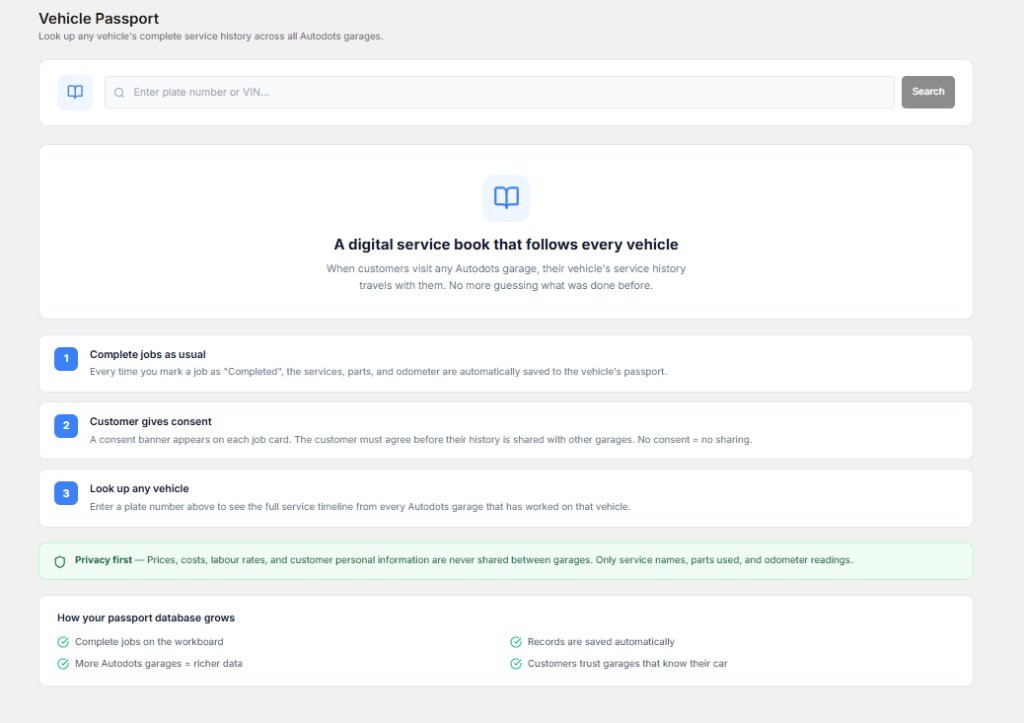
If you want to explore partnership opportunities and grow with automotive technology solutions, you can visit the AutoDots partner program for more information.
You can also explore more automotive software tips, guides, and updates through the AutoDots blog to learn about better ways of improving your garage business.
Frequently Asked Questions
What is a digital job card?
A digital job card is an electronic record that stores vehicle service details, customer information, repair requirements, and work updates. It replaces traditional paper records and makes information easier to manage.
How does AutoDots help me Manage Job Cards?
AutoDots helps garages create, update, and track job cards digitally. It keeps all service information organized and allows teams to monitor repair progress easily.
Can digital job cards improve customer service?
Yes, digital job cards improve customer service by providing accurate information about repairs, costs, and service status. Customers receive better communication and more transparency.
Is garage software useful for small workshops?
Yes, garage software is useful for both small and large workshops. It helps small businesses organize operations, reduce paperwork, and improve their professional image.
Conclusion
Managing garage operations becomes much easier when businesses use the right technology. A proper digital system improves accuracy, saves time, and creates better coordination between teams. By choosing the right software, you can Manage Job Cards more effectively and build a smoother service process for your customers.
A reliable garage management solution helps you focus on providing quality vehicle services while the software handles organization and tracking. Start improving your workshop operations with smarter tools and create a better experience for both your team and customers.