Running an auto repair business requires more than skilled mechanics and quality tools. Workshop owners also need to manage repair jobs, customer details, appointments, spare parts, payments, and daily operations. Handling everything manually can lead to delays, missed bookings, billing mistakes, and unhappy customers. The right auto repair shop software 2026 can help repair businesses organise their work and improve customer service.
There are many workshop management tools available, but not every option is suitable for every business. Some are designed for small garages, while others offer features for larger repair centres. In this guide, we will explore four software options and explain what to consider before choosing one.
Table of Contents
Why Do Repair Businesses Need Workshop Software?
Many repair shops still depend on paper job cards, notebooks, spreadsheets, and phone calls. These methods may work when a business is small, but they become difficult to manage as customer numbers and repair jobs increase.
A modern auto repair shop software 2026 solution can bring important workshop activities into one digital system. Depending on the platform and plan, it can help businesses:

- Create and manage digital job cards.
- Store customer and vehicle information.
- Prepare estimates and invoices.
- Manage appointments and repair schedules.
- Track spare parts and stock levels.
- Monitor payments and business performance.
- Keep customers informed about repair progress.
With organised information, staff can spend less time searching for records and more time focusing on repairs. It also becomes easier for owners to understand what is happening inside the workshop.
4 Best Software Options for Auto Repair Businesses
1. AutoDots – Workshop Management and Customer Operations
AutoDots is an option for automotive businesses that want to manage important workshop activities through a digital platform. It is worth considering for garages looking to organise customer records, repair jobs, estimates, invoices, appointments, and inventory in a more structured way.
Instead of maintaining separate records for every activity, businesses can use a connected system to manage day-to-day operations. This can make it easier for workshop owners and staff to follow repair jobs and keep customer information organised.
Useful capabilities to explore:
- Digital job cards: Create and manage repair records without depending entirely on paper documents.
- Customer management: Keep customer information organised for future visits and communication.
- Estimates and invoices: Prepare billing documents and maintain clearer payment records.
- Appointment scheduling: Organise customer bookings and workshop schedules.
- Inventory management: Maintain better visibility of spare parts and stock.
- Business reports: Review available business information to understand workshop activity.
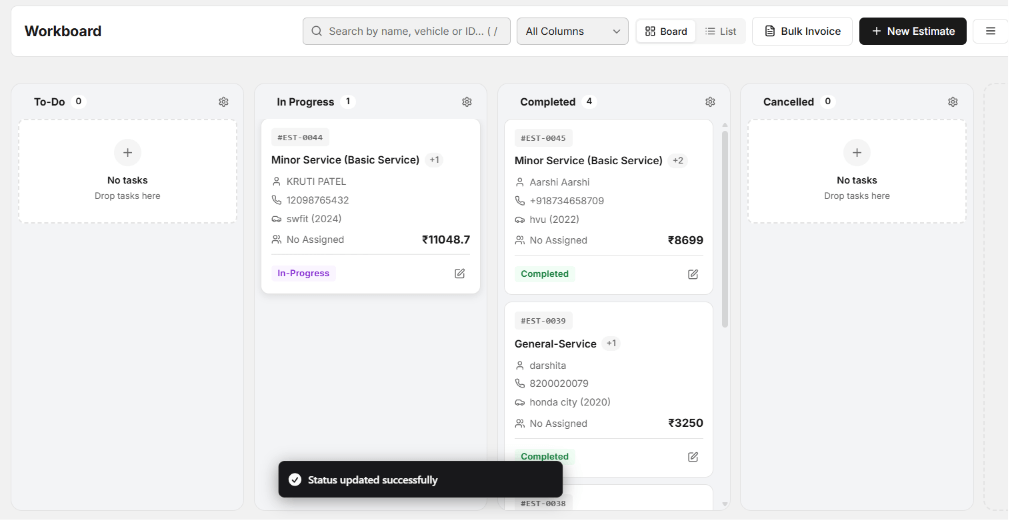
AutoDots is worth exploring if your business wants to bring several workshop activities together rather than using disconnected tools. Check the available features and plan limits before making a decision.
Visit the AutoDots partner program to learn more about its workshop platform. You can also review the AutoDots pricing plans to understand the available options.
2. Shopmonkey – Repair Shop Workflow Management
Shopmonkey is a workshop management platform designed for automotive repair businesses. It is an option for shops that want to organise service workflows and reduce the amount of manual administration involved in handling repair orders.
Depending on the selected plan and available integrations, businesses can explore features related to estimates, repair orders, customer communication, invoicing, and shop operations.
Why consider Shopmonkey?
- It provides tools for organising repair shop workflows.
- It can help manage estimates and repair orders.
- It offers digital processes for customer and service management.
- It may suit businesses looking for a dedicated repair shop platform.
Before choosing Shopmonkey, check its availability in your country, supported payment methods, integrations, and pricing. Also confirm whether its features match your workshop’s daily requirements.
3. Tekmetric – Digital Auto Repair Shop Management
Tekmetric is another software option developed for automotive repair shops. It focuses on helping businesses manage repair operations through digital workflows. It may be useful for shops that want more organised repair orders and better visibility into service activities.
Points to consider:
- Digital tools for managing repair orders.
- Support for estimates and customer approvals.
- Workshop workflow and operational visibility.
- Features intended for automotive service businesses.
Tekmetric may be worth comparing if your business wants a specialised repair shop system. However, check regional availability, integrations, staff access, and the total subscription cost before signing up.
4. AutoLeap – Automotive Repair Shop Software
AutoLeap is a software platform built for auto repair businesses. It aims to help workshops manage service operations and customer-related activities through digital tools.
Repair businesses can explore its available features for managing estimates, repair orders, customer communication, and shop workflows. The exact capabilities depend on the product offering and subscription details.
Why explore AutoLeap?
- It is designed for automotive repair businesses.
- It offers digital workflow management capabilities.
- It can be considered by shops looking to organise customer and repair information.
- It provides another option to compare with other workshop platforms.
Ask for a product demonstration and confirm whether the software supports your location, business size, preferred integrations, and daily processes.
How to Compare These Software Options
Choosing the right auto repair shop software 2026 requires more than comparing brand names. A tool that works well for a large repair centre may not be the best choice for a small independent garage.
Use the following factors when comparing different platforms.
1. Features You Actually Need
Start by identifying your biggest workshop problems. If you frequently lose track of repair jobs, prioritise job card management. If spare parts are difficult to control, look for inventory tools. If customer bookings create confusion, focus on appointment scheduling.
Avoid paying for advanced features that your business will not use. Choose a system that solves your current problems and can support your future requirements.
2. Ease of Use
Software should make workshop operations easier, not create more work. Mechanics, service advisors, and managers should be able to understand the basic functions without complicated training.
Ask for a demonstration and check how easily staff can create job cards, find customer records, prepare estimates, and update repair progress.
3. Pricing and Subscription Costs
Compare monthly or annual subscription fees, user limits, setup charges, and additional costs for integrations. A low starting price may not include every feature your workshop needs.
Calculate the total cost before choosing a platform. Also check whether you can change plans as your business grows.
4. Customer Support and Training
Reliable support can make a major difference when your workshop starts using a new system. Check whether the provider offers onboarding, training materials, and help when technical problems occur.
For businesses operating in India, it is also useful to check local support availability, currency, payment options, and compatibility with existing business processes.
5. Data Security and Access
Customer details, vehicle records, invoices, and business information should be handled carefully. Ask providers how they protect data, manage user permissions, and support backups or data exports.
Common Mistakes to Avoid When Choosing Workshop Software
Even a good platform may not deliver the expected results if the business selects or uses it incorrectly. Avoid these common mistakes:
- Choosing only by price: A cheaper plan may not include the features your workshop needs.
- Ignoring staff requirements: Involve the people who will use the system every day.
- Not checking integrations: Confirm compatibility with the tools and services your business already uses.
- Skipping the demonstration: Test the important workflows before making a commitment.
- Not training employees: Give staff enough time and guidance to adopt the new process.
How AutoDots Can Help Your Workshop
AutoDots can be considered by repair businesses that want a more organised way to manage their daily workshop activities. Digital job cards, customer management, estimates, invoicing, appointment scheduling, and inventory tools can help reduce dependence on scattered records.
When these activities are managed through a structured platform, workshop owners can improve visibility into repair jobs and customer operations. Staff can also work with more organised information instead of repeatedly checking notebooks, messages, or separate spreadsheets.
If you are comparing auto repair shop software 2026 options, explore the AutoDots platform and check which features are included in the available plans. Select the solution based on your workshop size, team requirements, and budget.
To discover more automotive business tips and workshop management ideas, visit the AutoDots automotive blog.
Frequently Asked Questions
1. What is auto repair shop software?
It is a digital platform that helps repair businesses manage activities such as job cards, customer information, estimates, invoices, appointments, inventory, and repair workflows.
2. Which auto repair shop software 2026 option is suitable for a small garage?
The right choice depends on your budget, team size, and daily requirements. Compare AutoDots, Shopmonkey, Tekmetric, and AutoLeap based on their features, regional availability, ease of use, and pricing.
3. Can workshop software help reduce manual work?
Yes. Digital records and organised workflows can reduce repetitive paperwork, make information easier to find, and help staff manage customer and repair details more efficiently.
4. Is cloud-based workshop software useful?
Cloud-based systems can allow authorised users to access business information through supported devices and internet connections. Check each provider’s access options, security practices, and offline capabilities.
5. How should I compare software pricing?
Compare subscription fees, included features, user limits, setup costs, integrations, support, and possible extra charges. Choose a plan that fits your current needs and expected business growth.
Conclusion
The right digital system can make workshop operations more organised and help repair businesses manage customer information, repair jobs, appointments, and stock. AutoDots, Shopmonkey, Tekmetric, and AutoLeap are four options worth exploring, but the best choice depends on your business requirements.
Before making a decision, compare the features, test the important workflows, review the pricing, and involve your staff. A suitable auto repair shop software 2026 solution should make everyday work easier, support better customer service, and help your repair business prepare for future growth.