Running an auto repair shop requires more than technical repair skills. Garage owners also need to manage customer details, vehicle records, repair orders, spare parts, appointments, estimates, invoices, and payments. When these activities are handled manually, employees may spend more time on paperwork and less time serving customers.
Garage management software can help bring these daily activities together in one digital system. However, small workshops do not always need expensive packages with dozens of advanced features. The smart approach is to identify the Essential Features for Your Budget and select tools that solve your actual business problems.
In this guide, we explain six must-have garage software tools, why they matter, and how small and growing workshops can choose a suitable solution without overspending.
Table of Contents
Why Should You Choose Garage Software Based on Your Budget?
Every workshop operates differently. A small garage may handle a limited number of vehicles with two or three technicians, while a larger service centre may manage multiple service bays and employees.
Buying software without understanding your requirements can lead to unnecessary expenses. You may end up paying for features that your employees rarely use.
Before selecting a platform, consider these common workshop challenges:
- Customer and vehicle information stored in different registers.
- Repair updates communicated through repeated phone calls.
- Difficulty tracking spare parts and stock availability.
- Manual preparation of estimates and invoices.
- Missed appointments and unclear technician schedules.
- Limited visibility into daily revenue and outstanding payments.
A suitable digital system should address these problems without making daily operations complicated.
6 Must-Have Garage Software Tools for Every Workshop
1. Digital Job Card Management
A job card is one of the most important records in an automotive workshop. It contains information about the customer, vehicle, reported problem, required repairs, assigned technician, and service status.
When job cards are prepared manually, information can be incomplete or difficult to find. Digital job card management helps employees create organised repair records and update them as work progresses.
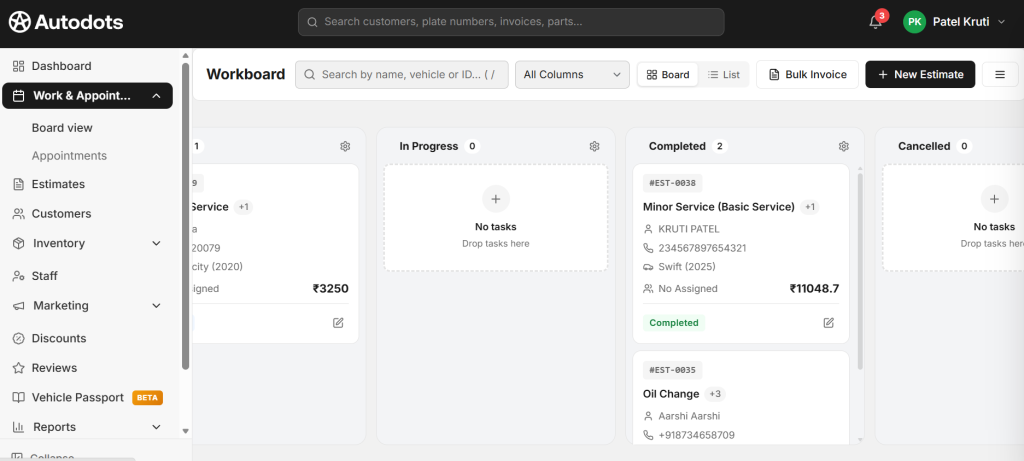
Important features to check:
- Customer and vehicle details.
- Vehicle registration and service information.
- Customer complaints and inspection notes.
- Technician assignment.
- Repair status and job history.
- Labour and parts details.
Why it matters: A digital job card creates a clear record of every repair. Service advisors can check job progress, while technicians can understand the work assigned to them.
2. Customer Management and Vehicle History
Customer information is valuable for every garage. A workshop needs to know who owns the vehicle, what services were completed previously, and whether any recommended repairs are still pending.
Customer management software stores contact information and connects it with vehicle records. This makes it easier to check previous visits and understand a customer’s service requirements.
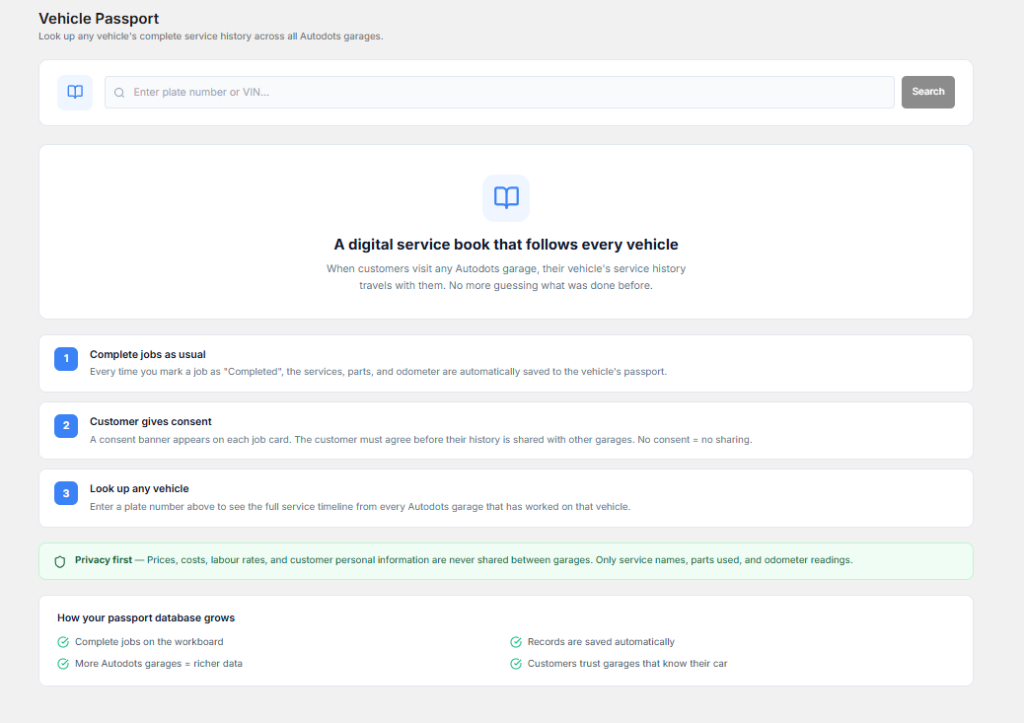
Useful features include:
- Customer contact information.
- Multiple vehicles under one customer account.
- Previous repair and service history.
- Service reminders and follow-up records.
- Customer communication history.
Why it matters: Organised records help staff provide more consistent service. They can also support repeat visits through timely reminders and better communication.
3. Estimates, Invoicing, and Payment Management
Preparing accurate estimates and invoices is an important part of workshop operations. Customers want to understand the cost of labour, spare parts, taxes, and additional services before approving repairs.
Manual billing can take time, especially when employees need to calculate several parts and labour charges separately. Digital billing tools can help prepare estimates and invoices using organised job information.
Look for these capabilities:
- Professional estimates and quotations.
- Labour and spare parts charges.
- Applicable tax calculations.
- Digital invoice generation.
- Payment status and outstanding balance tracking.
- Printable and shareable invoices.
Why it matters: Faster billing can reduce administrative work and help customers understand their repair expenses. Indian workshops should also check whether the software supports their GST invoicing requirements.
4. Spare Parts and Inventory Management
Spare parts are essential for completing repair jobs. If a workshop does not know which parts are available, technicians may have to wait for stock or employees may place unnecessary orders.
Inventory management tools help owners maintain records of available parts, purchases, usage, and stock levels. Some systems also provide low-stock alerts to help staff plan purchases.
Important inventory features:
- Parts catalogue and product details.
- Available quantity and stock updates.
- Purchase and supplier records.
- Parts used in repair jobs.
- Low-stock notifications.
- Inventory reports.
Why it matters: Better stock visibility can help workshops avoid unnecessary purchases, reduce stock shortages, and maintain more organised parts records.
5. Appointment Scheduling and Technician Management
A busy garage needs a clear schedule for customer bookings and repair activities. Without proper planning, several vehicles may arrive at the same time while technicians are already handling other jobs.
Appointment scheduling tools help service advisors organise bookings and assign work according to available capacity. Technician management features can also help managers understand who is handling each repair.
Useful features include:
- Daily and weekly booking calendars.
- Customer appointment records.
- Technician assignment.
- Job status updates.
- Workload visibility.
- Appointment reminders.
Why it matters: A structured schedule can help reduce confusion, improve workload planning, and make customer waiting times easier to manage.
6. Customer Communication and Business Reports
Customers want regular updates about their vehicles. They may need to know when an inspection is complete, whether additional repairs are required, and when their vehicle will be ready.
Customer communication tools can help workshops share estimates, service updates, reminders, and payment information. Business reports provide another important benefit by showing how the workshop is performing.
Look for these features:
- WhatsApp, SMS, or email communication where supported.
- Repair progress updates.
- Estimate approval records.
- Service reminders and follow-ups.
- Daily and monthly revenue reports.
- Job completion and payment reports.
Why it matters: Clear communication can improve the customer experience, while business reports help owners make better decisions about workshop operations.
How to Prioritise Software Features on a Limited Budget
Not every garage needs all six tools from the beginning. If your budget is limited, start with the features that have the greatest impact on your daily operations.
| Workshop Requirement | Priority Feature | Business Benefit |
|---|---|---|
| Paper-based repair records | Digital job cards | Organised repair information |
| Difficulty finding customer details | Customer management | Easy access to service history |
| Slow manual billing | Estimates and invoicing | More organised billing |
| Uncontrolled spare parts | Inventory management | Better stock visibility |
| Booking conflicts | Appointment scheduling | Improved daily planning |
| Poor customer updates | Communication and reports | Better service visibility |
For a small garage, job cards, customer records, and billing may be the first priorities. Inventory and technician management can become more important as the number of repair jobs increases.
How to Compare Garage Software Before Buying
Understanding the Essential Features for Your Budget is only one part of the selection process. You should also check how easily the software fits into your existing workshop operations.
1. Compare Complete Pricing
Check the monthly and annual subscription costs. Ask about additional users, setup charges, data migration, training, messaging, and payment processing fees. A low starting price may not include every feature your workshop needs.
2. Ask for a Product Demonstration
Request a demonstration using a real repair example. Ask the provider to create a customer record, open a job card, prepare an estimate, add parts, and generate an invoice. This will help you understand the actual workflow.
3. Check Mobile Compatibility
Technicians may need access to job information while working inside the service bay. Check whether the software works properly on the mobile devices used by your team.
4. Review Customer Support
Small garages may not have a dedicated IT employee. Choose a provider that offers clear documentation, onboarding assistance, and reliable support when technical problems occur.
5. Understand Data Security
Customer details, vehicle history, and invoices are important business records. Ask about backups, user permissions, data export, and account security before selecting a platform.
A Practical Example: Calculate the Value of Digital Tools
Consider a small workshop that handles 12 vehicles every day. Employees spend around five additional minutes per vehicle searching for customer records, checking repair status, and preparing billing information.
This adds up to 60 minutes of administrative work each working day. Across 25 working days, the workshop spends 25 hours on these activities.
A well-organised digital workflow may reduce some of this repetitive work. However, the actual result depends on staff training, software features, and how consistently employees use the system.
To measure the improvement, track these activities before and after introducing software:
- Average time required to create a job card.
- Time spent preparing estimates and invoices.
- Number of missed appointments.
- Time required to check spare parts availability.
- Number of customer updates completed on time.
This simple calculation helps owners understand whether the software is creating real business value.
How AutoDots Can Help Your Workshop
AutoDots provides digital tools designed to help automotive workshops manage important business activities. Instead of maintaining separate records for every task, garage owners can explore a connected system for managing their daily operations.
AutoDots includes features such as digital job cards, estimates, invoicing, appointment scheduling, customer management, inventory tools, WhatsApp integration, and business reports. These capabilities can help workshops organise repair work and maintain better visibility into their operations.
Another useful feature is the customer marketplace listing, which gives participating garages an opportunity to present their services online and help potential customers discover their workshops.
Garage owners can compare available plans and staff limits through the official AutoDots pricing page. Businesses interested in partnership opportunities can also explore the AutoDots partner program.
For more information about automotive technology, garage operations, and business growth, visit the AutoDots automotive blog.
Common Mistakes to Avoid When Choosing Garage Software
- Choosing only by price: A cheap plan may not include the features required for daily operations.
- Ignoring employee training: Software becomes useful only when employees understand how to use it.
- Buying unnecessary features: Avoid paying for advanced tools that your workshop does not currently need.
- Not checking integrations: Confirm whether the system works with your accounting and payment tools.
- Ignoring data export: Make sure you can retrieve important business records if you change providers.
Frequently Asked Questions
1. What Are the Essential Features for Your Budget When Choosing Garage Software?
The most important features usually include digital job cards, customer management, estimates, invoicing, inventory tracking, appointment scheduling, and customer communication. Select the tools that solve your workshop’s current problems first.
2. Does a Small Garage Need Advanced Inventory Management?
Not every small garage needs advanced inventory tools. However, even basic stock tracking can help owners monitor frequently used parts, identify shortages, and maintain better purchase records.
3. Can Garage Software Generate GST Invoices?
Some platforms support tax-related invoicing and GST workflows. Indian workshops should confirm GST settings, invoice formats, and reporting requirements with the software provider before subscribing.
4. Is Cloud-Based Garage Software Better for Small Workshops?
Cloud-based software can allow authorised employees to access workshop information from supported devices. It may be useful for owners who want to monitor jobs without being physically present at the front desk. Internet availability and data security should also be considered.
5. Can Garage Software Improve Customer Communication?
Yes. Depending on the available features, it can help share estimates, repair updates, service reminders, and payment information. Clear communication can make the service experience more organised.
6. How Can I Control the Cost of Garage Management Software?
Start with essential features, compare complete subscription costs, check user limits, and avoid unnecessary add-ons. You can upgrade later when your workshop needs additional capabilities.
Conclusion
Garage management software can help workshops reduce paperwork, organise repair jobs, manage customer information, and improve daily operations. However, buying the most expensive package is not always the best decision for a small business.
The right Essential Features for Your Budget should match your workshop’s size, daily requirements, and future plans. Start with job cards, customer records, billing, and the tools your employees need most. Compare available platforms, request demonstrations, and choose a system that provides practical value without unnecessary expenses.